A customer gets a restock email, clicks through excited, and finds the product is somehow still unavailable, or worse, the order goes through and then can't actually be fulfilled. Community threads on Shopify and Klaviyo describe this exact pattern often enough that it's clearly not a one-off bug: in a multi-location store, the back-in-stock alert fires because inventory looks available somewhere in the account, even though the location that actually ships online orders is still empty.
This doesn't happen to every store. It's specific to merchants running more than one Shopify location, a warehouse plus a retail storefront, multiple fulfillment centers, or a Shopify Markets setup spanning regions. If that's your store, it's worth understanding exactly why this breaks before it costs you a customer's trust.
Why Back-in-Stock Alerts Break Across Multiple Locations
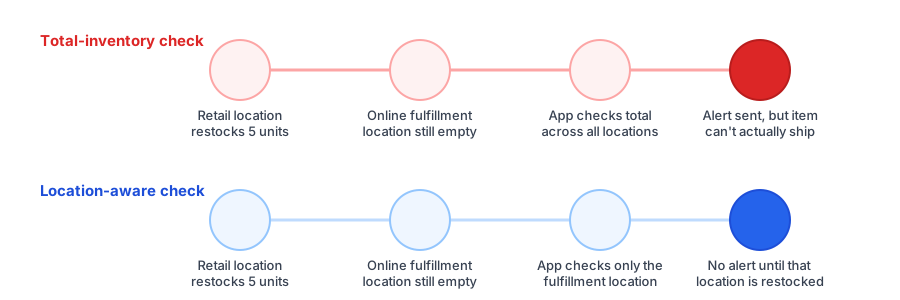
Shopify tracks inventory separately per location under the hood, but not every back-in-stock tool checks it that way. A common shortcut is to check whether a product's total available quantity, summed across every location on the account, is greater than zero. That number can look healthy even when the specific location responsible for fulfilling online orders has nothing on the shelf, because stock sitting at a retail store or a location not connected to online fulfillment still counts toward that total.
The result is a multi location inventory notification that technically isn't wrong about inventory existing somewhere, but is wrong about the thing the customer actually cares about: whether their order can ship. From the shopper's side, that distinction doesn't matter. They just see a restock email for a product that, functionally, still isn't available to them.
How Shopify Markets Adds Another Layer
For merchants selling internationally, shopify markets back in stock setups add a second dimension to the same problem. Markets are often mapped to specific locations or regions, so a customer browsing from one market might be served pricing and availability tied to a location entirely different from where a domestic customer's order would ship. If a back-in-stock app isn't Markets-aware, it can check the wrong location's inventory for a given customer's region, either firing alerts too early or missing genuine restocks that a customer in that market should have been told about.
What a Location-Specific Restock Alert Should Actually Do
A correctly built location specific restock alert checks inventory at the location, or locations, actually responsible for fulfilling a given customer's order, not the store-wide total. In practice, that means confirming a few things before trusting your setup:
- Identify which location(s) fulfill online orders. If you run a hybrid retail-and-online setup, this may not be every location on the account.
- Confirm your back-in-stock app checks that location specifically, not a combined total across every location, including ones that never touch an online order.
- If you use Shopify Markets, verify the app maps markets to the correct fulfilling location for each region you sell into, rather than applying one inventory check globally.
- Test it directly by adding stock only to a non-fulfillment location and confirming no alert fires, then adding stock to the correct location and confirming it does.
See how Griffin handles restock alerts on your own store's inventory setup, free to start.
Install Griffin on ShopifyThat last step matters more than it might seem. Because this failure mode doesn't show up in every restock, only ones where a non-fulfillment location happens to update first, a setup can look fine for weeks before it sends a false alert on exactly the wrong day. Testing it once, deliberately, catches the problem before a customer does.
FAQ
Why did a customer get a back-in-stock alert but the product still showed unavailable at checkout?
This usually means the app checked total inventory across every Shopify location instead of the specific location that fulfills online orders. Stock at a retail store or a location not used for online fulfillment can trigger a false restock alert.
Do back-in-stock alerts work correctly with Shopify Markets?
Only if the app is aware of how your Markets are mapped to locations. A merchant selling internationally with different locations serving different regions needs alerts checked against the location relevant to each customer, not a single global inventory total.
What's the difference between total inventory and location-specific inventory for restock alerts?
Total inventory adds up stock across every location a store has, including ones that don't fulfill online orders. Location-specific inventory only counts what's available where the order will actually ship from, which is the number that determines whether a customer's order can be fulfilled.
Do I need multiple locations set up for this to be an issue?
Yes, this specifically affects stores with more than one Shopify location, such as a warehouse plus a retail store, or multiple fulfillment centers. Single-location stores don't run into this particular problem.
The Bottom Line
A back-in-stock alert is supposed to build trust by delivering on a promise: this is available again, go buy it. Getting the location wrong breaks that promise in a way that's arguably worse than never sending the alert at all, since it costs a customer's confidence in the store rather than just a missed sale. If you run more than one location, it's worth a few minutes to confirm your restock alerts are checking the right one before you rely on them.
If your setup is misfiring in ways that look similar but aren't location-related, our guide on common back-in-stock app problems and fixes covers the other usual causes. Otherwise, Griffin installs as a lightweight app block with no theme code edits required. Install Griffin on the Shopify App Store to get started free.