A shopper finds the product they want and it is sold out. Without a back-in-stock notification, that is where the story ends: they leave, and you may never see them again. With one, they leave an email address and come back when the item does. Back-in-stock notifications are a simple idea with a surprising number of details, from which setting hides the button to why an email can show the wrong photo. This guide walks through the whole subject in order and links to the detailed post on each part.
What a Back-in-Stock Notification Is
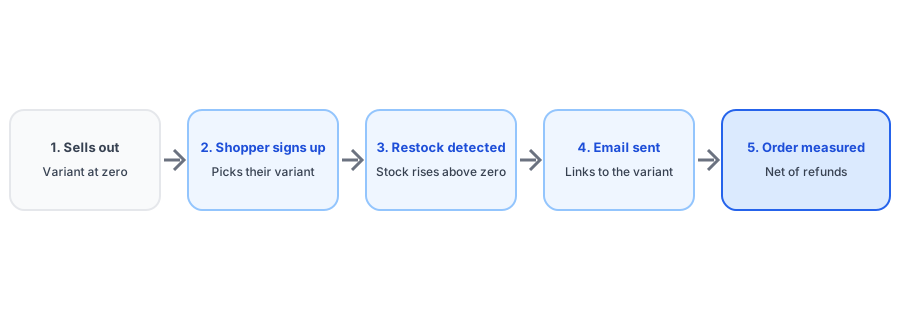
It is an automatic message sent to a shopper who asked to be told when a sold-out product is available again. Three things make it work: a way for the shopper to sign up on the product page, a system that notices when stock returns, and an email that sends them back to the right product. It is different from a low-stock alert, which warns you about running out; see low stock alerts versus back-in-stock alerts. It is also different from a waitlist and from a preorder, covered in notifications versus waitlists and alerts versus preorders.
Does Shopify Do This Natively?
No. Shopify records your stock and can run automations when it changes, but it does not collect signups or email shoppers when a product returns. The full answer, including what Shopify Flow adds, is in does Shopify have a built-in back-in-stock notification. In practice you choose between an app, a flow in your email platform, or a manual process; our comparison with Klaviyo covers the middle option.
Setting It Up
Adding the signup is the quick part. Our step-by-step guide to adding a Notify Me button without code covers it. Then check the details that decide whether it works for your theme and catalog:
- Layout: a popup or an inline form, discussed in popup versus inline.
- Theme fit: custom themes sometimes need a selector fix.
- Variants: the button must follow the shopper's size or color, see variant switching and the all-variants rule.
- Accessibility: use our accessibility checklist.
- Inventory settings: continue selling can hide the button entirely.
Writing the Email That Brings Them Back
The alert is only useful if it is opened, trusted and clicked. Start with email copy and design that converts, then handle the awkward cases: a price change, the wrong product photo, whether to add a discount, and emails that land in spam.
Where Restock Alerts Go Wrong
Most problems come from a handful of causes. If nothing arrives, see the troubleshooting guide and, for Klaviyo flows, why a flow does not send. If customers get too many, read about duplicate emails, false alerts from phantom inventory and alerts about hidden products. Stores with several locations, markets or a retail shop should read about multiple locations, Shopify Markets and POS inventory.
Griffin is a Shopify back-in-stock app that notifies subscribers by email, per variant, with a free plan.
Install Griffin on ShopifyChoosing Channels and Handling Consent
Email is the usual starting point. If you are weighing others, compare email and SMS, web push and WhatsApp. Whatever you choose, get consent right: read double opt-in and GDPR basics and what an app does with customer records. Language is part of trust too; see multilingual alerts.
Special Cases
- Bundles: bundled products restock when their parts do.
- Small restocks: limited restocks and long waitlists.
- Products that never return: discontinued items.
- Recurring orders: subscription products.
- Sudden demand: viral sellouts and peak-season volume.
- Fulfillment models: dropshipping and print-on-demand.
Different categories behave differently, so there are guides for apparel, streetwear, jewelry, beauty, supplements, collectibles, furniture and pet supplies.
Measuring Results and the Sales Behind Them
Alerts should earn their keep. Learn how to attribute orders in measuring restock revenue, and use the waitlist as demand data via tracking demand on out-of-stock products. For the bigger picture, see how restock alerts reduce cart abandonment and what hiding sold-out products does to SEO. To alert your own team, use a Shopify Flow.
Choosing an App
Run the afternoon test in how to evaluate a back-in-stock app. Check what you will pay in the pricing guide and what a free tier covers in free plan limits. If you are moving from another tool, read what transfers when you switch. If you advertise, also see Google Merchant Center availability.
FAQ
Does Shopify have a built-in back-in-stock notification?
No. Shopify tracks stock and can trigger automations when it changes, but it does not collect shopper signups or email customers when a product returns. You need an app, an email platform flow or a manual process.
How do back-in-stock notifications work?
A shopper leaves their email on a sold-out product, the app records which variant they want, it detects when that variant's inventory rises above zero, and it emails the subscribers. Good setups also link straight to the variant and measure resulting orders.
Are back-in-stock notifications worth it?
They are worth it when shoppers regularly meet sold-out products, because the alert reaches people who already asked for the item. Measure recovered revenue against the app's cost rather than assuming; our measurement guide explains how.
Which channel is best: email, SMS or push?
Email is the simplest, most widely accepted starting point and needs the least consent overhead. SMS and push can add reach but bring extra consent rules and setup. Compare them before adding channels.
The Bottom Line
A back-in-stock notification turns a dead end into a request you can act on. Set it up per variant, write an email people trust, check the settings that quietly break it, and measure the sales it returns. Griffin is a Shopify back-in-stock app you can install from the Shopify App Store, free to start.