Selling internationally on Shopify usually means setting up separate markets: one for the US, one for Canada, one for Europe, each with its own pricing, currency and sometimes its own inventory arrangement. Most back-in-stock tools were designed with a single storefront in mind. When a store grows into several markets, a shopify markets back in stock alert can fail in two quiet ways: a subscriber is never told their product returned, or they are told but see the wrong currency. Neither shows up as an error, which is why both tend to survive for months.
Problem One: The Alert That Never Arrives
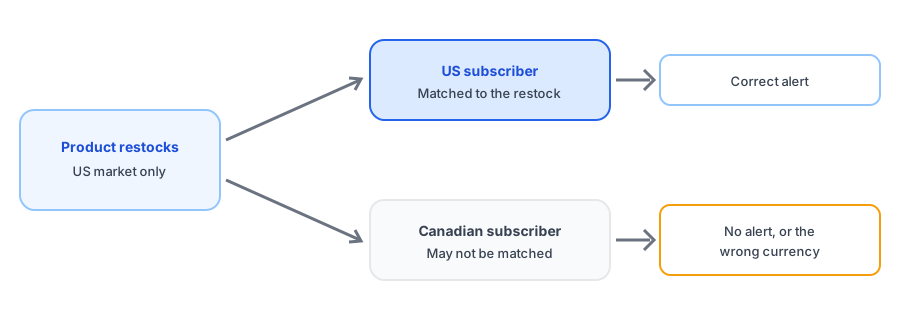
A back-in-stock app vendor has said plainly that most restock apps do not treat separate Shopify Markets as distinct. That has a concrete consequence. If a product restocks for your US market but the app is watching the store as a single unit, or the other way around, the subscriber who signed up from a different market may never be matched to the event that matters to them. They waited for a restock that, from their market's point of view, never officially happened.
This is a multi-market restock notification problem more than a bug in any single app. The app has to know which market a subscriber belongs to and which market's availability to check, and that information is not always captured at signup. Before you rely on alerts across markets, find out whether yours records it.
Problem Two: The Right Alert in the Wrong Currency
The second failure is more visible. Merchants in Klaviyo's community forums have described back-in-stock emails showing the wrong currency symbol under Shopify Markets. A shopper in Canada gets an email showing a US dollar price, or a European shopper sees the store's default currency, because the email is built from product data that does not carry their market. The product link may even convert correctly on the storefront, but the email has already set the wrong expectation.
That matters for the same reason it matters when a price changes: a number that looks different from what the shopper expected feels like a trick. Our post on whether a restock email should mention a price change covers that trust problem from the pricing side. A back-in-stock email showing the wrong currency is the international version of it.
Selling in more than one market? Test restock alerts on your own setup. Griffin adds Notify Me to sold-out products.
Install Griffin on ShopifyHow to Test Your Own Setup
You do not need to read the app's code. A short test tells you most of what you need to know.
- Sign up for a restock alert on a sold-out product from a non-default market, using a spare email address.
- Restock the product in that market only, and note whether the alert arrives at all.
- Check the currency, price and link in the email against what the same market sees on the storefront.
- Repeat from your default market to confirm nothing changed there.
If the alert fails to arrive or shows the wrong currency, ask the app's developer how markets are handled. Their answer, and how specific it is, tells you whether the gap is known.
How This Relates to Locations and Languages
Markets, locations and languages are three different dimensions, and international stores often hit all of them. Markets are where you sell; locations are where stock physically sits and are often mapped to markets, which we cover in our post on restock alerts across multiple locations. Language is separate again: see multilingual back-in-stock alerts and why product titles stay in the wrong language. Getting one right does not guarantee the other two.
We have not verified how every app handles market-specific inventory or currency, and that includes our own on every store configuration, so the test above is the reliable answer for your setup.
FAQ
Why did my back-in-stock email show the wrong currency?
The email is built from product data that may not carry the shopper's market, so it can fall back to your store's default currency. Merchants in Klaviyo's community forums have described this under Shopify Markets. Test with a subscriber from a non-default market.
Do back-in-stock apps treat each Shopify Market separately?
Not necessarily. A vendor in this space has stated plainly that most restock apps do not treat separate markets, such as the US and Canada, as distinct. Ask any app how it handles market-specific inventory before relying on it.
Can a subscriber be missed even if stock really returned?
Yes, in setups where a market's availability depends on its own inventory and the app only watches the store as a whole. The subscriber in the restocked market may not be matched to the event.
Is this the same problem as multiple locations?
They overlap but are not identical. Locations are where stock physically sits; markets are where you sell. Markets are often mapped to locations, so both can matter in the same store.
The Bottom Line
A store that sells in several markets is asking its restock tool to do more than a single-market store does, and most tools were not built with that in mind. Test with a subscriber from a non-default market, check the currency in the email, and ask your app how it handles markets. Griffin is a Shopify back-in-stock app you can install from the Shopify App Store, free to start, and the same test applies to it as to any other.