A shopper adds a variant to their cart, gets to checkout, and finds out it's sold out. Or worse - they never even get that far, because the product page shows "Out of Stock" the moment they land on it. Either way, the outcome is the same: they leave, and most of them don't come back on their own.
This is one of the most overlooked forms of cart abandonment on Shopify. It doesn't show up the same way in analytics as a slow checkout or a missing payment method, but the effect is identical - a customer who wanted to buy, and didn't. Back in stock alerts on Shopify exist specifically to close that gap, and for stores that sell products with limited or seasonal inventory, they're one of the highest-leverage, lowest-effort fixes available.
Why out-of-stock pages quietly kill conversions
Most cart abandonment advice focuses on checkout friction - too many form fields, surprise shipping costs, a clunky payment flow. Those matter, but they assume the customer could complete the purchase if they wanted to. An out-of-stock product removes that option entirely. There's no discount, no better checkout button, and no retargeting ad that fixes "this item doesn't exist right now."
Without a way to capture that demand, the shopper has exactly two options: leave and try to remember to check back later, or leave and buy the same or a similar product from a competitor. Neither outcome benefits the store. The intent to buy was real - the store just had nothing to do with it.
How back-in-stock alerts work
The mechanism is simple, which is part of why it's effective. Instead of a dead end, the out-of-stock product page shows a "Notify Me" option. The shopper enters their email, and the store's inventory system takes over from there:
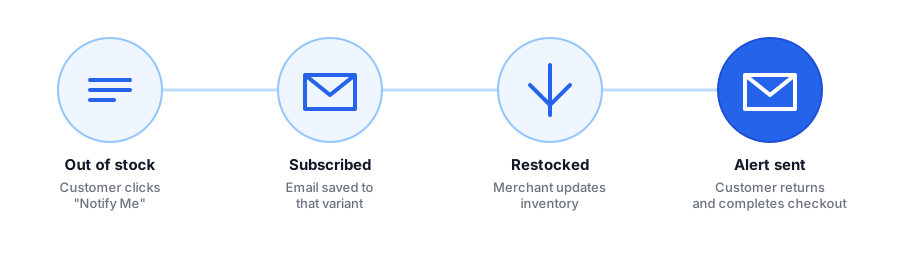
- The customer subscribes to a specific product - or, ideally, a specific variant like size or color.
- The merchant restocks inventory through their normal Shopify admin process, no extra steps required.
- The moment inventory updates, an automated out of stock notification email goes out to everyone who subscribed.
- The customer clicks through and completes the purchase they originally intended to make.
The store didn't have to run a sale, send a discount code, or spend on ads to bring that shopper back. The shopper opted in, and the store closed the loop automatically.
What to look for in a back-in-stock app
Not all back-in-stock tools are built the same, and the wrong setup can quietly undercut the results. A few things matter more than they first appear to:
- Variant-level subscriptions. If a customer wants a medium in blue, notifying them when any size or color restocks trains them to ignore your emails. Precision keeps open rates high.
- No theme code editing. Apps that require manual liquid edits are more likely to break during theme updates. A native, app-block-based widget survives theme changes without maintenance.
- Branded, not generic, emails. A restock notification that looks like spam gets ignored. One that matches your store's look reads as a legitimate update from a brand the customer already chose.
- Demand visibility. Knowing which out-of-stock products have the most subscribers helps prioritize what to reorder first - turning the notify list into a restocking signal, not just a marketing list.
This is exactly the gap Griffin was built to fill for Shopify merchants: a lightweight shopify inventory alerts widget that installs without code, tracks demand per variant, and sends branded restock emails automatically.
See how a "Notify Me" widget looks on your own store - installs in under a minute, free to start.
Install Griffin on ShopifyBest practices to maximize recovered sales
Installing a back-in-stock app is most of the work, but a few habits make the difference between a nice-to-have feature and a real dent in cart abandonment numbers:
- Keep the widget visible. Don't bury "Notify Me" below the fold or hide it behind a click - it should appear exactly where the "Add to Cart" button would normally be.
- Restock in smaller, more frequent batches if your supply chain allows it. More restock events mean more chances to re-engage a warm subscriber list instead of one large email blast.
- Treat the subscriber list as inventory intelligence. A product with hundreds of "Notify Me" signups is telling you exactly what to reorder next, independent of any notification you send.
- Don't let the emails go stale. Send the notification the moment inventory updates - a delay of even a day gives the customer time to buy elsewhere.
FAQ
Do back-in-stock alerts actually reduce cart abandonment?
Yes. Most abandonment on an out-of-stock page happens because the shopper has no way to come back later. A back-in-stock alert removes that dead end - it gives the shopper a reason to return the moment the product is available again, instead of buying from a competitor.
Do I need a developer to add this to my Shopify store?
No. Apps like Griffin install directly from the Shopify App Store and add a "Notify Me" widget to out-of-stock product pages automatically - no theme code editing required.
Do back-in-stock notifications work with product variants?
With Griffin, yes. Customers subscribe to the exact size, color, or variant they want, and only get notified when that specific variant is restocked - not the whole product.
Is email enough, or do I need SMS too?
Email is the highest-leverage starting point: it's free to send, has no per-message cost, and most shoppers check it multiple times a day. SMS can help later, but email alone recovers the majority of at-risk sales for most small Shopify stores.
The takeaway
Cart abandonment isn't only a checkout problem - for stores with limited or seasonal inventory, it starts the moment a product goes out of stock. A back-in-stock alert turns that dead end into a follow-up touchpoint the customer opted into, at zero incremental cost per notification. It's one of the simplest changes a Shopify merchant can make that directly recovers revenue that was already close to converting.
Want to see it running on your own store? Griffin sets up a variant-aware "Notify Me" widget and branded restock emails in about a minute, with a free plan to start. Install Griffin on the Shopify App Store to try it on your next restock.