Search "shopify waitlist app" or "back in stock vs waitlist shopify" and you'll find both terms used almost interchangeably. They're not the same tool, and using the wrong one on the wrong product is a common, avoidable mistake. A waitlist and a back-in-stock notification both collect a customer's email in front of a product they can't buy today, but what happens next, and what kind of product each one is built for, is completely different.
If your store sells items that go in and out of stock on a normal cadence, size runs, seasonal colorways, popular SKUs that sell faster than you can reorder, the tool you actually need is a restock notification, not a waitlist. Here's the distinction, and how to tell which one your store needs.
What's the difference between a waitlist and a back-in-stock notification?
A waitlist exists before a product is sellable. It's typically used for a pre-launch drop, a made-to-order item, or a limited run the merchant hasn't committed to producing yet. Joining a waitlist means "let me know when this becomes available at all" - there's no existing inventory behind it.
A back-in-stock notification exists after a product already existed and sold out. The item has a real SKU, a real price, and a purchase history. Subscribing means "let me know the moment this specific variant is restocked" - the merchant already knows exactly what to reorder and roughly when.
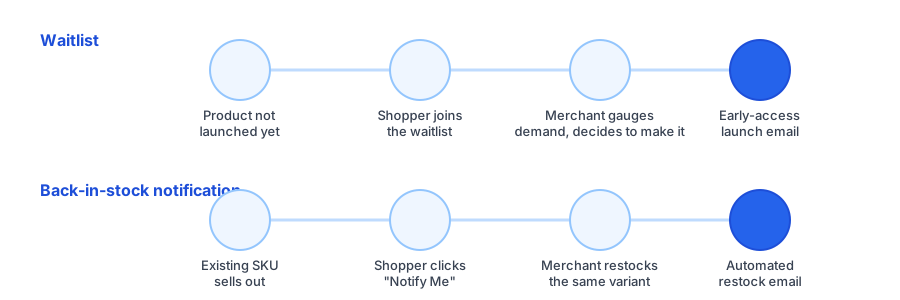
| Situation | Waitlist | Back-in-stock notification |
|---|---|---|
| Product currently exists for sale | Usually not yet | Yes, it sold out |
| Merchant knows exact restock date | Rarely | Often, based on reorder lead time |
| Best fit | Pre-launch drops, made-to-order goods | Regular apparel, accessories, everyday SKUs |
| Typical send frequency | One-time, at launch | Every restock cycle |
When a shopify waitlist app makes sense
Waitlists earn their keep when a product genuinely doesn't exist as sellable inventory yet. That covers a narrower set of cases than most merchants assume:
- Pre-launch drops. Building hype and a launch-day email list before a collection goes live.
- Made-to-order or limited-batch goods, where the merchant is deciding how many units to produce based on signups.
- Crowdfunded or pre-order products that need a minimum interest threshold before manufacturing starts.
In all of these, the waitlist itself is doing double duty as market research. The signup count tells the merchant whether to make the product at all, not just when to restock it.
When restock notifications are the better fit
Most Shopify stores aren't deciding whether to make a product - they're managing inventory on products that already sell. That's the far more common case, and it's exactly what an out of stock waitlist gets misused for when a true back-in-stock tool would work better. If any of these describe your store, restock notifications are the right tool:
- You sell apparel or footwear where specific sizes or colors sell out faster than others.
- You reorder the same SKUs from a supplier on a recurring basis.
- Popular products regularly go out of stock and come back within days or weeks, not months.
- You want demand data per variant to prioritize what to reorder first.
This is also where the mechanics matter more than they first appear. A true back-in-stock system tracks inventory at the variant level and fires automatically the instant stock updates, no manual list export, no merchant remembering to send an email. We covered the revenue impact of this in more detail in how back-in-stock alerts reduce cart abandonment on Shopify - the short version is that every day of delay between a restock and the notification is a day a customer might buy from someone else.
See how a variant-level "Notify Me" widget looks on your own product pages - installs in under a minute, free to start.
Install Griffin on ShopifyCommon out of stock waitlist pitfalls to avoid
Merchants who reach for a generic waitlist tool on regular restock items usually run into the same few problems:
- No variant-level targeting. A shopper who wanted a size 9 in black gets notified when any size or color comes back, so they ignore the email and the app looks broken.
- Manual notification sending. Some waitlist tools export a list rather than auto-sending on restock, which means a real delay between "back in stock" and "customer told."
- One signup, no repeat cycle. Waitlist tools built for a single launch event don't always handle a product that sells out and restocks repeatedly throughout the year.
- Mixed signals. Using waitlist language ("join the waitlist") on a product that's actually just temporarily out of stock sets the wrong expectation - customers assume it might never come back.
FAQ
Is a waitlist the same thing as a back-in-stock notification?
No. A waitlist typically captures demand before a product exists or ships, often to gauge interest or manage a launch. A back-in-stock notification captures demand after an existing product sells out, and notifies subscribers the moment that same variant is restocked.
Which one should a regular Shopify store use?
Most Shopify stores selling standard, repeatedly-restocked products should use back-in-stock notifications. Waitlists make more sense for pre-launch drops, made-to-order items, or limited runs where the product doesn't exist yet.
Can I use both a waitlist app and a restock notification app?
Yes, and some stores do. A waitlist can handle pre-launch product interest, while a back-in-stock app like Griffin handles ongoing restocks of live inventory. Just avoid running both on the same product, since it confuses customers about what they're signing up for.
Do back-in-stock apps work at the variant level?
With Griffin, yes. Customers subscribe to the exact size, color, or variant they want, and only get notified when that specific variant is restocked, not the whole product.
The takeaway
A waitlist and a back-in-stock notification look similar from the outside - both are an email capture in front of a product a customer can't buy yet - but they're built for different moments in a product's life. If you're deciding whether to make something, use a waitlist. If you're managing regular restocks of products that already sell, a back-in-stock notification is the tool that actually fits, and it's what most Shopify stores need more often than they realize.
Curious what that looks like on your own store? Griffin adds a variant-aware "Notify Me" widget and sends branded restock emails automatically, with a free plan to start. Install Griffin on the Shopify App Store to try it on your next restock.