"Only 3 left" is one of the oldest lines in retail, and it works because, when it is true, it tells the shopper something useful: act now or risk missing out. When it is false, it works once. Shoppers notice when a countdown resets or a stock counter never moves, and they remember. A low stock message you can stand behind comes down to a simple rule: show it only when it reflects real inventory, and set the threshold from how quickly the product actually sells. This guide gives you fifteen honest lines and a calculator that picks the threshold.
The Rule: Only True Scarcity
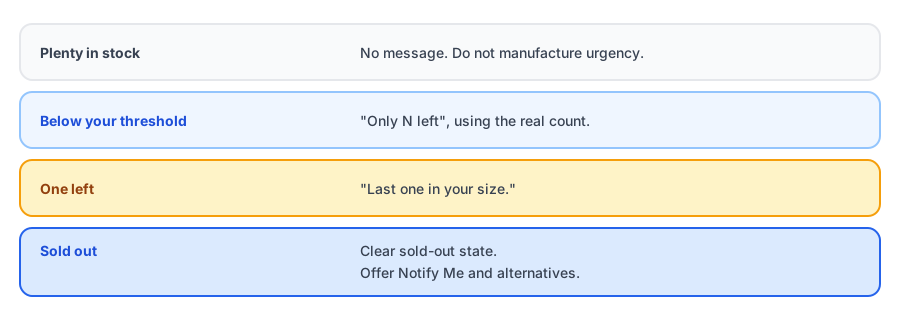
Use real numbers from your real inventory, update them as stock changes, and never fabricate a timer. Several sources note that showing genuinely low stock can convert better than hiding it, but those are opinions, not independent results, so treat any promised lift with caution and test on your own store. In many places, invented urgency can also be treated as a misleading practice. That is a good reason to keep it honest even before you worry about the rules. This is not legal advice.
Find Your Threshold
A fixed number such as "show when five are left" is wrong for most catalogs. Twelve units of a fast seller may be a day of stock; twelve units of a slow one may be a month. A better trigger is time: show the message when the remaining stock is about as much as you expect to sell in a few days. Enter your own numbers below; the values shown are examples.
Fifteen Honest Lines
Replace {N} with your live inventory count, and fill in dates only if they are real. Pick one style and use it consistently.
- Only {N} left in stock
- {N} left. Order soon if you want it
- Low stock: {N} remaining
- Selling fast. {N} left
- Almost gone: {N} left
- Just {N} in stock right now
- Last {N} available
- Down to the last few
- Popular item, limited stock
- Running low, order today to be sure
- This size is nearly sold out
- We have {N} left and no restock date yet
- Few left, restock expected [date]
- Stock is limited, and we will not be able to reorder before [date]
- Last one in your size
When the last unit goes, keep the shopper. Griffin adds Notify Me to sold-out products.
Install Griffin on ShopifyHow to Show It on Shopify
Many themes include an inventory status or low-stock display with a threshold setting, so check your theme's product page options first; apps and custom code can add more. Whatever you use, make sure the number comes from your live inventory and that variants are handled separately, since a product with five sizes can be low in one and plentiful in another. Griffin does not add low-stock messages; it takes over at the moment stock reaches zero.
What Happens at Zero
The shopper nudged by "only 3 left" who hesitated is exactly the person who most wants a restock alert. Make sure the page flips cleanly from a low-stock message to a sold-out state with a Notify Me option. Our sold-out page checklist covers the rest of that page, and the complete guide to back-in-stock notifications covers the alert. If you want to warn your own team before stock runs out, see low stock alerts versus back-in-stock alerts and alerting your team with Shopify Flow.
Mistakes to Avoid
- Countdown timers that reset. They are the fastest way to lose trust.
- A low-stock message on every product. If everything is "almost gone," nothing is.
- Showing store-wide numbers for variants. Show the count for the option the shopper selected.
- Leaving the message up after a restock. Update it promptly so it never says "2 left" when you have 200.
- Using scarcity to cover for a product that is not in demand. Honesty works both ways.
FAQ
Does showing low stock increase sales?
It can help when it is true, because it gives a shopper a real reason to decide. Sources disagree on how much, and we found no independent figure, so test it on your own store rather than relying on a promised lift.
What is fake urgency?
Urgency that is not real: countdown timers that reset, stock counts that never change, or 'only 2 left' messages that do not reflect inventory. It erodes trust and can be treated as misleading in many places. This is not legal advice.
When should a low-stock message appear?
When the remaining stock is low relative to how fast it sells, not a fixed number for every product. A fast seller with 12 left may be genuinely low, while a slow one with 12 is not.
What should I show when stock hits zero?
A clear sold-out state and a way to be notified when it returns. The shopper who was nudged by 'only 3 left' and missed it is your best restock-alert signup.
The Bottom Line
Honest scarcity respects the shopper and still gives them a reason to act. Base the message on real stock, trigger it by sales speed, and make sure the page has somewhere to send people when the last unit goes. Griffin is a Shopify back-in-stock app you can install from the Shopify App Store, free to start.