Most stockouts do not arrive without warning. The stock number falls for days, and nobody is watching it. A low-stock alert is the early warning: it tells you, while there is still time, that a product is about to run out. It is for you and your team, not for your shoppers, which makes it different from a back-in-stock alert. This guide shows you how to set a shopify low stock alert up with a threshold that suits how fast you actually sell, a Shopify Flow recipe you can copy, and what to check in your own admin, since the sources we found disagree on what Shopify includes natively.
Find Your Threshold
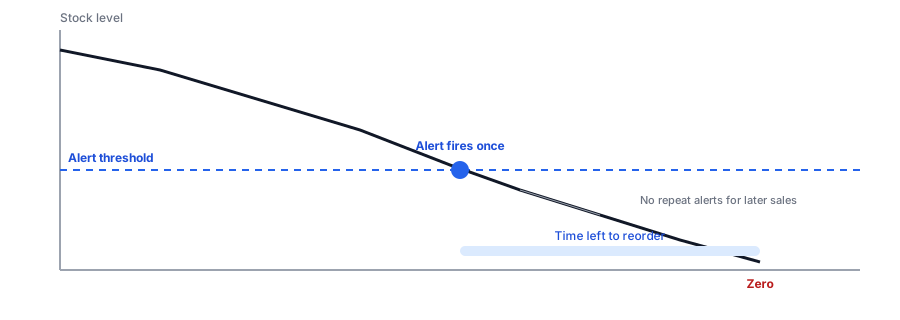
A fixed number such as "alert me at five" works for almost nothing. A better trigger is time: alert when the remaining stock equals the time it takes to reorder plus a safety buffer. Enter your own numbers below; the values shown are examples.
What to Check in Your Own Admin First
Sources disagree about what Shopify includes. Some guides describe a staff notification setting under inventory with a single threshold; others say you need an app or Flow. Because we could not settle it from public sources, check your own admin, and if there is a native setting, test it with a real variant and see whether it fires at your threshold or only at zero. A single threshold for every product is a poor fit for a catalog where some items sell ten times as fast as others.
Build It With Shopify Flow
Flow gives you per-variant thresholds with no extra app. Use the recipe above: trigger on the variant's inventory quantity changing, add a condition for your threshold, and add a second condition so it only fires on the crossing. Without the second condition, every sale below the threshold sends another email. Then send an email to whoever handles reordering. Build and test it on a development store or a test variant first, and keep in mind that inventory triggers run per variant, so a product with many variants can start many runs. We cover the broader pattern in our post on notifying your own team about restocks.
Low-stock alerts warn you. Griffin handles the other side, telling shoppers when a sold-out product returns.
Install Griffin on ShopifyWho Should Get the Alert
An alert only works if it reaches the person who can act on it. Send it to whoever places the orders, not to a shared inbox nobody reads, and consider a second recipient for backup. If different people own different suppliers, split the alerts by product or collection so each person sees only theirs. Keep the message short: the product, the variant, the current quantity and a link to the admin page, so the recipient can reorder in one step.
Apps Are an Option Too
Several apps offer per-product or per-variant thresholds with email or chat alerts, and some add reorder suggestions. Compare permissions, price and how they handle variants before installing. Whichever route you choose, the threshold is the part that matters, and it should come from your sales and lead time, as in our reorder point calculator.
Low Stock Alert Versus Back-in-Stock Alert
They are two halves of one system. The low-stock alert tells you to reorder before you run out. The back-in-stock alert tells shoppers who found it sold out that it is back. If the first works, you need the second less often; when it does not, the second recovers what the first missed. Our post on low stock versus back-in-stock alerts explains the difference, and the complete guide to back-in-stock notifications covers the shopper side. Griffin does not send low-stock alerts to merchants.
FAQ
Does Shopify have a built-in low stock alert?
Sources conflict: some guides describe a staff notification setting under inventory, while others say you need an app or Flow. Check your own admin before relying on either, and test with a real variant.
What is the best threshold for a low stock alert?
One tied to your sales speed and your supplier's lead time, not a fixed number. A good threshold gives you enough time to reorder before you run out. The planner above sets one from your numbers.
Why would I get repeated low stock alerts?
Because an automation that fires on every inventory change below the threshold will send one each time a sale lowers the count. Add a condition so it only fires when stock crosses the threshold, not every change below it.
Is a low stock alert the same as a back-in-stock alert?
No. A low stock alert warns you that you are about to run out. A back-in-stock alert tells shoppers a sold-out product is available again. You need both.
The Bottom Line
A good low-stock alert fires once, early enough to reorder, at a threshold based on how you really sell. Set the threshold with the planner, build the Flow, test it, and pair it with a restock alert for the shoppers you still miss. Griffin is a Shopify back-in-stock app you can install from the Shopify App Store, free to start.