Sooner or later every Shopify merchant asks the same question: how many days of inventory do I have left? Stock on hand tells you what is on the shelf today. It does not tell you when it will be gone, and it does not tell you when to place the next order. The calculator below turns a few numbers into a run-out date and a reorder-by date, so you can see how long you have before the shelf is empty. To work out your days of inventory remaining, enter your stock, your recent sales and your supplier's lead time. The values shown are examples.
The Calculator
The Formula in Plain Terms
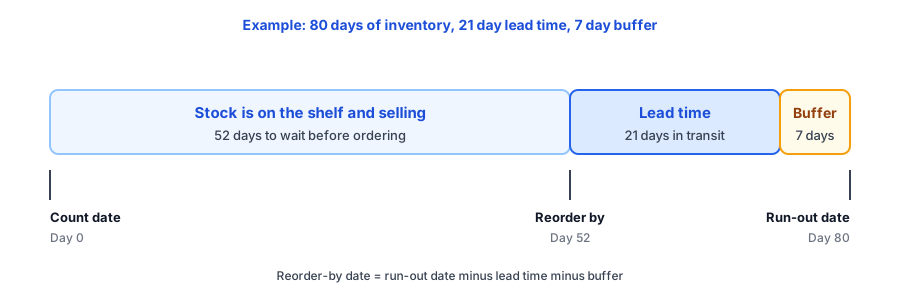
Days of inventory left is units on hand divided by average units sold per day. Average units sold per day is units sold in the window divided by the days in the window. With the example values, 90 units over 30 days is 3 units a day, and 240 units on hand lasts 80 days. Your run-out date is the count date plus those 80 days.
The reorder-by date works backwards from the run-out date. Subtract your supplier's lead time and a safety buffer. In the example, a 21-day lead time plus a 7-day buffer is 28 days, so the order has to go out 52 days after the count. This is the reorder point idea expressed as a date instead of a stock level. Our reorder point and safety stock calculator covers the unit version, and the low-stock alert planner shows how to turn it into a warning that reaches you before the shelf is empty.
Where Shopify Shows It
Shopify's help documentation describes a "Days of inventory remaining" report in its product analytics, defined as the quantity still in stock divided by the average number sold per day. Sources disagree on how far back the report looks, and sources suggest a variant with no sales can show N/A instead of a number, so confirm both in your own admin before you rely on it. Doing the sum yourself has an advantage: you choose the window, and you can add the two things a stock report cannot know, your own lead time and any change you expect in demand.
Why the Number Can Mislead You
A stockout hides your real demand
If a product was sold out for ten days of a thirty-day window, dividing by thirty understates how fast it sells when it is available. Count only the days it was in stock. Ninety units over 20 in-stock days is 4.5 a day, not 3, and 240 units would last about 53 days, not 80. The lost-sales calculator estimates what those empty days cost you.
Sales speed does not stay constant
A promotion, a season or a mention from a creator can multiply demand within a week, and a quiet spell can cut it. That is what the expected-change field is for. Enter 100 for a sale week and the example drops from 80 days to 40, which moves the reorder-by date from day 52 to day 12. Before a big sale, plan how much to hold back with the stock allocation calculator, and check whether stock is moving with the sell-through rate calculator.
One product number can hide a sold-out variant
Totals mislead when sizes or colours sell unevenly. A hoodie with 200 units across all sizes can have zero in the size that sells fastest. Run the calculation per variant, starting with your best sellers. Our post on size runs explains why the popular sizes go first.
What to Do With the Date
- Reorder-by date still ahead: note it in your calendar, and recalculate whenever sales change noticeably.
- Reorder-by date passed, run-out date still ahead: order now. You have less cushion than planned, so ask your supplier whether a faster option exists.
- Lead time longer than your days left: a gap is likely even if you order today. Tell shoppers when to expect the product back; our replies for "when will it be back in stock?" give you ready wording.
A gap is where you can still capture demand. Griffin, a Shopify back-in-stock app, adds a Notify Me popup or inline form to sold-out variants. Shoppers sign up for the variant they want, and the restock email links back to it. Signups are stored in Griffin's own records, and the free plan includes 100 notifications a month. The size of that waiting list is also a useful input for your next order, which our guide to tracking demand on out-of-stock products explains. Griffin does not forecast stock or calculate days of inventory, so use the calculator above for the ordering side.
Know your run-out date, then make sure the days without stock still produce sales. Griffin captures restock signups on sold-out variants.
Install Griffin on ShopifyFAQ
How do I calculate how many days of inventory I have left?
Divide the units you have on hand by the average units you sell per day. To get the daily average, divide units sold in a recent window by the number of days in that window, counting only days the product was in stock.
How many days of inventory is enough?
It depends on your supplier's lead time. Days left should comfortably exceed lead time plus a safety buffer. A number that sounds healthy is a problem if your supplier needs longer than that to deliver.
Which sales window should I use?
A 30-day window is a common starting point. Compare it with a longer window to see whether sales are speeding up or slowing down, and use the expected-change field to adjust for a sale or a season.
Does Griffin calculate days of inventory?
No. Griffin collects restock signups on sold-out variants and emails those shoppers when the item returns. It does not forecast stock or tell you when to reorder.
The Bottom Line
Days of inventory left is stock divided by daily sales, and the useful version turns it into two dates: when you run out and when you must order. Count only in-stock days, adjust for the demand you expect, and run it per variant for the products that matter. Griffin is a Shopify back-in-stock app you can install from the Shopify App Store, free to start.