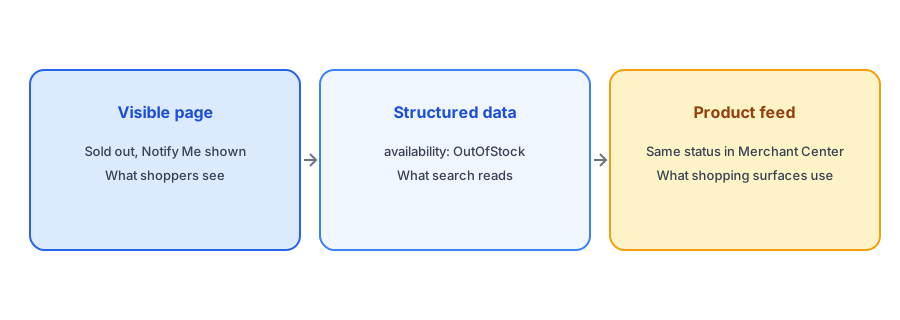
When a shopper visits a sold-out product page, they see a message and, ideally, a Notify Me form. When a search engine or an AI shopping assistant visits, it reads something different: structured data in the page's code that states whether the product is available. Product availability schema shopify themes output is usually generated automatically, which means most merchants never look at it, and that is fine until it is wrong. This post explains what the availability values mean, how they interact with a restock alert and what to check. We make no claims about how any particular AI assistant ranks products, because that is not something we can verify.
What the Markup Actually Says
Structured data uses a shared vocabulary from schema.org. For a product offer, the availability property takes values such as InStock, OutOfStock, PreOrder, BackOrder, LimitedAvailability and Discontinued. Most Shopify themes include a product JSON-LD block that sets availability from the selected variant's stock. When the variant is sold out, the theme normally outputs OutOfStock; when it is available, InStock. A search engine reading the page uses that value, along with price, to understand the offer. You can see yours by viewing the page source and searching for "availability", or by running the page through Google's Rich Results Test.
A Notify Me Button Does Not Change Availability
A common worry is that adding a Notify Me form will confuse the markup. It should not. The form is a visible element for shoppers. The structured data should still say OutOfStock while the product is sold out, which is the truth. Do not change availability to something optimistic to keep a page looking active, because machines that compare markup with the visible page may treat a mismatch as a problem. The pairing you want is honest markup plus a helpful visible next step, which is exactly what a sold-out page with a restock alert gives you. Our post on whether hiding out-of-stock products hurts your SEO explains why keeping the page live is usually better than removing it.
PreOrder and BackOrder Are Not Synonyms for Sold Out
Some stores are tempted to mark sold-out products as PreOrder or BackOrder to avoid the OutOfStock label. Use those values only if you actually accept orders for future fulfillment. If you do not, they misstate the offer. If you sell with "continue selling when out of stock" enabled, your inventory policy changes what the page offers; our guide to alerts when continue selling is on explains how that interacts with Notify Me. And if you run presales, our post on back-in-stock alerts versus preorder apps covers the difference.
Keep sold-out pages live and useful. Griffin adds Notify Me while your markup stays truthful.
Install Griffin on ShopifyKeeping Page, Markup and Feed in Agreement
Stock status appears in three places: the visible page, the structured data and, if you use Google Merchant Center, your product feed. They can drift apart, especially if the feed refreshes on a schedule while the page updates instantly. A shopper who clicks a Shopping listing marked in stock and lands on a sold-out page is a poor experience, and a mismatch can lead to warnings. Our guide to keeping Merchant Center availability in sync explains the feed side in detail.
Variants and Custom Themes
Availability is set per offer, and products with several variants may have one offer for each. Check that a sold-out variant shows OutOfStock while an in-stock variant on the same product shows InStock, rather than one value for the whole product. Customized themes, headless storefronts and some page builders may output markup differently or omit it, so test rather than assume. If your markup looks wrong, fix it at the theme level or ask your theme developer.
Why Accuracy Matters More as Machines Read Pages
Shoppers increasingly meet products through summaries, shopping panels and assistants that pull stock status from structured data rather than from the page layout. If your markup says a product is in stock when it is not, anything built on it passes the error along, and the shopper arrives disappointed. If it says out of stock when you have units, you lose the sale before the shopper sees the page. Either way, keeping the markup in step with real inventory is cheap insurance, and it needs no special tools beyond a periodic check.
A Practical Checklist
- View your product page source or use the Rich Results Test to read the availability value.
- Confirm sold-out variants show OutOfStock and available variants show InStock.
- Do not use PreOrder or BackOrder unless you really take those orders.
- Keep sold-out pages live with a Notify Me option instead of hiding them.
- Check that your product feed shows the same status as the page.
- Retest after theme changes or app installs.
FAQ
What availability value should a sold-out product use?
OutOfStock, unless you genuinely accept pre-orders or backorders. The markup should match what shoppers see.
Does a Notify Me button affect structured data?
No. It is a visible form. The availability value should still say the product is out of stock.
How can I check my markup?
View the page source and search for availability, or run the URL through Google's Rich Results Test.
Why does my feed disagree with my page?
Feeds often refresh on a schedule, so a page can change before the feed does. Check how often yours updates.
The Bottom Line
Machines trust your markup, so keep it honest: OutOfStock when it is out, and a useful next step for the human reading the page. Griffin is a Shopify back-in-stock app you can install from the Shopify App Store, free to start.