When a merchant reports that the Notify Me button is missing from a sold-out product, one setting explains a large share of cases: continue selling when out of stock. Shopify's help articles, app vendors and Klaviyo Community threads all point to it. With the setting on, Shopify keeps treating the variant as available even at zero stock, so a button designed to appear when something is unavailable simply never appears. That is a shopify continue selling out of stock notify me button problem, and it is as much a business decision as a technical one.
What the Setting Actually Does
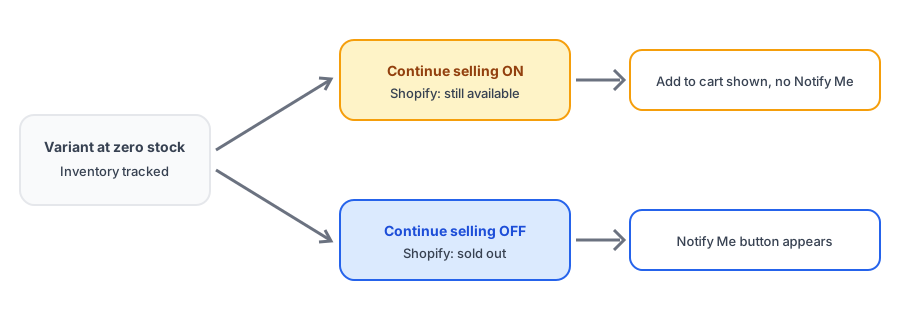
Each variant has an inventory policy. With inventory tracking on and continue selling off, a variant at zero is sold out and shoppers cannot buy it. With continue selling on, shoppers can keep ordering after stock hits zero, and the available quantity can go negative as oversold orders accumulate. If tracking is off entirely, Shopify does not treat the item as sold out at all. In every one of these cases the storefront still shows an add-to-cart button, and most restock buttons key off the sold-out state, so they stay hidden.
Is It a Mistake or a Strategy?
Before changing anything, work out which situation you are in.
It was switched on by accident
Sometimes a bulk edit or an old default turns continue selling on across products that should sell out. You then oversell, ship late and refund, and shoppers never get a way to wait. Turn it off for those variants and the button can appear.
It is deliberate backorder
Some stores want to keep taking orders on items that will be back shortly. That can be a good strategy when the wait is short and you say so plainly, but it means there is nothing to notify anyone about, because the item is still for sale. If you want both, check whether your app has a setting to show the button on products that still allow purchase; some apps do. Otherwise you are choosing between selling now and notifying later. Our post on back-in-stock alerts versus preorders covers where backorders sit between the two.
It is on for some variants only
Mixed settings explain the odd cases where one size shows the button and another does not. Check each variant, not just the product. This is separate from the problem of a button that only appears when every variant is sold out, which we cover in our post on that behavior.
Choose your inventory policy first, then add Notify Me to the products that should sell out. Griffin handles the alert.
Install Griffin on ShopifyOversold Stock Changes What a Restock Means
If you have been overselling, the real quantity may be below zero. Suppose three units are oversold and ten arrive. You have ten new units, but seven are already spoken for, and Shopify's available count shows seven. How an alert tool reads that matters. When Griffin adds up your stock it treats a negative available quantity at a location as zero, so oversold units do not cancel out a delivery. Other tools may count differently, which is one more reason to test with a real adjustment on your own store.
The same setting also quietly affects other features. Shopify's Bundles app, for instance, ignores a component set to continue selling when working out bundle availability, as we explain in our post on bundled products.
How to Check and Fix It
- Open the product in your Shopify admin and look at the inventory section for each variant: is tracking on, and is continue selling checked?
- Decide per product whether shoppers should wait for a restock or keep ordering on backorder.
- For items that should sell out, turn continue selling off and confirm the variant shows as sold out on the storefront.
- Check that the Notify Me app embed is on and the button is enabled for product pages.
- Test with a spare email address, then adjust stock and confirm the alert arrives.
FAQ
Why is my Notify Me button not showing on a sold-out product?
One of the most common reasons is that the variant is set to continue selling when out of stock. Shopify then treats it as available, and most back-in-stock buttons only appear on variants Shopify treats as unavailable. Inventory tracking being switched off has the same effect.
Should I turn off continue selling to show the button?
If you want shoppers to wait for a restock, yes. If you want to keep taking orders on a backorder, leave it on and be clear about shipping times, or use an app setting that shows the button on backorder products if one exists.
What happens to the stock count when I oversell?
With continue selling on, the available quantity can go below zero as orders come in. That means a delivery of ten units does not bring you to ten available if you had oversold three. How a restock tool counts that varies, so test it.
Is a backorder the same as a preorder?
Not exactly. A backorder usually means an item is expected back and you accept orders while waiting. Preorders more often apply before the item exists in stock at all. Our comparison of back-in-stock alerts and preorders covers the difference.
The Bottom Line
If your Notify Me button is hidden, look at the inventory policy before you suspect the app. Decide whether each product should sell out or take backorders, set it to match, and test a real restock. Griffin is a Shopify back-in-stock app you can install from the Shopify App Store, free to start.