A product sells out and the instinct kicks in: unpublish it, or pull it out of the collection, so shoppers don't land on a dead end. It feels like tidying up. For shopify out of stock products seo, though, that instinct usually does more harm than the thing it's trying to prevent. The page you're removing already has rankings, backlinks, and search visibility attached to it, and all of that gets put at risk the moment the page disappears.
What Actually Happens When You Unpublish a Sold-Out Product
Every product page that's been live for a while has accumulated some amount of SEO equity: other sites linking to it, social shares, and Google's own index treating that URL as a known, ranked page. Unpublish it, and every one of those existing backlinks instantly becomes a dead end. Depending on how your theme handles it, visitors and search crawlers hitting that URL either get a 404 or get redirected somewhere generic like your homepage.
Left long enough, a 404'd page gets crawled, flagged, and dropped from Google's index entirely. At that point, whatever ranking and backlink value that URL had built up is gone. If the product comes back in stock later, you're not picking up where that page left off, you're starting its SEO history over from zero on a "new" page, even though it's the exact same product.
The Alternative: Keep the Page Live, Mark It Unavailable
Hiding a sold-out product isn't actually necessary to tell shoppers (or Google) that it's unavailable. Shopify's product structured data includes an availability field, and once a variant's inventory hits zero with continue-selling turned off, that field can reflect an out-of-stock product schema shopify state instead of looking like a normal in-stock listing. Search engines read that signal directly, no need to remove the page to communicate it.
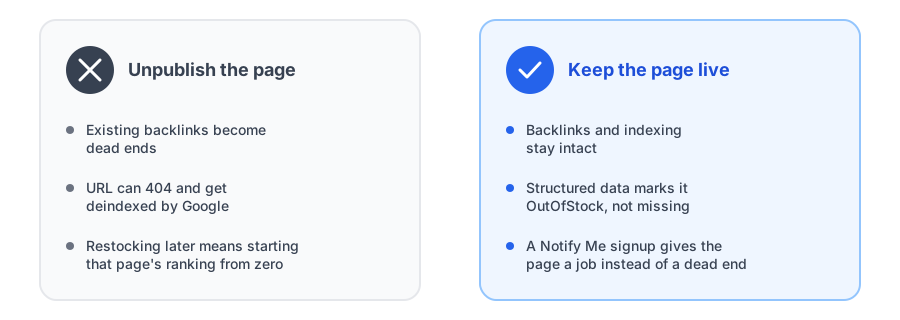
On the storefront side, that just means swapping the Add to Cart button for a clear "Currently unavailable" message and a way to get notified, rather than removing the page or hiding the product from collections entirely. The page keeps doing its job: it stays indexed, it keeps whatever backlinks point to it, and it gives the shopper who lands there something useful to do instead of hitting a wall.
Turn a sold-out page into a working signup instead of a dead end.
Install Griffin on ShopifyIf You Must Remove a Page, Redirect It
Sometimes a product really isn't coming back, and keeping its page live indefinitely doesn't make sense either. In that case, the fix still isn't to unpublish and hide the out-of-stock product, it's to set up a 301 redirect from that URL to a closely related product or a relevant collection page. A 301 passes most of the original page's link equity to its destination, rather than losing it outright the way a 404 does. It also means the shopper who finds that old link, maybe from a years-old blog post or a saved bookmark, lands somewhere useful instead of an error page.
Is There an Actual Ranking Boost, or Just Less to Lose?
It's worth being honest about what keeping a page live and adding a back-in-stock signup actually buys you. There's no confirmed, direct Google ranking signal tied to having a Notify Me button on a page, and claims that a lower bounce rate directly improves rankings go further than what Google has actually confirmed about its own algorithm. What a live, indexed page with a clear status and a working signup reliably does is avoid losing the rankings and backlinks that page already has, and give visitors who land there a reason to stay engaged with your store rather than leaving immediately. That's a real, defensible benefit, just a different one than "this one button boosts your SEO."
FAQ
Should I unpublish a Shopify product when it sells out?
Generally no. Keeping the page live and indexed, with clear out-of-stock messaging and a way for shoppers to get notified, preserves the page's existing backlinks and search rankings far better than unpublishing it does.
Does Shopify tell Google when a product is out of stock?
Yes. Shopify's product structured data includes an availability field that reflects an out-of-stock state once inventory hits zero and continue-selling is turned off, so search engines see the status without the page needing to disappear.
What should I do if a product is never coming back?
Redirect the URL to a closely related product or collection with a 301 redirect rather than letting it 404. That preserves most of the page's existing link equity instead of losing it outright.
Does adding a back-in-stock signup actually improve search rankings?
There's no confirmed, direct Google ranking signal tied to it. What it does reliably do is keep the page useful and indexed instead of becoming a dead end, which matters more for preserving existing rankings than for gaining new ones.
The Bottom Line
The tidy-looking move, unpublishing a sold-out product, is usually the one that costs you more in the long run. A page that stays live, clearly marked as unavailable, with a real way for shoppers to ask to be notified, keeps the SEO value that page already earned instead of starting over from nothing the next time it restocks.
Pairing that approach with a real signup is where it pays off: see how adding a back-in-stock Notify Me button works alongside reducing cart abandonment on sold-out pages. Griffin installs in one click, no theme code edits required. Install Griffin on the Shopify App Store to get started, free to start.