A bundle product looks like any other listing on a storefront: one page, one Add to Cart button, one stock status. Underneath, that status is being calculated from two or more separate component products, and the logic that does that calculation doesn't always get it right. For bundle products, the Notify Me button only ever shows what the bundle's calculated availability says, which means it's worth understanding how that number actually gets produced before trusting it.
How Shopify's Native Bundles Actually Track Availability
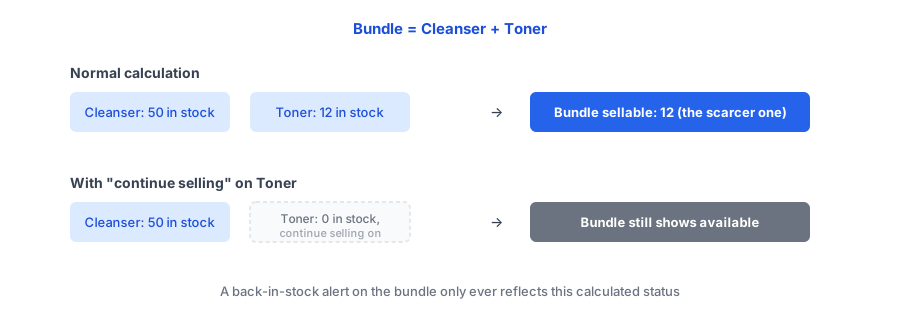
Shopify's own Bundles app sets a bundle's sellable quantity to whichever component has the least stock. A skincare bundle made of a cleanser with 50 units and a toner with 12 units can only sell 12 bundles, since the toner runs out first. That part works the way most merchants would expect.
The part that catches people off guard: a component set to "continue selling when out of stock" is excluded from that calculation entirely. If the toner in the example above hits zero but has continue-selling turned on, Shopify's Bundles app leaves it out of the math, and the bundle can keep showing as available even though one of its two components is genuinely gone.
Where This Breaks a Back-in-Stock Setup
A back-in-stock widget attached to a bundle watches the bundle's own listed stock status, the same way it would for any single product. It has no independent visibility into the individual components behind that number. That means a shopify bundle sold out notification is only as accurate as the Bundles app's own calculation, and that calculation has been reported to go wrong in both directions: a bundle can sit marked as sold out while its components are genuinely in stock, due to an inventory sync lag between the bundle and its parts, or a bundle can stay listed as available after a component truly runs out, either from the continue-selling exclusion above or from a recalculation bug merchants have reported needing to resolve by recreating the bundle or contacting Shopify support directly.
Either way, the back-in-stock app isn't the thing that's wrong. It's faithfully reflecting a number it was never built to question.
See how a Notify Me widget looks on your own bundle and standalone product pages.
Install Griffin on ShopifyWhat to Check If You Sell Bundles
A few checks are worth running on any store with bundle products, before assuming back-in-stock alerts based on component SKUs are working correctly:
- Check each component's continue-selling setting. If one is turned on, know that the bundle's availability will ignore that component hitting zero.
- Watch for products sold both individually and in bundles. Inventory depletes from the same pool either way, so a component can run low from bundle sales alone, even if the standalone product page still looks healthy.
- Treat a stuck "sold out" or "available" bundle as a sync issue, not a back-in-stock app problem. Recreating the bundle has resolved this for some merchants; a persistent mismatch is worth raising with Shopify support directly.
Where a Dedicated Bundle App Can Help Instead
If component-level accuracy matters a lot to your catalog, several apps exist specifically to recalculate bundle availability from live component stock, flip a bundle to draft the moment it can't be built, or flag which component will run out first. That's a different job than a back-in-stock notify-me widget, and a genuinely useful complement to one: the bundle-tracking app keeps the underlying availability number honest, and the back-in-stock widget turns a correctly sold-out bundle page into a recoverable signup instead of a dead end.
FAQ
Does a back-in-stock alert work on a Shopify bundle product?
Yes, generally the same way it works on any product: it watches the bundle's own listed stock status. How accurate that status is depends on how correctly the bundle's availability is being calculated from its components.
Why does my bundle show in stock when a component is actually out of stock?
Often because that component has "continue selling when out of stock" turned on. Shopify's Bundles app excludes a component in that state from the bundle's availability calculation entirely, so the bundle can keep showing as available.
Why does my bundle show sold out when all components are in stock?
This usually points to an inventory sync issue between the bundle and its components rather than a genuine stockout. Merchants have reported cases like this directly to Shopify support when simply recreating the bundle didn't resolve it.
Can a back-in-stock app fix incorrect bundle availability?
No. That's a bundle inventory calculation issue, not something a Notify Me widget controls. A dedicated bundle-tracking app or Shopify support is the right place to fix the underlying availability calculation.
The Bottom Line
A bundle's Notify Me button is only ever as reliable as the availability number feeding it, and that number comes from component math that can miss a real stockout or flag a false one. Knowing where that calculation lives, and what settings like continue-selling do to it, is the difference between trusting a bundle's stock status and quietly wondering why it never seems to match reality.
For products you sell outside of bundles too, our guide on adding a back-in-stock Notify Me button covers the standard setup. Griffin installs as a lightweight app block that works on any product page, bundle or standalone. Install Griffin on the Shopify App Store to get started, free to start.