A product sells out, a waitlist builds while it's gone, and by the time it restocks, something else has quietly changed too: the price. A supplier cost went up, a promotional period ended, or the item simply got repriced in the time it took to reorder. The default "it's back!" email template has nothing to say about any of this, and that silence creates exactly the wrong impression at the moment a merchant is trying to win back a sale. When the price changes before a back-in-stock alert goes out, the issue isn't really the price itself, it's whether the customer feels told or caught off guard.
Why This Catches Merchants Off Guard
Most restock email templates assume the product comes back unchanged: same price, same everything, just available again. That assumption usually holds. When it doesn't, a subscriber who clicks through expecting the price they remember, or simply expecting no surprises, lands on a shopify restock different price situation they weren't warned about. Nothing deceptive happened on the merchant's side, time passed and a cost changed, but from the customer's seat, the gap between "it's back" and "wait, it's more expensive now" reads as a bait-and-switch whether or not it was ever intended as one.
The Fix: Say It Plainly Instead of Staying Silent
Generic restock copy works fine when nothing else changed. The moment the price has moved, that same generic copy becomes a liability, since it implies everything is exactly as the subscriber left it. The fix doesn't require much: state the new price directly in the email, before the click, not after. A line as simple as "this is now priced at $42" does the job. It doesn't need to apologize or over-explain, it just needs to not let the customer find out on their own.
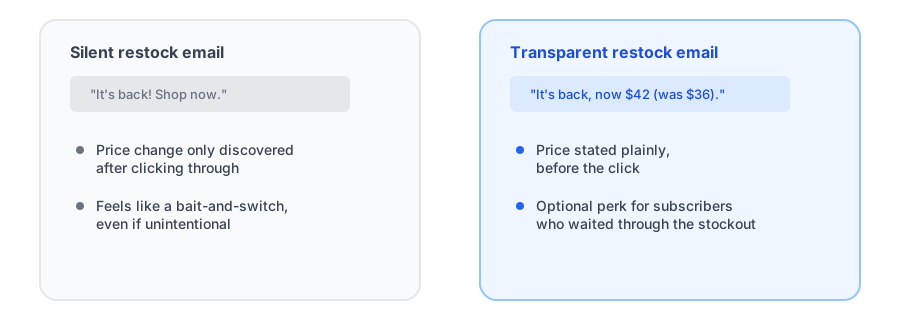
Consider a Perk for Subscribers Who Waited
If the price went up while a customer was waiting, a short-term discount or perk for that specific subscriber list is worth considering, even if it's not something every merchant needs to offer. The logic is straightforward: a subscriber who stuck around through a stockout is already showing more patience and intent than a new shopper landing on the page cold. Asking them to also absorb a price increase on top of the wait, with no acknowledgment at all, is where real goodwill gets spent for not much reason. This is entirely a margin and brand-judgment call, not something every restock needs, but it's a lever worth having in mind for back in stock discount loyal subscribers situations where the increase is significant.
See how Griffin's configurable restock email copy looks on your own store.
Install Griffin on ShopifyWhen the Price Drops Instead
The same principle runs in the other direction. If a product restocks at a lower price, say the thanks out loud rather than leaving it for the customer to notice on the product page. A subscriber who sees "it's back, and now $4 less" gets a small, genuine reason to feel good about having signed up in the first place, which is exactly the kind of reinforcement that makes someone subscribe to the next sold-out item too.
What This Doesn't Require
None of this needs automated price-change detection built into the app itself, and most back-in-stock tools don't have that kind of conditional logic in their templates regardless. Handling a price change in a restock email is really just a manual habit: before sending, check whether the current price matches what it was when the item sold out, and adjust the copy if it doesn't. It's a small step that only matters occasionally, but it matters every time it applies.
FAQ
Should I mention a price increase in a back-in-stock email?
Yes, plainly and upfront. A subscriber who clicks through expecting the price they remember and finds a higher one feels misled, even when nothing deceptive happened. Stating the new price in the email avoids that moment of surprise.
Do I need to explain why the price changed?
Not necessarily in detail. Simply acknowledging that the price is different now is usually enough to avoid the message feeling deceptive; a brief reason helps but isn't required.
Should I offer a discount to subscribers if the price went up?
It's optional, but it's a reasonable goodwill gesture for subscribers who waited through a stockout, especially the earliest signups, so they don't feel penalized twice: once by the wait, and again by a higher price.
Do back-in-stock apps handle price changes automatically?
Generally no. Most restock email templates don't have built-in logic for price changes, so checking the current price against what it was when the item sold out, and adjusting the email copy accordingly, is a manual step for the merchant.
The Bottom Line
A restock email's whole job is to turn stored-up anticipation into a completed sale. A price change that shows up as a surprise works against that job, no matter how reasonable the price change actually is. Saying it plainly, and considering a small perk for subscribers who waited through a genuine increase, keeps the moment feeling like good news instead of a letdown.
For more on getting restock email copy right in general, see our guide on back-in-stock email copy and design that converts. Griffin lets you customize restock email copy per product, so a price-change note takes one edit, not a template rebuild. Install Griffin on the Shopify App Store to get started, free to start.