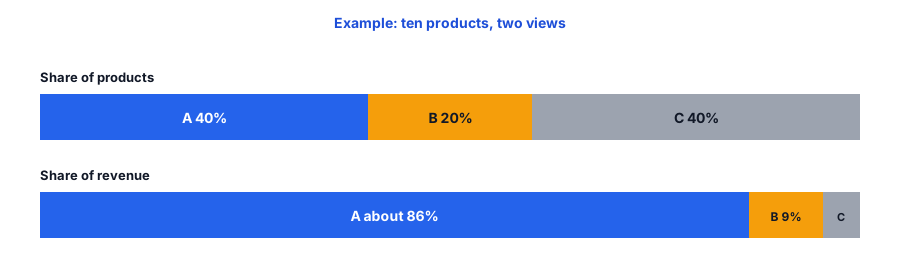
Not every product deserves the same attention. A few products usually carry most of your revenue, and the rest share what is left. ABC analysis puts that into a ranked list: you sort products by revenue, add up the running share and split them into three classes, so you know where reorder effort should go first. If you want to run an ABC analysis on your Shopify store without a spreadsheet, paste your product revenue below and read the classes. The products and numbers shown are examples.
The ABC Analysis Tool
How the Classes Are Decided
The tool ranks products from highest revenue to lowest and keeps a running total. A product is class A if the share before it was below your A cutoff, class B if it was below your B cutoff, and class C after that. Because the product that crosses a cutoff stays in the earlier class, A usually ends up a little above 80 percent, as it does in the example. A product with no revenue lands in C. Refunds larger than sales count as zero.
Shopify's help documentation describes an ABC analysis report that grades products by revenue. Sources suggest A-grade is roughly 80 percent of revenue, B roughly 15 percent and C the remaining 5 percent, over a recent window of days. Confirm the current wording, the window and where the report sits in your admin before you rely on it; see Shopify's ABC inventory analysis page. Running it yourself lets you choose the period and the cutoffs.
What Each Class Needs
Class A: protect availability
These are the products where a stockout hurts most. Give them a proper reorder point, using our reorder point and safety stock calculator, and check how many days of stock remain each week with the days of inventory left calculator. Work at variant level, since one missing size can stop the sales of a best seller.
Class B: steady and watched
Use a standard reorder cadence and review monthly. Watch for products that are climbing toward A, and for slow ones drifting toward C. The sell-through rate calculator helps you see which is happening.
Class C: do not overbuy
C products tie up cash without adding much revenue. Order conservatively, and ask whether each one earns its place. Some do: a low-revenue accessory can be the add-on that closes a sale, or a niche item may have loyal buyers. Judge those by purpose, not only by rank.
What Revenue Ranking Cannot See
- Margin: a mid-ranked product with a high margin can matter more than a top seller with thin margins. Run the tool on gross profit too and compare.
- New products: a launch from last week looks like a C because it has had little time to sell.
- Seasonality: a product that sells strongly for six weeks can rank low over a full year. Pick a period that matches your buying cycle.
- Unserved demand: a sold-out product shows little revenue however many people wanted it.
That last one is where signups help. Griffin, a Shopify back-in-stock app, adds a Notify Me popup or inline form to sold-out products. Shoppers sign up for the variant they want, and Griffin emails them when it returns. Because signups are recorded per product and variant, a C product with a long waiting list is worth a second look; our guide to tracking demand on out-of-stock products shows how to read it. The free plan includes 100 notifications a month. Griffin does not classify products or calculate revenue shares, so use the tool above for that.
Your A products cannot afford a dead end when they sell out. Griffin adds Notify Me to sold-out variants so the demand is not lost.
Install Griffin on ShopifyA 10-Minute Routine
- Export product sales for a period that suits your business, such as a year or the last full season. Confirm which report to use in your admin.
- Paste product names and revenue into the tool.
- Copy your class A list into a note and check each product's reorder point and days of stock left.
- Scan class C for products to stop reordering or to clear.
- Repeat each quarter, or before a busy season. The list changes.
Pair it with a quick low-stock warning so your A products never surprise you; our low-stock alert planner sets a threshold from your own numbers.
FAQ
What is ABC analysis in inventory?
It ranks products by how much revenue they bring in and sorts them into three classes: A for the few products that carry most of the revenue, B for a middle group and C for the long tail. The classes tell you where reorder effort matters most.
What thresholds should I use for A, B and C?
A common split is A up to about 80 percent of cumulative revenue, B up to about 95 percent and C for the rest. Treat those as a starting point and adjust them to your catalogue, since a store with a few dozen products and a store with thousands behave differently.
Should I rank by revenue, units or profit?
Revenue is the easiest place to start. If your margins differ a lot between products, rank by gross profit as well and compare the two lists. Units can help when prices vary widely, but they hide high-value items.
Does Griffin do ABC analysis?
No. Griffin captures restock signups on sold-out products and variants and emails those shoppers when the item is back. It does not classify products or calculate revenue shares.
The Bottom Line
ABC analysis answers one question: where should my attention go first? Rank by revenue, protect the A products, keep an eye on B and be careful with C, then remember what the ranking cannot see. Griffin is a Shopify back-in-stock app you can install from the Shopify App Store, free to start.