A back-in-stock waitlist works great when a restock comfortably covers everyone on it. The question most setups never account for is what happens when it doesn't: a small-batch item comes back with 20 units against a 200-person waitlist, and the default behavior in most apps is to email all 200 subscribers at once. A limited restock like that isn't really solved by the notification firing correctly, it's solved by what happens to the 180 people who click through to a sold-out page minutes later.
The Problem With Notifying Everyone at Once
Blasting the full waitlist the moment a small restock lands creates a race, not a notification. Whoever happens to check their email fastest, or has notifications turned on, buys the limited stock within minutes, and everyone else gets a restock email that already describes units that no longer exist by the time they open it. That's a worse experience in some ways than the original stockout, since now the merchant has actively told them "it's back" right before showing them it's gone again.
There's also a fairness problem buried in a straight email blast. Signing up for a back-in-stock alert first thing feels like it should count for something, but an all-at-once notification rewards email-checking speed, not signup order. A subscriber who joined the waitlist an hour before the restock can easily beat out someone who's been waiting for weeks, purely by being faster to click.
The Alternative: A Queue-Based Restock
Some platforms handle this with a queue instead of a blast: notify only as many subscribers as there are units, in the order they originally joined the waitlist list, not the order they happen to check email. If someone notified early doesn't complete a purchase within a set window, the next person in line gets notified instead, and the process continues until the restock sells through.
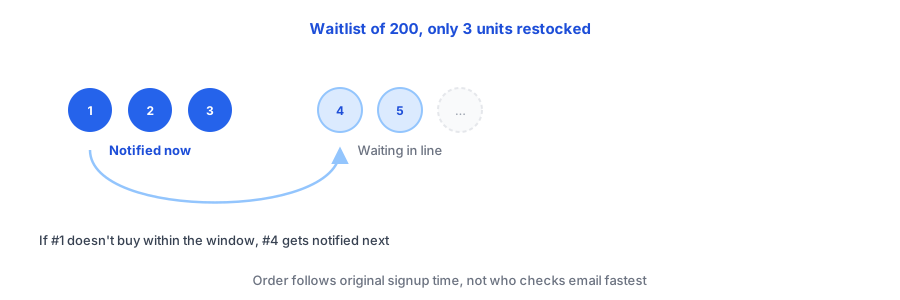
Not every back-in-stock app sends alerts in signup order today, so it's worth checking directly with whichever app you're using rather than assuming the behavior. What it buys you when it is available is a fairer distribution of a scarce restock and far fewer subscribers landing on a "sold out" page moments after being told the opposite.
See how Griffin handles subscriber notifications on your own restocks.
Install Griffin on ShopifyWhat to Do If Your App Doesn't Support a Queue
If your back-in-stock app only supports a single blast, you still have two practical options for a genuinely restock fewer units than subscribers scenario:
- Notify in manual batches, if your app lets you export subscribers (covered in our guide on what transfers when switching back-in-stock apps), by sorting the export by signup date and emailing the oldest group first, holding the rest until you see how much stock remains.
- Set expectations in the email itself, with plain language like "limited quantity available, first come, first served while supplies last," so subscribers who don't make it in time understand why, rather than feeling misled by a restock announcement that turned out to be mostly symbolic.
Setting Expectations at Signup, Not Just at Restock
For categories where restocks are reliably smaller than the waitlist, small-batch goods, handmade items, limited production runs, it's worth setting that expectation where the subscriber signs up, not just in the eventual restock email. A line like "restocks are limited in quantity" next to the signup form keeps a first-come, first-served restock from feeling like a broken promise every time a small batch sells out again in minutes.
FAQ
What happens if I have more back-in-stock subscribers than units restocked?
Whichever subscribers see and act on the email fastest will likely buy out the limited stock within minutes, and everyone else lands on a sold-out page again shortly after being told it's back, unless the merchant handles the mismatch deliberately.
Does notifying everyone at once treat subscribers fairly?
Not really. It rewards whoever checks their email fastest rather than whoever signed up first, so a subscriber who joined the waitlist an hour ago can beat out someone who's been waiting for weeks.
What's a queue-based or "smart" restock notification?
It notifies only as many subscribers as there are units available, in original signup order, and moves on to the next people in line if the ones notified first don't complete a purchase within a set window.
What should I do if my back-in-stock app doesn't support a queue?
Notify in smaller, deliberate batches by signup date if your app supports exporting the list, and at minimum set expectations in the restock email copy that quantities are limited and it's first come, first served.
The Bottom Line
A back-in-stock waitlist that works perfectly for a full restock can still create a worse experience than no notification at all when the restock is small. Whether that means using a queue-based notification where it's available, notifying in manual batches, or just being upfront about limited quantity, the goal is the same: don't let "it's back" become a second letdown for most of the people who hear it.
If you're figuring out how to word that kind of email well, our guide on back-in-stock email copy that converts is a good next read. Griffin installs as a lightweight, email-first app block with no theme code edits required. Install Griffin on the Shopify App Store to get started, free to start.