Merchants often ask how fast a restock alert should go out, and the instinct is the same everywhere: as fast as possible. For popular items that instinct is mostly right, because the shoppers who asked to be told are the most likely to buy and they are competing with each other for limited units. But timing a back-in-stock alert involves two other considerations: the alert should only go out when the stock is genuinely sellable, and you should know what you will do when more people click than you have units. We have no reliable published data on how send speed changes conversion, so this post gives decision rules rather than percentages.
The Alert Should Follow the Stock, Not Lead It
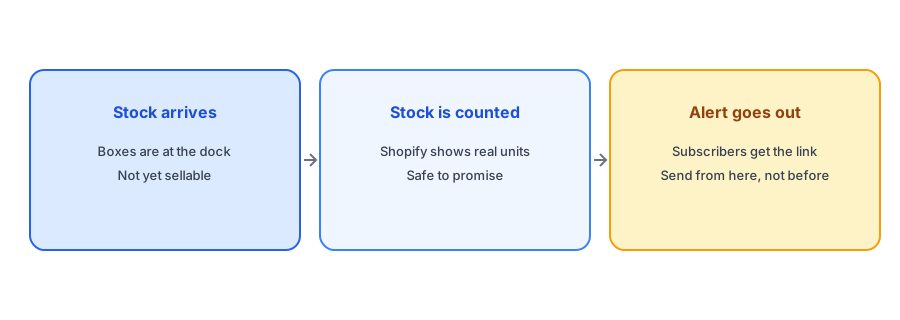
A restock has stages. Boxes arrive, someone counts them, they are put away and the quantity is updated in Shopify. An alert sent before that last step promises something you cannot yet deliver, and a shopper who clicks and finds it sold out is worse off than one who never heard. The right trigger is the moment Shopify holds a true, sellable quantity. If your count is updated by hand, build a habit of updating it as soon as stock is checked. If an integration updates it, know how long that takes; our post on 3PL and ERP inventory sync explains how to time it.
When Immediately Is Right
If you have plenty of stock relative to the waitlist, send as soon as the count is true. Every hour of delay is an hour in which a motivated shopper might buy elsewhere or lose interest. For everyday products with deep stock, there is little reason to hold anything back. Griffin emails the subscribers of the variant that returned to stock, so the people who asked for that variant hear about it, and only them.
When the Waitlist Is Bigger Than the Stock
The harder case is a small restock with a large list. If twenty units return and two hundred people are waiting, a simultaneous alert creates a rush in which most people lose. That is not a failure of the alert, but it is a failure of expectations. Decide beforehand how you will handle it: tell subscribers that quantities are limited, link to a clear sold-out message if units run out, or run a fairer process such as a ranked or staged release. Our posts on limited restocks and waitlists and a fair waitlist for limited units walk through the choices. The worst outcome is a clicked link that leads to nothing.
Notify the people who asked, for the variant they asked about. Griffin is free to start.
Install Griffin on ShopifyEmail Delivery Is Not Instant Either
Even after an alert is triggered, delivery takes time. Large sends are queued, mailbox providers may delay messages and some recipients will not see the email for hours. That is another reason to avoid promises like "first come, first served" unless you have designed for it. A restock email that explains what to expect is better than one that implies a race, and the wording matters; our restock email templates include a limited-units version.
Time of Day and Day of Week
If you control when stock goes live, you can pick the moment. Releasing a popular restock when your support team is available, when your site is not busy with another sale and when your audience is awake makes problems easier to handle. If you restock around a major sale, check that your setup can cope; see our guide to preparing for Black Friday and Cyber Monday volume. For products that restock unpredictably, you do not get to choose, and a fast, accurate alert is the best you can do.
Check the Alert Before You Trust It
Before a big restock, test the whole path. Put a low-stock item into a known state, restock it in a test and confirm that the email arrives, that the link opens the right variant and that the product can actually be added to the cart. Do this on a phone as well as a desktop, since most clicks come from mobile. A few minutes of testing before a high-demand restock is far cheaper than explaining a broken link to hundreds of subscribers afterwards.
A Practical Checklist
- Trigger the alert from a true Shopify count, not from physical arrival.
- Send quickly when stock is deep relative to the waitlist.
- For small restocks, decide how you will handle the rush before it happens.
- Say in the email if quantities are limited.
- Check the link goes to the right variant and that it can be bought.
- Avoid promising "first come, first served" unless you can deliver it.
FAQ
Should a back-in-stock alert go out immediately?
Usually yes, once the Shopify quantity is true and sellable. Delay only if the waitlist is much bigger than the stock and you have a plan for fairness.
What if the alert goes out before stock is ready?
Subscribers click, find it unavailable and lose trust. Trigger alerts from a verified count to avoid it.
How do I handle a small restock and a long waitlist?
Tell subscribers quantities are limited, consider a staged or ranked release and make the sold-out state clear.
Is email delivery instant?
No. Sends are queued and mailbox providers can delay messages, so avoid promises that depend on exact timing.
The Bottom Line
Send fast, but only when the alert is true, and plan for the case where demand exceeds units. Griffin is a Shopify back-in-stock app you can install from the Shopify App Store, free to start. For the bigger picture, see our complete guide to back-in-stock notifications.