Most of the work that goes into a back-in-stock program happens before the email ever gets sent: the widget, the signup flow, the wait for inventory to come back. Then the product restocks, the notification fires automatically, and a lot of merchants stop thinking about it there. But the email itself is the moment all that earlier effort either pays off or doesn't. A subscriber who deliberately asked to be told when an item was back is about as warm a lead as exists in ecommerce, and back in stock email best practices on Shopify are really about not wasting that moment with a generic, easy-to-ignore message.
What a Restock Email Needs to Actually Convert
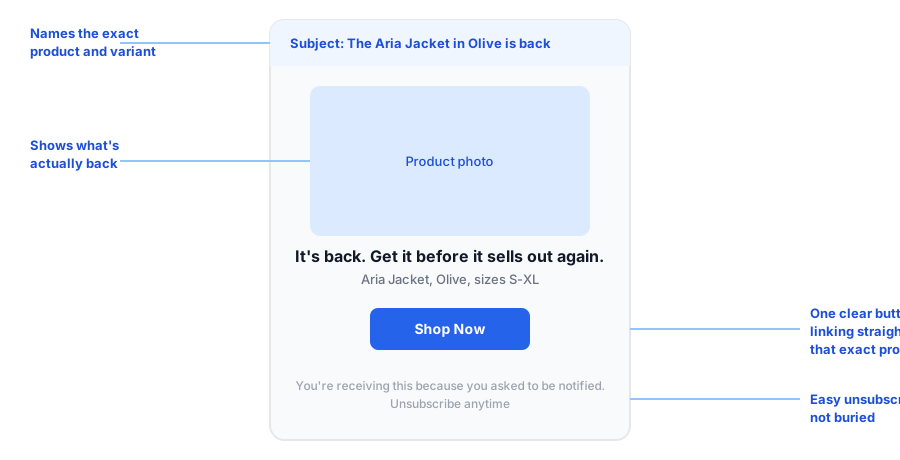
The mechanics matter less than most merchants assume. A restock email doesn't need elaborate design, seasonal graphics, or multiple products crammed into one send. It needs four things: a subject line that names the exact product, a photo of that product, one clear headline, and a single button that links directly to the product (and ideally the specific variant) that sold out. Every additional element is optional. Missing any of those four is what turns a good signal into a wasted one.
Subject Lines That Get Opened
The most common mistake in restock email copy is a subject line that says something restocked without saying what. "Good news, it's back!" tells a subscriber nothing until they open the email, and plenty of people skim past a subject line that vague. Naming the product, and the specific variant if that's what sold out, gives the subscriber everything they need to decide to open it in the first place.
| Weak subject line | Specific subject line |
|---|---|
| "It's back in stock!" | "The Aria Jacket in Olive is back" |
| "Good news about your item" | "Your size is back: Aria Jacket, Medium" |
| "Restock alert" | "Aria Jacket restocked, get yours before it sells out again" |
None of these examples require clever copywriting. They just require the subject line to do the one job it has: tell the subscriber, at a glance, that the specific thing they asked about is available again.
One Product, One Message, One Link
It's tempting to batch several restocks into a single weekly email, especially for stores restocking multiple items at once. Resist that. A subscriber who signed up for one product wants an email about that product, not a roundup where their item is buried third in a list. Bundling restocks dilutes the exact reason the email was sent, and it also means the email has to link somewhere generic, like a collection page, instead of straight to the product page the subscriber already showed interest in.
That direct link matters more than it might seem. A subscriber who clicks through expects to land on the exact product, ready to check the size or color and buy. Sending them to a homepage or a broader collection adds a step they didn't ask for, and every extra step is a chance for them to lose interest before completing the purchase.
Design and Branding Without Overthinking It
Restock emails don't need custom design work for every send. Griffin's branded email templates match your store's look and feel automatically, and merchants can configure the copy and button styling once rather than rebuilding the email from scratch every time a product restocks. That's the practical version of "on-brand": consistent enough that the email is recognizably from your store, simple enough that it doesn't require design time per product.
The footer deserves the same attention as the subject line. An easy, visible unsubscribe link isn't just good practice, it also keeps your list made up of subscribers who actually want these emails, which matters for how the rest of your marketing gets delivered.
See what a branded, ready-to-send restock email looks like on your own store.
Install Griffin on ShopifyFAQ
What should a back-in-stock email subject line include?
Name the specific product, and the variant if it sold out by size or color. A subscriber who signed up for one item wants to know that exact item is back, not that something in your store restocked.
How many products should one restock email cover?
Usually just one, the product the subscriber asked about. Bundling several unrelated restocks into one email dilutes the message and buries the item they actually signed up for.
Should a restock email link to the homepage or the product page?
The exact product page, ideally the specific variant. Sending someone to a homepage or collection page after they already showed intent on one product adds friction that loses sales.
Do I need design skills to send a good restock email?
No. A back-in-stock email doesn't need to be elaborate. A product photo, a clear headline, and one button that links to the right page cover most of what makes these emails work.
The Bottom Line
A restock email isn't cold outreach, it's a message to someone who already told you they wanted this exact product. Naming that product clearly, linking straight to it, and keeping the design simple and on-brand is most of what separates a restock email that converts from one that gets deleted unread.
If you're setting up back-in-stock alerts for the first time, see how adding a Notify Me button works alongside Griffin's branded restock emails. Install Griffin on the Shopify App Store to start sending them, free to start.