A restock alert is only as truthful as the inventory number behind it. Most of the time that number is right: a shipment arrives, someone counts it, the stock goes up and subscribers hear about it. But merchants in Shopify Community threads describe counts drifting upward on their own, and a back-in-stock app has no way to know. It just sees a product go from zero to something, and it does what it was built to do. A false back-in-stock alert sent this way is hard to notice, because from the system's point of view nothing went wrong.
How Phantom Inventory Happens
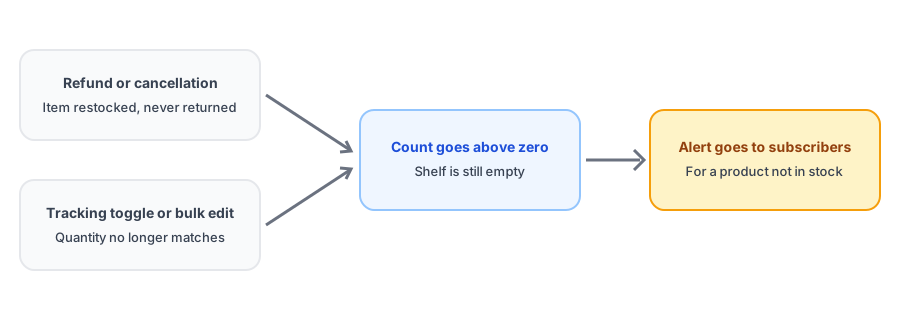
Two causes come up most often in those threads. The first is refunds and cancellations that restock an item the merchant never physically received back. When an order is refunded or cancelled, Shopify can add the items back to inventory. If the product was damaged, lost in transit or never returned, the count is now higher than reality. This behavior, where a refund restocks inventory, is easy to miss because it happens as a side effect of a routine action, not a deliberate count change.
The second is inventory tracking being switched off and on. Flipping that setting, or running bulk edits and imports, can leave quantities different from what was on the shelf. Any of these can produce an upward bump that looks identical to a real delivery.
Why the App Cannot Catch It
This is not a flaw peculiar to one app. A back-in-stock tool reacts to inventory changes reported by Shopify; it does not see your warehouse. Griffin works the same way: when a variant's inventory rises above its notification threshold, subscribers to that variant are queued for an alert. There is no reliable way for software to tell a phantom bump from a genuine delivery, so the safeguard has to be the count itself. That makes this an inventory hygiene issue as much as an app issue.
The cost is real. A shopper who clicks a restock email and finds the product unavailable, or orders something you cannot ship, trusts the next alert less. We cover a related version of this in our post on restock alerts across multiple locations, where the count looks right in total but wrong where it matters.
There is also a subtler version. A product can legitimately return to stock in small amounts that do not match what you intended to sell, such as a single returned unit that restocks automatically. If you have a long subscriber list, one unit is enough to trigger an alert to everyone waiting on that variant, and most will find it gone within minutes. It is worth deciding in advance how returns of sold-out items should be handled, since a single restocked unit can generate a lot of disappointment. Our guide to limited restocks and waitlists covers what to do when the units available are far fewer than the people waiting.
Griffin notifies subscribers when your inventory returns, so the count you maintain is the one it trusts.
Install Griffin on ShopifyHow to Prevent It
- When refunding or cancelling an order, choose deliberately whether items go back into inventory. Damaged, lost or unreturned items should not.
- Treat the inventory tracking setting as something to change carefully. After toggling it, or after any bulk edit or import, check the counts on your best-selling and sold-out products.
- Review inventory adjustment history when an alert fires unexpectedly. It shows what changed and why.
- Keep a regular cycle count for products that have active subscriber lists, since those are the ones where a wrong number reaches customers.
- Fix a wrong count quickly. Setting stock back to the true number before alerts finish sending limits the damage.
What to Do When It Has Already Happened
Correct the count first so the product shows as sold out again. Then decide whether to tell subscribers. A short note that an alert went out in error, and that you will notify them again when stock truly returns, costs little and protects the relationship. For more on what separates a good restock message from a forgettable one, see our back-in-stock email guide, and if alerts misbehave in other ways, our troubleshooting guide.
FAQ
Can a refund trigger a back-in-stock alert?
It can. If a refund or cancellation puts an item back into inventory, your stock count rises, and a back-in-stock app that watches inventory will see a restock, even if the item was never physically returned to the shelf.
Can a back-in-stock app tell a real restock from a false one?
Not reliably. It sees the number Shopify reports, not what is physically in your warehouse. The count is the signal, so keeping the count honest is the fix.
How do I find out why my inventory count changed?
Open the product's inventory in your Shopify admin and look at its adjustment history, which records changes and their reasons. Check it whenever an alert goes out and you were not expecting a restock.
What should I do if a false alert already went out?
Correct the inventory count first so the product shows as sold out again. Then consider a short, honest follow-up to subscribers, since a customer who clicks through to a sold-out page is more forgiving when told what happened.
The Bottom Line
False restock alerts are rarely an app failure. They are an inventory count that stopped matching the shelf, and an app doing exactly what it was told. Decide deliberately what goes back into stock on refunds, check counts after toggles and bulk edits, and look at adjustment history when an alert surprises you. Griffin is a Shopify back-in-stock app you can install from the Shopify App Store, free to start.