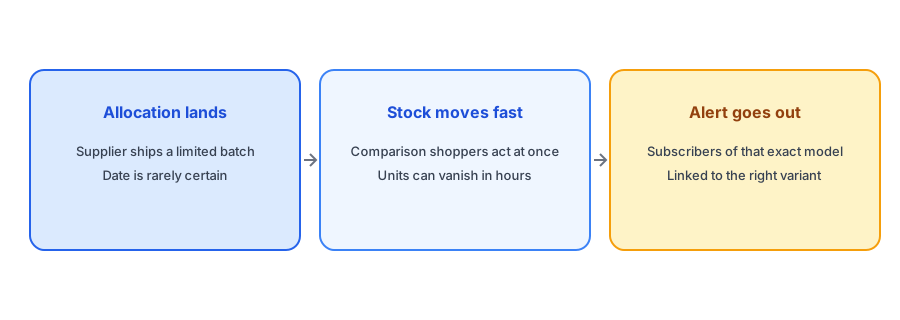
Electronics stores live with a stockout pattern that most other categories do not. Supply is often allocated by the manufacturer or distributor, so a restock arrives as a limited batch on a date you may not control, and demand for a popular gadget can empty it quickly. Back-in-stock alerts for electronics are the same mechanism as in any niche, but the buying behavior around them is different: shoppers compare specs, read reviews and cross-shop several stores before they commit. We could not find published data on restock alerts in this niche, so this post reasons from how gadgets are bought and sold and avoids inventing figures.
Supply Arrives in Batches, Not on a Schedule
A clothing brand that sells out can usually reorder and give a rough date. A gadget store often cannot. Allocation from a supplier may land in one shipment, then nothing for weeks. That makes the sign-up page do real work: shoppers who see a sold-out product with no explanation tend to leave, while shoppers who can ask to be told when it returns at least have a reason to come back. Be honest about uncertainty. Saying "we expect more but do not have a date" is better than guessing a date you then miss, and our replies for "when will it be back in stock?" include wording for exactly this case.
Model Revisions and Variants Need Precision
Gadgets come in generations, colors, storage sizes and bundles. A shopper waiting on the 256 GB model in black does not want to hear that the 128 GB model in white is back, and a revised model number can be a genuinely different product. Griffin attaches each signup to the specific variant the shopper chose and notifies only that variant's subscribers when it is restocked, linking straight to it. If your catalog swaps a product for a new revision rather than restocking the old one, treat that as a discontinuation rather than a restock; our guide to subscribers on a discontinued product covers what to send instead.
Comparison Shoppers Are Both the Opportunity and the Risk
Electronics buyers tend to research heavily, which means a sold-out page is often one of several tabs. That works in your favor if the shopper has already chosen your model and just needs a way to be reminded. It works against you if the page gives them nothing to do. A visible Notify Me option keeps a high-intent visitor in your orbit. It also helps to offer a nearby alternative on the same page, since some buyers care more about the spec than the exact model; see our guide to matching alternatives on a sold-out page.
Give high-intent gadget shoppers a reason to come back. Griffin adds Notify Me to each sold-out model.
Install Griffin on ShopifySmall Batches, Big Waitlists
When a popular device returns in a small allocation, there may be far more subscribers than units. Sending every subscriber an email at once is not wrong, but you should decide beforehand how you will handle the first few minutes and what you will say to people who arrive after it sells out again. Our posts on limited restocks and waitlists and on running a fair waitlist for limited units walk through the options. The goal is to avoid the worst outcome: a subscriber clicks a link and finds the item already gone, with no explanation.
Warranty, Returns and Trust
Electronics shoppers worry about authenticity, warranty and returns more than most. A restock email is a small chance to reassure them: state the return window, confirm the unit is new and covered, and link to your policy page. Keep the message short, since the person has already decided they want the product.
What to Put in the Restock Email
Keep the message focused. The shopper already knows the product, so lead with the exact model and variant that is back, add a direct link to it, and say plainly if quantities are limited. A single line about delivery times helps, because gadget buyers often want the item by a particular date. Avoid padding the email with accessories and upsells: a related case or cable below the main link is fine, but the first thing the shopper sees should be the item they asked for. If you use a discount to move slow models, keep it out of the restock email for hot items; our post on discount codes in back-in-stock emails explains when a code helps and when it just gives away margin.
A Practical Checklist
- Add Notify Me to every model, color and storage option that can sell out.
- Be candid when you do not have a restock date.
- Treat a swapped model number as a new product, not a restock.
- Plan how to handle a small batch and a large waitlist before the stock arrives.
- Repeat your return and warranty terms in the restock email.
FAQ
Why do electronics stores need restock alerts?
Because stock often arrives in unpredictable supplier batches and sells quickly. An alert lets interested shoppers hear about a restock without checking the page repeatedly.
Should each model and color have its own alert?
Yes. Different models, colors and storage sizes are different variants with their own stock, and a subscriber should only be told about the one they chose.
What if I do not know when stock will return?
Say so plainly. A candid note that more is expected, with no promised date, builds more trust than a date you may not meet.
What if the product is replaced by a newer model?
That is a discontinuation, not a restock. Tell subscribers the old model is not returning and point them to the replacement.
The Bottom Line
For gadgets, the restock alert is a bridge between unpredictable supply and shoppers who research carefully. Be precise about variants, honest about timing and ready for small batches. Griffin is a Shopify back-in-stock app you can install from the Shopify App Store, free to start. For the full picture, see our complete guide to back-in-stock notifications.