When a product is sold out, some shoppers will wait and some will not. For the ones who will not, what is on the page decides whether they leave or find something else to buy. Showing alternatives is a sensible way to keep them, but only if the suggestion is good. A mismatched recommendation looks lazy and sends the shopper away just as surely as a blank page. This guide gives you a six-point match test for each candidate, rules for how many to show and where, and the one thing to avoid: letting alternatives push out the Notify Me option. If your out-of-stock pages still get traffic and you want to recommend alternatives, start here.
The 6-Point Match Test
Use this on any product you are thinking of offering in place of a sold-out one. Tick what is true and read the verdict.
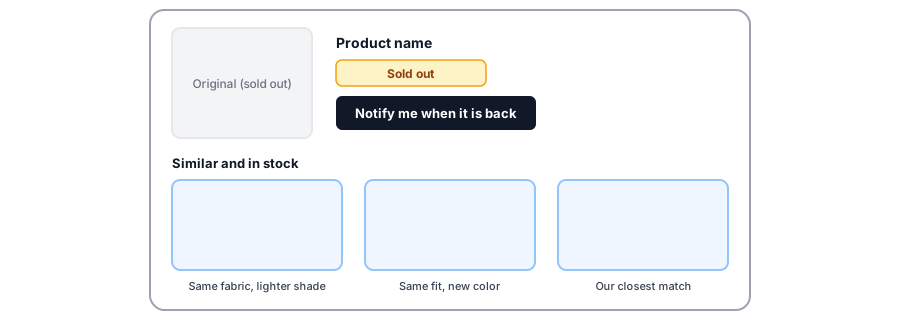
A Good Match and a Bad One
Say the sold-out item is a linen shirt in medium, in sage green. A good alternative is the same shirt in a nearby color with medium in stock, or a shirt in the same fabric and fit with a similar price. A bad alternative is a polyester shirt twice the price, or a linen shirt in a size the shopper does not wear. The test above catches both: the second fails on the same job, price and variant checks even though it looks superficially similar. When in doubt, show fewer, better matches. One honest suggestion is worth more than four that miss.
How Many, and Where
- Show two to four alternatives. Fewer feels thin; more becomes a catalog.
- Place them below the sold-out message and Notify Me option, where the shopper looks next.
- Add a short line to each saying why it matches, such as "Same fabric, one shade lighter."
- Keep the original's details visible so shoppers can compare.
Serve the shoppers who will wait too. Griffin adds Notify Me to sold-out variants, alongside whatever alternatives you show.
Install Griffin on ShopifyWays to Show Alternatives on Shopify
Your options depend on your theme and plan, so check what you already have. Many themes include a related-products section. Shopify also offers product recommendation tools, often through its Search and Discovery app, where you can adjust what appears. You can pair specific products by hand, for example with metafields if your theme supports them, and a recommendations app can add more control. Automatic suggestions are a fine starting point, but check them on your most important sold-out pages, since they do not always match on price or availability. Griffin does not provide recommendations; it handles the alert for shoppers who choose to wait.
Keep Notify Me Beside Them
The most common mistake is replacing the signup with alternatives. Shoppers who wanted the original, and are willing to wait, are your best restock customers. Offer both and let the shopper choose. Our sold-out page checklist shows the rest of the page, and nine things to do when a product is out of stock puts alternatives in context.
When the Original Is Not Coming Back
Alternatives matter most for products that are gone for good. Tell people waiting on the list, point them to the closest match, and close the loop; see what to do with subscribers when a product is discontinued. For shoppers you have already lost to a stockout, the scripts in our win-back plan include a close-alternative email.
Measure Whether It Works
Compare sold-out page behavior before and after you add alternatives: how many visitors click through to a suggestion, and how many of those buy. Judge it by orders, not clicks, and keep your expectations modest, since no independent benchmark exists for how much alternatives retain. Our post on the lost-sales calculator can help you size the opportunity first.
FAQ
How many alternatives should I show on a sold-out page?
Usually two to four. Enough to give a real choice, few enough that the shopper is not overwhelmed. Keep the Notify Me option visible so those who prefer to wait can do so.
Should alternatives replace the Notify Me button?
No. Offer both. Some shoppers will switch and some will wait, and you want to serve each. Hiding Notify Me to push alternatives loses the shoppers who only wanted the original.
Are automatic recommendations good enough?
They can be a starting point, but they are not always matched on price, category or stock. Check them on your most important sold-out pages, and pair products by hand where it matters most.
Do I need an app to recommend alternatives?
Not necessarily. Your theme may include a related-products section, and Shopify offers product recommendation tools, though what is available depends on your theme and plan. Check what you already have before adding an app.
The Bottom Line
A good alternative keeps a sale you would have lost. A poor one costs a click and some trust. Test each match, show a few, and keep the Notify Me option beside them. Griffin is a Shopify back-in-stock app you can install from the Shopify App Store, free to start.