A limited drop selling out in under a minute looks like a success story, and mostly it is. But every one of those sold-out product pages is also a dead end for the shopper who was a few seconds too slow. No form to fill out, no way to signal they still want that size in that colorway, nothing. Streetwear merchants are paying more attention to back-in-stock alerts because they are realizing that dead end is costing them more than it needs to.
Streetwear and sneaker stores aren't like a typical apparel shop restocking basics on a predictable supplier cycle. Drops are their own kind of release, and the notification strategy that fits a normal restock doesn't automatically fit a hype release.
Why Streetwear Drops Restock Differently Than Regular Apparel
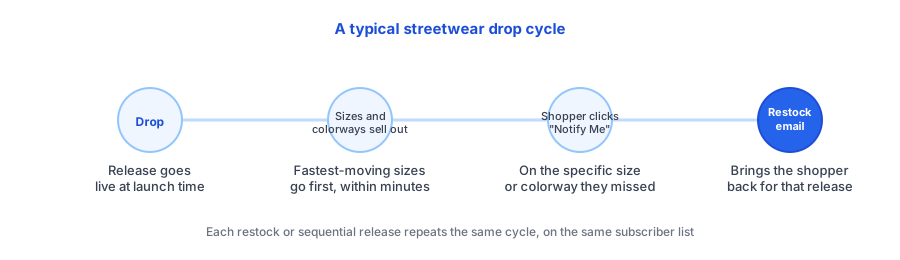
Most back-in-stock guidance assumes a steady-state category, where a SKU sells at a fairly even pace and gets reordered when it runs low. Streetwear and sneakers don't behave that way. A drop launches, and within minutes the fastest-moving sizes and colorways are gone while others linger. Then, depending on the brand, the same style might come back in a second or third release, sometimes in smaller batches, sometimes on a completely different schedule than the original launch.
That's what makes a hype release restock alert different from a normal restock notification. It isn't just "let me know when this comes back," it's capturing interest across a whole sequence of releases for the same core style, often at the exact size or colorway level, since that's where sell-through speed diverges the most.
The Case for a Sneaker Restock Notification on Drop Pages
A sneaker restock notification does two jobs at once. First, the obvious one: it gives a shopper who missed a size a real path back to the store instead of pushing them toward a resale marketplace at a markup. Second, and just as valuable, it turns every sold-out drop page into a demand signal. Subscribe counts by size and colorway show exactly which variants had the most missed demand, which is a far more useful input for planning the next release or restock than overall sell-through time alone.
This only works if tracking happens at the variant level. A shopper who wanted a size 10 in the original colorway doesn't care that size 7 in a different colorway is back. If the notification isn't scoped that precisely, it either goes out to the wrong people or doesn't go out at all, and either way the store looks unreliable right after a drop it should be capitalizing on.
Setting Up a Limited Drop Shopify App the Right Way
A back-in-stock app for limited drops needs to handle one thing regular restock tools often don't: not every drop is coming back. Some releases are genuinely one-time, and treating them the same as a restockable SKU sets up a promise the store can't keep. The fix mirrors what works for other made-to-order or limited-run categories: split the two cases at setup, so a restockable style routes to a back-in-stock notify-me widget, and a true one-time drop routes shoppers to a general new-drop signup instead.
Beyond that split, the setup itself is straightforward. The widget needs to sit on the product page at the size and colorway level, the alert needs to fire automatically the moment inventory updates (no manual list export before a competitor's restock alert beats yours to the inbox), and none of it should require custom theme development that slows down how fast a new drop page can go live.
See how a variant-level "Notify Me" widget looks on a drop page, free to start and live in minutes.
Install Griffin on ShopifyTurning a Sold-Out Drop Page Into Demand for the Next One
The best version of this setup does more than recover the current drop. Every subscriber who signed up because they missed a size is also a warm audience for the next release, especially if the brand's next drop is a genuine restock rather than something new. Instead of starting cold on each launch, a store with restock alerts running consistently builds a list of shoppers who have already shown real, size-specific intent, which is a stronger signal than a generic newsletter signup.
FAQ
Do back-in-stock alerts even matter if a drop sells out in minutes?
Yes. Most drops restock the same style in a second or third release, or the exact size and colorway sells out while others remain. An alert captures the shopper who missed a specific variant instead of losing them entirely.
Should every size and colorway get its own restock alert?
Yes, variant-level tracking matters more for streetwear than most categories. A shopper who wanted a specific size doesn't want to be told a different size is back, so the notification needs to be scoped to the exact variant they subscribed to.
What if a drop will never be restocked?
A back-in-stock alert doesn't apply to a true one-time release. In that case, route interested shoppers to a general new-drop or waitlist signup instead of a restock promise you can't keep.
Can back-in-stock alerts help decide what to restock next?
Yes. Subscribe counts per size and colorway show which variants had the most missed demand, which is a more direct signal than overall sell-through speed for deciding what to bring back first.
The Bottom Line
A drop selling out fast is a good problem, but it's still a problem if every missed shopper has nowhere to go but a resale site. Setting up size- and colorway-level restock alerts turns that dead end into both a recovered sale and a demand signal for the next release, without slowing down how quickly a new drop page can go live.
If you're setting this up for your own drops, Griffin installs as a lightweight app block with variant-aware notify-me subscriptions, no theme code edits required. For releases that truly won't come back, it's also worth reading Back-in-Stock Notifications vs Waitlists to decide which flow fits each drop. Install Griffin on the Shopify App Store to get it live before your next release.