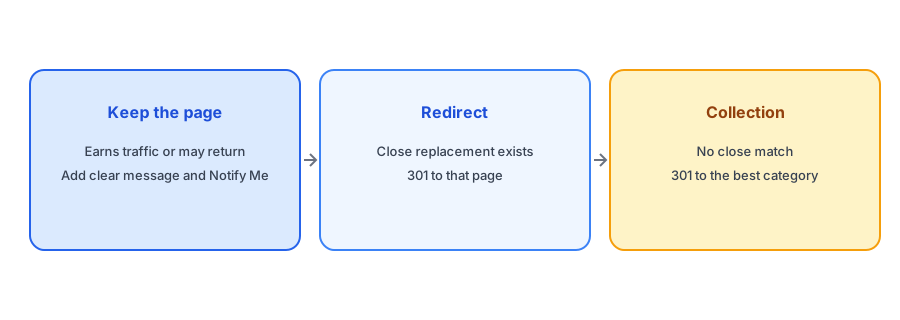
When a product is discontinued, the page does not disappear from Google, from other sites that linked to it or from the posts and emails that pointed to it. People keep arriving, and what they find decides whether they stay. You have three broad options: keep the page, redirect it somewhere useful or remove it. The right choice depends on traffic, links and whether the product might return. This guide helps you decide on a redirect for discontinued products that you can live with. Shopify's menus and redirect tools change over time, so check current documentation for the steps. We do not quote search-impact figures, because we have no reliable data and results vary by store.
First, Is It Really Discontinued?
Be sure before you act. A product that is out of stock and may return should stay live with a Notify Me option, which keeps traffic and captures demand; see our guide to finding sold-out pages that still get search traffic. A redirect or deletion is for products that are truly gone. If you are unsure, wait, or set the product to draft rather than deleting it, since drafts keep your data and can be restored. Decide explicitly, and record the decision.
Option One: Keep the Page Live
If the page still earns search visits or has links pointing to it, keeping it can be the best choice, even for a product that will not return. Update it so it is honest and helpful: say clearly that the product is discontinued, show close alternatives and link to the relevant collection. Remove any promise of a restock. This keeps the page's value and serves visitors who arrived looking for that item. The cost is that you must maintain it, and a stale page can frustrate people if it is not clear.
Option Two: Redirect to a Close Replacement
If there is a genuinely similar product, such as the newer version of the same item, a permanent redirect, usually called a 301, sends visitors and most of the page's search value to that product. In Shopify's admin you can create URL redirects, which map an old path to a new one. Choose the target carefully: it should match what the visitor was looking for. A redirect to something unrelated confuses people and search engines may treat it as a soft error. If the replacement differs in important ways, say so on the destination page.
For products that will return, keep the page and capture interest. Griffin adds Notify Me to each sold-out variant and is free to start.
Install Griffin on ShopifyOption Three: Redirect to the Best Collection
If there is no close match, redirect to the collection that best fits the product's category. A visitor looking for a specific kettle, say, lands on your kettles collection, which is relevant and useful. Avoid sending everything to the homepage: it rarely matches what people wanted, and it gives search engines little reason to pass on the old page's value. If no collection is relevant at all, it may be better to let the page return a not-found response than to redirect it somewhere misleading.
What About Subscribers?
Redirecting does not tell people who asked for a restock that it will not happen. If you have Notify Me requests for the product, tell those subscribers it is discontinued, suggest an alternative and close the requests; our guide to handling subscribers when a product is discontinued covers the wording. If you delete variants rather than whole products, see how to delete variants without losing your waitlists.
Archive, Draft or Delete?
Shopify lets you set a product to draft or archived, or delete it. A draft or archived product disappears from your storefront but keeps its data, so you can bring it back later. Deleting removes it permanently, along with its history. If the product might return, choose draft or archive. If you delete, create the redirect at the same time, so visitors never meet a dead page. When you change a product's handle, Shopify typically offers to create a redirect automatically, but check that it did.
Check the Result
After a change, test the old URL in a private window and confirm it goes where you expect, in one hop. Watch Search Console over the following weeks for crawl errors on the old URL. Keep a simple list of old URLs and their targets, so you can fix mistakes and avoid chains of redirects. Our post on whether hiding out-of-stock products hurts SEO explains the wider principle.
A Practical Checklist
- Confirm the product is truly discontinued before acting.
- Keep the page live with a clear message if it still earns traffic.
- Redirect to a close replacement if one exists, otherwise to the best collection.
- Avoid redirecting everything to the homepage.
- Use draft or archive if the product might return.
- Tell Notify Me subscribers and close their requests.
- Test the redirect and keep a list of old URLs.
FAQ
Should I redirect a discontinued product?
If it will not return and a close replacement or relevant collection exists, yes, with a permanent redirect. If it still earns traffic, you can also keep the page with a clear message.
Where should a discontinued product redirect to?
To the closest replacement or the best matching collection, not the homepage.
Is it better to archive or delete a product?
Archive or draft if it might return, since the data is kept. Delete only when it is gone for good, and create a redirect at the same time.
What about people waiting for a restock?
Tell them it is discontinued, suggest an alternative and close their requests.
The Bottom Line
Decide deliberately, redirect to something relevant and tell the people who were waiting. Griffin is a Shopify back-in-stock app you can install from the Shopify App Store, free to start.