Cleaning up a catalog is healthy: a size that never sold, a color you dropped, two options folded into one. The risk is the people waiting. Every variant that has sold out may have shoppers who asked to be told when it returns, and deleting the variant does not tell them anything. This guide gives you a safe order of operations for four situations, based on what Griffin's code does, and a planner that turns your situation into numbered steps and a message you can send. If you are about to delete product variants on Shopify and have a waitlist, start here. The names shown are examples.
The Cleanup Planner
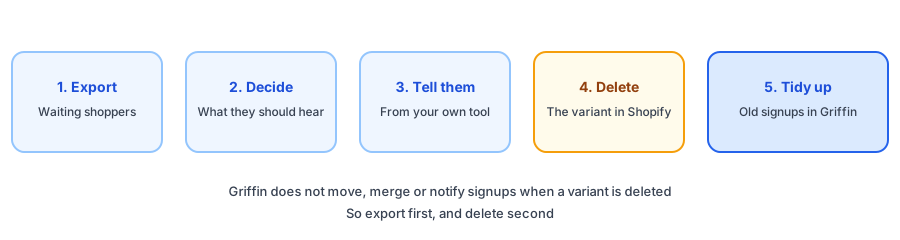
What Griffin Does When a Variant or Product Is Deleted
We checked this against Griffin's code instead of guessing. Griffin sends restock emails when Shopify reports inventory going up for a variant people signed up for. It does not process variant or product delete and update events, and we found nothing that moves, merges or notifies signups when a variant disappears. The signups stay where they are, and because a deleted variant never gets stock again, they are never emailed.
Products are handled a little differently. Periodically (by default every six hours), Griffin asks Shopify whether the products that shoppers are waiting on still exist. If one is gone, Griffin marks it as deleted in Shopify. The signups and history are kept, but Reports and the dashboard stop listing the product as demand, and nothing is emailed automatically. If Shopify reports the product again, the flag is lifted. If that check cannot reach Shopify, nothing changes. A subscription that you delete or unsubscribe is never emailed, even if an email was already queued.
Why Not Fold the Old Waitlist Into the New Variant
It is tempting to treat a replacement as a restock. Do not. People signed up for a specific item and the restock email is about that item, so telling them it is back when it is a different one costs you trust. Our guide to discontinued products and subscribers covers the same principle: send one honest message instead, and let people decide.
Tools in the Griffin App
Griffin, a Shopify back-in-stock app, lets you export your subscriptions, and delete or unsubscribe subscriptions in bulk. It does not let you add subscribers by hand, and it does not move signups between variants. Signups are stored in Griffin's own records, not your Shopify customer list, and the free plan includes 100 notifications a month. Confirm the exact names and locations of the export and bulk actions in the app, since they may change.
Waitlists are demand you can see. Griffin records signups per product and variant, so you know who is waiting before you delete.
Install Griffin on ShopifyBefore You Delete: Questions to Ask
- Is it dead, or just sold out? Check the waitlist before you decide; the guide to tracking demand on out-of-stock products shows how to read it.
- Is a different action enough? Hiding a variant may protect the record, and a deleted one is harder to bring back. Check what your admin offers.
- Will counts stay honest afterwards? Check with the cycle count checklist, and use the stockout postmortem template if the cleanup follows a repeat sell-out.
- What will shoppers see? A sold-out page with no way forward helps nobody; see the sold-out page checklist.
After the Cleanup
Once you have finished, check that nothing is left behind. Look at the subscriptions list for the variant you removed and confirm it is empty or that you kept what remains on purpose. Keep the export and the message you sent for your records, in case someone replies. If you reorganize options often, do it in one batch, so you contact waiting shoppers once instead of several times. Add catalog changes to your weekly routine so the same steps run every time.
FAQ
What happens to waitlist signups when I delete a variant?
In Griffin's code we could find nothing that moves or notifies them when a variant is deleted. The signups stay in your records, and because the deleted variant will never receive stock updates, they are never emailed. That is why you should export them and tidy up on purpose.
Can Griffin move subscribers to a replacement variant?
No. Griffin has no way to move or merge signups between variants. You can export the shoppers, tell them yourself and delete or unsubscribe the old signups.
What happens if I delete the whole product?
Griffin periodically checks Shopify for products that shoppers are waiting on (by default every six hours). Once it finds one is gone, it marks the product as deleted in Shopify: the signups and history are kept, Reports and the dashboard stop counting it as demand, and nothing is emailed automatically.
Should I email people who signed up for a variant I removed?
A single honest message usually earns more trust than silence, but keep it relevant and one-off, and check the rules where you sell about contacting people who signed up for a specific item. Do not send a restock email for a different item.
The Bottom Line
Export the waiting shoppers, decide what to tell them, tell them yourself, then delete the variant and tidy up the old signups. Griffin will not do the middle steps for you, so plan them. Griffin is a Shopify back-in-stock app you can install from the Shopify App Store, free to start.