Every sold-out product raises the same few questions: when will it be back, can you save me one, can I order it now, what if it never returns? If the answers live only in your inbox, you will write them again and again, and each reply may say something slightly different. The generator below builds a ready-to-paste FAQ and a short policy paragraph from your own choices. It covers the questions shoppers ask most, and where an answer depends on your store, it lets you pick. The out-of-stock policy template you can adapt in a few minutes is below, with sample values that you should replace.
The FAQ and Policy Generator
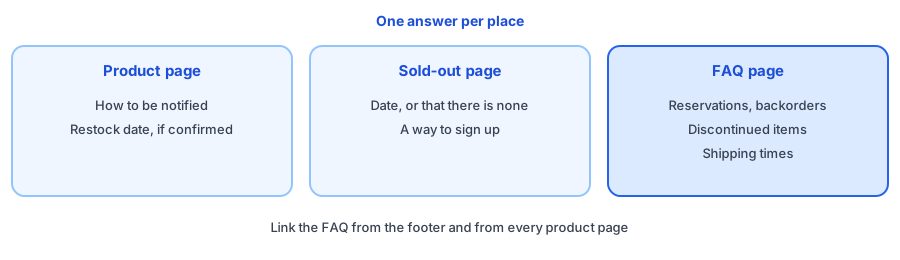
What to Put Where
Shoppers will not read a policy page before they decide, so match the answer to the moment. On the product page, say how to be notified, and give the restock date only if it is confirmed. On the sold-out page, avoid dead ends: our sold-out page checklist shows what to include. On a single FAQ page, keep the longer answers about reservations, backorders and shipping, then link it from the footer and product pages.
Rules for Honest Answers
- Say what you do not know. "We do not have a date yet" beats a guess you miss.
- Promise only what you will do. If you say you will email people, make sure that happens.
- Keep the answers consistent with your emails, chat replies and banners, so shoppers hear one story. Our eight reply templates match these answers for email, chat and DMs.
- Update the page when your approach changes, such as when you start taking backorders.
Where Griffin Fits, and Where It Does Not
Griffin, a Shopify back-in-stock app, covers the notification answer. It adds a Notify Me popup or inline form to sold-out products, shoppers sign up for the variant they want, and Griffin emails them when it is back. Signups are stored in Griffin's own records, and the free plan includes 100 notifications a month. Griffin does not take backorders or preorders, reserve units, set restock dates or write your policy, so the other answers are yours. If you are weighing backorders, see back in stock alerts versus preorders and how to set up preorders or a restock alert. For delays on items you can still sell, the shipping delay banner generator writes the site copy.
Answer the stock questions once, then let shoppers sign up for the rest. Griffin adds Notify Me to your sold-out variants.
Install Griffin on ShopifyFAQ
Do I need an out-of-stock policy?
It is not a legal requirement everywhere, but a short, clear policy answers the questions shoppers ask most and saves you from replying to the same messages. Check the rules where you sell, since requirements for availability and delivery statements vary.
Where should I put my out-of-stock FAQ?
A single FAQ or policy page that you link from product pages, the footer and your sold-out page works well. Repeat the one or two answers that matter most, such as how to be notified, directly on the product page.
Should I promise a restock date?
Only if the date is confirmed and you can keep it. Otherwise say that you do not have a date, and offer a way to be told when the item returns.
What does Griffin cover in this FAQ?
Griffin covers the notification answer. It adds a Notify Me button to sold-out products and emails shoppers when the item returns. It does not take backorders or preorders, reserve units, set restock dates or write your policy for you.
The Bottom Line
A good out-of-stock policy is short, honest and placed where shoppers will see it. Use the generator, edit it until every line is true for your store and keep it updated. Griffin is a Shopify back-in-stock app you can install from the Shopify App Store, free to start.