Merchants usually start looking at switching back-in-stock apps for a specific reason: pricing that no longer fits, a missing feature the store now needs, or support that hasn't been responsive. What's easy to assume, and often wrong, is that everything built up in the old app quietly comes along for the ride. Some of it does. A meaningful amount of it doesn't, and finding that out mid-switch instead of before it is what turns a routine app change into a messy one.
What Actually Transfers
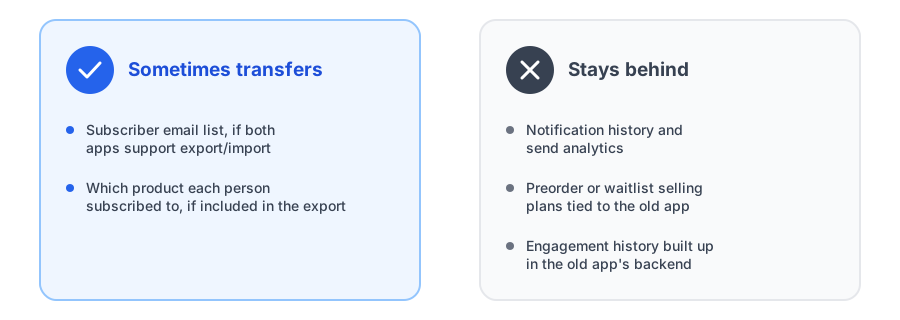
The one thing genuinely worth checking on both ends is the subscriber list itself. A back in stock subscriber export, where the old app lets you download the emails (and ideally which product or variant each person subscribed to) as a file, is common enough, but it's not universal, and neither is the ability to import that file into the new app. Before assuming this will just work, confirm two things separately: that your current app supports exporting subscribers in some usable format, and that the app you're migrating to accepts an import in that same format. Assuming one implies the other is where switches go sideways.
What Doesn't Transfer
Notification history and analytics, records of what was sent, opened, or clicked, live inside the old app's own backend and have no standard way of moving to a different vendor's system. Plan on starting that reporting fresh with the new app rather than looking for a way to preserve it.
Preorder or waitlist selling plans are the other common surprise. If your old back-in-stock app also handled preorders through a Shopify selling plan it created and manages, that configuration belongs to the old app, not to the product itself. Uninstalling it can leave those selling plans orphaned or non-functional, so they need to be recreated directly in the new app rather than assumed to carry over automatically.
Widget styling and copy are a smaller but still real gap. Any customization you made to the old app's button text, colors, or placement lives in that app's own settings panel, not in your theme, so a new app starts from its own defaults rather than picking up where the last one left off. It's a quick fix once you know to expect it, but it's easy to forget until a merchant notices the new button looks generic on launch day.
Comparing options before you commit to migrating your back-in-stock app? See how Griffin's setup looks first.
Install Griffin on ShopifyThe Overlap Problem: Running Two Apps at Once
It's tempting to install the new app before removing the old one, just to compare them side by side. In practice, having two back-in-stock apps active at the same time usually means two Notify Me widgets competing for the same spot on a product page, which is confusing for customers and can lead to duplicate signups or duplicate restock emails for the same subscriber. If you do want an overlap period to test the new app, keep it short and deliberate, and disable the old app's embed in the Theme Editor before customers start seeing both.
A Practical Switching Checklist
- Export subscribers from the old app first, if it offers that option, before starting any other step.
- Confirm import support with the new app's team rather than assuming the file will just work.
- Disable the old app's embed in the Theme Editor before enabling the new one, to avoid duplicate widgets.
- Recreate preorder or waitlist selling plans directly in the new app rather than expecting them to carry over.
- Uninstall the old app fully once the new setup is confirmed working, rather than leaving it installed and inactive indefinitely.
FAQ
Can I export my back-in-stock subscriber list when switching apps?
Sometimes, if the old app offers an export and the new app supports importing that format. Support for this varies by app, so it's worth confirming with both apps' support teams before committing to a switch date.
Will my notification history and analytics transfer to a new app?
No. Send history, open and click data, and any dashboard analytics live inside the old app's own backend and don't move with a subscriber export. Plan to start that history fresh with the new app.
Can I run two back-in-stock apps at the same time during a switch?
It's possible but not recommended beyond a short, controlled overlap. Two active apps usually means two Notify Me widgets on the same product page, which confuses customers and can result in duplicate signups or emails.
Do preorder or waitlist selling plans transfer to a new app?
No. Selling plans tied to a preorder or waitlist feature are typically built and owned by the specific app that created them, so they need to be recreated in the new app rather than assumed to carry over.
The Bottom Line
A back-in-stock app switch goes smoothly when you plan around what actually moves, mainly the subscriber list, and rebuild the rest deliberately instead of hoping it appears. Checking export and import support on both sides before you commit, avoiding a prolonged overlap between two active apps, and rebuilding preorder plans directly in the new app covers most of what trips merchants up.
If you're evaluating where to land, our back-in-stock app pricing guide is a useful next read, and Griffin installs as a lightweight, email-first app block with no theme code edits required. Install Griffin on the Shopify App Store to see the setup for yourself, free to start.