A free plan is an easy way to try a restock app, and for many small stores it is all they will ever need. But free almost never means unlimited. Nearly every free tier caps one thing, the number of notifications you can send in a month, and the question that matters is whether that cap covers your busiest restock. If you are comparing free back-in-stock apps, it helps to understand exactly what is being counted, how to estimate your own number, and what the app does at the limit.
What Gets Counted
On most plans the unit is the notification: one restock email to one subscriber. That has a consequence people miss. The limit is not about how many products you restock or how many times. It is about how many people are waiting. A restock with 5 subscribers uses 5. A restock with 150 uses 150. In Griffin, the count is made up of restock notifications that were actually sent or delivered in the current usage period, so alerts that failed or are still queued do not use up the allowance. Griffin's free plan covers 100 notifications a month. Other apps count differently, so ask whether failed sends, retries or confirmation emails count against you.
Estimating Your Own Number
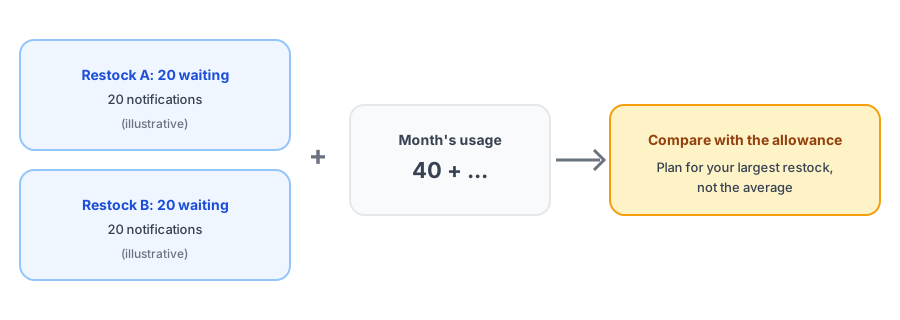
You can estimate your monthly usage in a few minutes with numbers you already have. For each product that sold out and restocked last month, write down how many people were waiting when it came back, then add them up. That total is your notification usage. An illustration, not a benchmark: if three products restocked with about 20 subscribers each, that is roughly 60 notifications, comfortably inside 100. If one popular product restocked to a list of 150, that single restock is larger than the whole allowance.
The figure to plan around is your largest restock, not your average one. Averages hide the spike that actually causes trouble. Our post on tracking demand on out-of-stock products shows how to see waitlist sizes per product.
What Happens at the Limit
This is the part to check before you rely on any free plan. Some apps stop sending, some quietly drop what does not fit, and some hold the rest. In Griffin, when the plan limit is reached, the remaining notifications stay queued and are sent after the usage period resets, and your dashboard shows a warning as you pass 80 percent and reach 100 percent. On the free plan the usage period is a monthly window starting from the date you installed, not the calendar month, so your reset date may not be the first of the month.
Held notifications are better than lost ones, but they are still late. For a product that sells out fast, an alert that arrives two weeks after the restock is worth much less. That is the real cost of an allowance that is too small.
Start free and see your real numbers. Griffin's free plan covers 100 notifications a month.
Install Griffin on ShopifyFree Versus Paid: What Really Changes
The difference between free and paid is usually capacity, with a few features layered on top. Before you upgrade, ask what you would actually gain: more notifications, faster handling of large restocks, additional reporting. The comparison that matters is the cost of the plan against the sales that delayed or missing alerts would have recovered. Our pricing guide covers what is reasonable to pay, and our post on measuring restock revenue shows how to put a number on the other side of that equation.
A Practical Way to Decide
- List last month's restocks and the waitlist size for each, then total them.
- Find your largest single restock and check it fits inside the allowance.
- Ask the app what happens at the limit and how late the overflow can be.
- Plan for seasonal peaks; see our post on preparing for Black Friday and Cyber Monday volume.
- Revisit after a few months of real data instead of guessing up front.
Plan limits and prices change, so confirm current numbers on each app's listing before you decide.
FAQ
What counts as one notification on a free plan?
Typically one restock email sent to one subscriber. A restock that notifies 40 subscribers uses 40 notifications. Check how your app counts, including whether failed sends and confirmation emails are included.
What happens when I hit the free limit?
It depends on the app. Some stop sending, some drop the overflow, some hold it until the next period. Griffin holds the remaining notifications and sends them after the usage period resets, but ask any app before you rely on it.
Is a free plan enough for a small store?
Often, if your restocks are small and infrequent. A single popular product with a long waitlist can use a whole month's allowance in one go, so estimate your largest restock, not your average.
When should I upgrade?
When your biggest restocks regularly exceed the allowance, or when waiting for the next period delays alerts on products that sell out fast. Compare the cost with the sales those delayed alerts would recover.
The Bottom Line
A free plan is a monthly allowance of alerts, driven by how many people are waiting, not how many products you restock. Estimate your largest restock, find out what happens at the cap, and upgrade only when the numbers justify it. Griffin is a Shopify back-in-stock app you can install from the Shopify App Store, free to start.