A shopper signs up for a restock alert, the product comes back, you send the email, and they never see it. It is sitting in spam, or missing from the inbox altogether. Back-in-stock emails going to spam is a frustrating problem because it is invisible: the app reports the message as sent, your dashboard looks healthy, and the only symptom is customers who do not come back. Deliverability comes down to a few ideas that are worth understanding even if you never touch a DNS record.
What Inbox Providers Look At
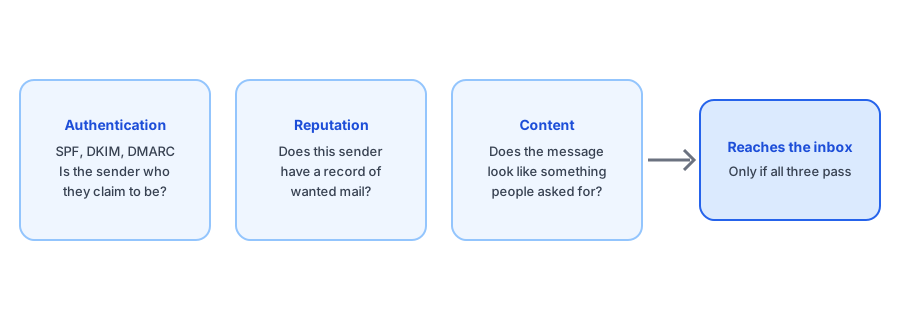
When a message arrives, the receiving provider asks three questions. Is this sender who it claims to be? Does this sender have a track record of mail people want? Does the message itself look like something people want? The first is authentication, the second is reputation, and the third is content. Restock emails have a natural advantage on the third, because the recipient asked for the message, but they can still fail on the first two.
SPF, DKIM and DMARC in Plain Terms
These three acronyms do most of the authentication work.
- SPF is a DNS record that lists the servers allowed to send mail for a domain. If a message comes from a server that is not on the list, providers get suspicious.
- DKIM attaches a cryptographic signature to each message. The receiving server checks it against a public key in DNS to confirm the message came from an authorized sender and was not altered in transit.
- DMARC ties the two together. It tells providers what to do when SPF or DKIM fail for the domain shown in the From address, and it asks for reports so the domain owner can see what is happening.
What matters most for a store owner is alignment. The domain that passes these checks should match the domain in the From address. A message that authenticates for one domain while claiming another looks like exactly what spammers do.
Why Bulk Sender Rules Matter Even for Small Stores
In 2024, Gmail and Yahoo began requiring stronger authentication from bulk senders, along with easy unsubscribing and low spam-complaint rates. You may think of yourself as a small sender, but your restock emails are often sent through a shared app infrastructure, so the reputation of that infrastructure is part of what decides whether yours reach the inbox. This is a reason to ask your app how it handles authentication, not a reason to panic.
Griffin sends restock alerts with your store name as the sender name and your store email as the reply address.
Install Griffin on ShopifyShared Sender or Your Own Domain?
Most restock apps send from their own authenticated domain, putting your store name in the sender name and routing replies to you. That setup works well for most stores because the app has done the DNS work and carries a shared reputation across many merchants. The trade-off is that you share that reputation with everyone else on the platform. Some tools offer sending from your own domain, which gives you control and a branded address, but it needs correct DNS records and ongoing monitoring. Neither option is universally better. The question to ask any app is which it uses, whether the domain is authenticated, and what options exist if you need your own.
What You Can Check Yourself
- Send a test restock email to Gmail, Outlook, Yahoo and iCloud addresses and note where each lands.
- In Gmail, open the message, choose Show original, and look for pass results for SPF, DKIM and DMARC.
- Check that the sender name is recognizable, ideally your store name, and that replies go to a real address.
- Make sure the email includes a working unsubscribe link and a clear reason the person is receiving it.
- Keep subject lines and copy specific to the product the shopper asked about, not promotional. Our back-in-stock email guide covers what works.
Confirmation emails matter too. A double opt-in message that lands in spam can quietly lose you a subscriber before they have even joined the list, which we cover in our post on double opt-in and deliverability basics. Many app help pages also suggest telling shoppers on the signup confirmation to check spam and add the sender to their contacts.
If the emails never arrive at all, spam placement may not be the cause; see our troubleshooting guide for the other usual suspects.
FAQ
Why do my back-in-stock emails go to spam?
The usual reasons are weak sender authentication, a sender address that does not match the sending domain, a shared sender with a poor reputation, or content that reads like a promotion. Start by checking authentication and by testing with several inbox providers.
What are SPF and DKIM in plain terms?
SPF is a DNS record listing which servers may send mail for a domain. DKIM adds a cryptographic signature proving the message was not altered and came from an authorized sender. Together with DMARC, they let inbox providers verify who is really sending.
Do I need my own sending domain for restock emails?
Not necessarily. Many apps send from their own authenticated domain, which works for most stores. Sending from your own domain gives you control over reputation and branding, but it needs DNS setup and ongoing care. Ask your app what it supports.
What can a shopper do if the email lands in spam?
Marking it as not spam and adding the sender to contacts helps, and many app help pages suggest telling subscribers this on the signup confirmation. It is a stopgap, not a fix.
The Bottom Line
Restock emails go to spam when authentication, reputation or content falls short. You cannot control everything, but you can test where mail lands, read the authentication results, and ask your app plain questions about how it sends. Griffin is a Shopify back-in-stock app you can install from the Shopify App Store, free to start, and the same checks apply to it as to any other.