Stock that does not sell is money sitting on a shelf. Every month it stays, it costs you space and cash, and it gets harder to sell. The way out is rarely one dramatic move. It is a plan: pick the right option for each product, set a price floor so you do not clear stock at a loss and keep an eye on what the discount actually earns. This guide covers five ways to move dead stock on Shopify and a markdown calculator that shows your margin after a discount, your price floor and how many extra sales a discount needs. The prices and quantities shown are examples.
The Markdown Calculator
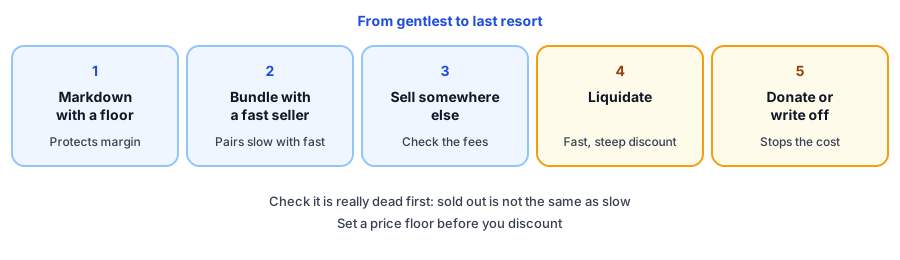
Five Ways to Move Slow Inventory
1. Markdown with a floor
The simplest option is a discount, but set the floor first. In the example, a 30 percent discount takes a 50 price to 35, which earns 15 on a unit that costs 20. That is a 42.9 percent margin, but each sale earns half of what a full-price sale would, so you need two sales to make the same profit. Step the discount down in stages, and stop at your floor.
2. Bundle with a fast seller
Pair a slow product with a product that sells well, so the popular item carries the slow one. A bundle works best when the two genuinely go together; forcing a bad pairing annoys customers. Use the ABC analysis tool to find your fast sellers, and your slowest class C products, to pair.
3. Sell it somewhere else
A product that is stale in your store may still appeal to another audience or channel, such as a marketplace or an in-person event. Check the fees and the effort before you commit, because a channel with high fees can turn a clearance into a loss.
4. Liquidate
Selling a whole lot to a buyer is the fastest way to free space and cash, at a steep discount. Sources suggest recovery varies widely by buyer and product, so get an actual quote before you rely on a number.
5. Donate or write off
If nothing else works, donating or disposing of stock stops it costing you more. Keep records of what you gave away, and check with an accountant about the treatment where you live.
Before You Clear Anything
- Check that it is dead. A product that is sold out is not dead stock, and a slow product in one season can be a fast one in another. The sell-through rate calculator and the inventory turnover ratio calculator show how slowly it moves. Shopify's dead stock entry and the ABC analysis report are useful references; confirm the current wording in your admin.
- Check variants. A size or color can be dead while the rest of the product sells.
- Check the waiting list. If shoppers are waiting for a variant, it is not dead; see below.
- Stop the inflow. Cancel or reduce reorders, and use the seasonal inventory planner so the next peak does not repeat the mistake.
Where Griffin Fits
Griffin does not move slow inventory; it works on the opposite problem, products that sell out. Griffin, a Shopify back-in-stock app, adds a Notify Me popup or inline form to sold-out products, and shoppers sign up for the variant they want. Signups are recorded per product and variant, so a waiting list can warn you against clearing or dropping something that is merely out of stock; our guide to tracking demand on out-of-stock products shows how to read it. The free plan includes 100 notifications a month. Add a dead stock check to your weekly inventory check.
Clear what is slow, protect what is in demand. Griffin shows who is waiting on sold-out variants before you stop reordering them.
Install Griffin on ShopifyFAQ
What is dead stock?
Dead stock is inventory that has not sold for a long time and is unlikely to sell at its current price. It ties up cash and shelf space, and the longer it sits the harder it tends to be to move.
How deep a discount can I afford?
Work backwards from a minimum margin you will accept. The price floor is your unit cost divided by one minus that margin, and the maximum discount is how far that floor sits below your current price. The calculator above does this for you.
Is a deeper discount always better at clearing stock?
No. A deeper discount sells more units but earns less on each, and below your cost every sale is a loss. Compare the profit from a smaller markdown with the units you would need at a deeper one.
Does Griffin help clear dead stock?
No. Griffin captures restock signups on sold-out products and variants and emails those shoppers when the item is back. It does not discount or move slow inventory, but a waiting list is a useful check that a sold-out item is not actually in demand before you stop reordering it.
The Bottom Line
Clear dead stock with a plan: check it is really dead, choose the gentlest option that works and never go below your price floor. Then fix the buying that created it. Griffin is a Shopify back-in-stock app you can install from the Shopify App Store, free to start.