Inventory turnover answers a question that stock levels cannot: how quickly does the money you put into inventory come back as sales? If you have wondered about your inventory turnover ratio on Shopify, you need only three numbers: the cost of the goods you sold, your inventory value at the start of the period and your inventory value at the end. The calculator below returns your turns, your days of inventory and a plain-English reading. The numbers shown are examples.
The Calculator
The Formula, Step by Step
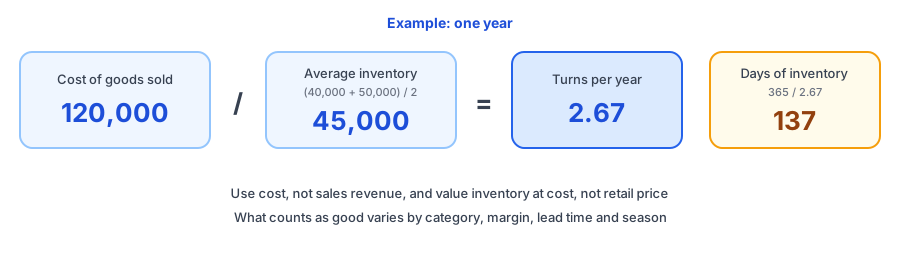
Shopify's retail guides give the inventory turnover ratio as cost of goods sold divided by average inventory, with average inventory taken as beginning inventory plus ending inventory, divided by two. Sources suggest some published worked examples drop the brackets in that average, so check any example you find against (beginning + ending) / 2. In the example, 40,000 at the start and 50,000 at the end average 45,000. Cost of goods sold of 120,000 divided by 45,000 is about 2.67 turns. See Shopify's inventory turnover ratio guide for its own explanation.
Days of inventory, sometimes called days sales of inventory, is the number of days in the period divided by turns. Here 365 divided by 2.67 is about 137 days: on average, a unit sits for about that long before it sells. If your period is shorter than a year, the calculator also shows turns per year, scaled up so you can compare periods.
Turnover Versus Days Left
These two get mixed up. Turnover looks backwards across the whole store or a category and tells you how efficiently your money moves. The days of inventory left calculator looks forward, product by product, and tells you when stock will run out. Use turnover to judge your buying overall, and days left to decide what to order this week.
What a Good Number Looks Like
There is no universal good number. It varies by category, by margin, by how long your supplier takes and by how seasonal your sales are. A store selling fast-moving consumables will usually turn stock more often than one selling furniture, and neither should copy the other. The useful comparisons are your own past periods and similar products inside your own catalogue.
Read the direction, not the label. A falling turnover can mean you are overbuying or that demand has slowed, and your cash is sitting on shelves. A very high turnover can mean efficient buying, or that you keep running out. Check which with the sell-through rate calculator and with the lost-sales calculator, because a store can post a great turnover while turning away sales.
Common Mistakes
- Using revenue instead of cost of goods sold. Turnover compares cost with cost, so sales revenue overstates it.
- Valuing inventory at retail price. Use what you paid, including costs you normally count.
- Mixing periods, such as a year of cost of goods sold with a single month's inventory.
- Using only two points when stock swings. If you build up before the holidays, add values in between with the optional box above.
- Averaging everything together. Fast and slow products behave differently, so calculate by category, or by class with the ABC analysis tool.
Improving It Without Running Out
Turning stock faster is only good if you keep your best sellers available. Set reorder points with the reorder point and safety stock calculator so buying follows demand. Look for slow movers, which often sit in class C, and decide on purpose whether to clear them. Order smaller batches more often only if your supplier's terms allow it. Include turnover in your weekly inventory check so you see the trend before the quarter ends.
Where Griffin Fits
Fast-turning products are the ones most likely to sell out. Griffin, a Shopify back-in-stock app, adds a Notify Me popup or inline form to sold-out products. Shoppers sign up for the variant they want, and Griffin emails them when it is back. Signups are stored in Griffin's own records, and the free plan includes 100 notifications a month. Griffin does not calculate turnover or advise on how much to order; it helps you keep the demand from a stockout, which our guide to tracking demand on out-of-stock products explains.
A high turnover can hide missed sales. Griffin captures restock signups on sold-out variants so the demand is not lost.
Install Griffin on ShopifyFAQ
What is inventory turnover?
It measures how many times you sell through your average stock in a period. It is cost of goods sold divided by average inventory, so a higher number means stock converts to sales faster.
How do I calculate inventory turnover?
Divide your cost of goods sold for the period by your average inventory at cost. Average inventory is your beginning inventory plus your ending inventory, divided by two. Use the same period for both numbers.
What is a good inventory turnover ratio?
There is no universal number. It varies by category, margin, supplier lead time and seasonality, so compare yourself with your own past results and with similar products, not with a headline figure.
What is the difference between inventory turnover and sell-through rate?
Sell-through compares units sold with units available and is usually measured per product over a short period. Turnover compares the cost of what you sold with the value of your average inventory and is usually measured for the whole store or a category over a year.
Does Griffin calculate inventory turnover?
No. Griffin captures restock signups on sold-out products and variants and emails those shoppers when the item is back. It does not calculate turnover, but it can show demand you could not serve while a fast-turning product was out of stock.
The Bottom Line
Inventory turnover turns two accounting numbers into a decision: is your money moving or sitting? Calculate it on cost, keep the period consistent, compare yourself with yourself and read it alongside stockouts. Griffin is a Shopify back-in-stock app you can install from the Shopify App Store, free to start.