A Notify Me form is a tiny commitment. The shopper is already disappointed that the product is sold out, and they are deciding in a few seconds whether to give you anything at all. That is why the choice of Notify Me form fields matters more than it looks. Every extra field is a reason to close the form. We have no reliable published figures on how much each field costs, so we will not quote a percentage, but the direction is well understood: fewer fields means more signups, and you should only add one if you can say exactly what you will do with it.
Start With What the Alert Needs
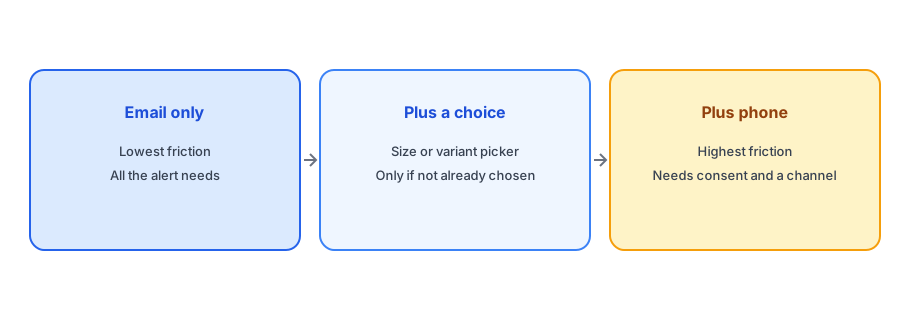
To send a back-in-stock email you need two things: an email address, and knowledge of which product and variant the shopper wants. The email is the only field you have to ask for. The variant is usually known from the page: the shopper selected a size and color before seeing it was sold out, so the form can attach that choice automatically. Griffin sends alerts by email, so an email address is the one thing it needs from the shopper, and it ties each signup to the variant the shopper chose. Anything beyond that is optional and should earn its place.
When a Size or Variant Picker Is Worth It
A picker makes sense when the shopper has not already chosen. If a product has several sizes and all are sold out, someone landing on the page may not have picked one, and the form needs to know. If the shopper has chosen, do not ask again, since repeating the question is pure friction. Check how your form behaves when the shopper switches variants; our post on why the button can disappear on a variant switch covers a related failure. For apparel specifically, see our guide to size-specific restocks and broken size runs.
Quantity: Tempting, Rarely Needed
Some merchants want to know how many units a shopper would buy, to forecast demand. It is a reasonable question for a wholesale buyer and an odd one for a consumer. Most shoppers do not know yet, and asking may make them hesitate. You can learn demand from the number of signups per variant without asking anyone to commit to a quantity; our guide to tracking customer demand for out-of-stock products shows how.
Keep the form to one field. Griffin adds a simple email-based Notify Me to every sold-out variant.
Install Griffin on ShopifyPhone Numbers: A Trade-Off, Not a Feature
Asking for a phone number is the most common extra field, usually because a merchant wants to send a text. It carries a real cost: shoppers are more reluctant to share a number, and texting requires explicit consent and compliance with rules that vary by region. If your alerts go out by email, collecting a phone number you will not use only adds friction and a data-handling responsibility. If you do plan to text, ask for it as a clearly labeled option rather than a requirement. Our comparison of email versus SMS back-in-stock alerts goes into the trade-offs, and our post on double opt-in and GDPR basics covers consent.
Labels, Consent and the Moment of Asking
Small details matter as much as the number of fields. Label the button with what happens next, such as "Email me when it is back", so the shopper knows what they are agreeing to. Say plainly that you will use the address only for this alert, if that is true. Place the form where it is seen without dominating the page; our post on popup versus inline Notify Me placement explains how to test that on mobile, where a long form is most painful.
Testing Changes Without Guessing
If you want to know what a field costs on your store, test it rather than assume. Change one thing at a time, such as removing a field or relabeling the button, and compare the signup rate for sold-out pages over a similar period. Your signup rate is simple to calculate: signups divided by views of sold-out product pages. Avoid changing several things at once, and give each version enough traffic before you judge it, since small stores will see noisy results.
A Practical Checklist
- Ask for an email address and nothing more unless you can name the use.
- Reuse the variant the shopper already chose instead of asking again.
- Add a picker only when no variant has been selected.
- Skip quantity for consumers, and read demand from signup counts.
- Do not collect a phone number you will not use; if you do, make it optional with clear consent.
- Test the form on a phone before you publish it.
FAQ
What fields does a Notify Me form need?
An email address, plus knowledge of which product and variant the shopper wants. The variant can usually be taken from the page.
Does adding more fields reduce signups?
It generally does, because each field is another reason to leave. Add one only if you have a clear use for it.
Should I ask for a phone number?
Only if you will use it and have consent. For email alerts it adds friction and data responsibility without any benefit.
Should I ask how many units a shopper wants?
Rarely for consumers. Signup counts per variant tell you most of what you need about demand.
The Bottom Line
Treat every field as a cost and keep the form to what the alert needs. For most stores that is a single email address and a variant you already know. Griffin is a Shopify back-in-stock app you can install from the Shopify App Store, free to start.