A restock is one of the few moments when you have good news and a ready audience. The people who asked "when is it back?" are still out there, and a well-timed post can reach them. The hard part is the wording: you want to announce a restock without sounding desperate, and without inventing urgency you cannot back up. The restock announcement caption generator below fills in your product, day and time and produces 20 original captions across three stages: teaser, reveal and last call. Edit anything before you post. The values shown are examples.
The Caption Generator
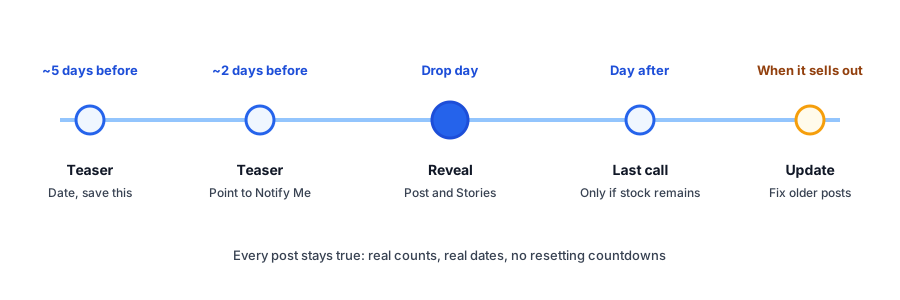
A Simple Posting Schedule
- About five days before: a teaser with the date, written so people save it.
- About two days before: a teaser that points to Notify Me on the product page.
- Drop day, at the stated time: the reveal, repeated in Stories.
- The day after, if stock remains: a last-call post that says to check the product page for what is left.
- When the batch is gone: a short sold-out update, then remove or edit earlier posts that now mislead.
This is a starting pattern, not a tested formula. If your audience is small, two posts may be enough.
Keep the Scarcity Honest
Real scarcity can be a legitimate reason to act now. Invented scarcity is a risk. Sources suggest that consumer protection regulators in some markets treat baseless countdown timers and false low-stock claims as misleading, so check the rules where you sell, and treat this as general guidance and not legal advice. A few habits keep you safe and keep trust high:
- Mention a quantity only if it is a real count of units that exist and are unsold, and delete or update the post when it changes.
- Do not run a countdown that resets, and do not announce a deadline you will move.
- Say a batch is limited only if it is. If you can reorder tomorrow, do not imply otherwise.
- Do not claim "selling fast" unless it is selling fast.
Our guide to honest low-stock messages covers the same principle on the product page, and the limited restock waitlist guide covers what to do when demand is bigger than the batch.
Why Every Post Points to Notify Me
A caption reaches people on the day they happen to scroll past it. Many who want the product will miss it. Pointing to the Notify Me button gives them a way to be told without watching your feed. Griffin, a Shopify back-in-stock app, shows a Notify Me popup or inline form on sold-out products. Shoppers sign up for the variant they want, and the restock email links to it. Signups are stored in Griffin's own records, and the free plan includes 100 notifications a month. Griffin does not write captions, schedule posts or publish to Instagram or TikTok; it handles the email side of the restock.
Social posts reach people once. Notify Me emails them when the item is actually back. Griffin adds it to your sold-out products.
Install Griffin on ShopifyAfter the Post: The Email
The caption announces. The email delivers the link at the right moment. Write that message with our back-in-stock email templates and test a few lines from the subject line guide. For comments and DMs that ask when it returns, the eight reply templates save time. Brands that run drops from social often will also like the streetwear guide.
FAQ
How often should I post about a restock?
A common pattern is one or two teaser posts before the drop, a reveal on the day, a last-call post if stock remains and a short update when it sells out. Post more only if you have something new to say.
Can I say there are only a few left?
Only if it is true when you post it. Use a real count, update or delete the post when the number changes, and avoid wording that implies pressure you cannot back up with stock.
Should the same caption work on Instagram and TikTok?
The wording can, but trim it for TikTok, where a shorter line over the video usually reads better. Keep the link instruction accurate for each platform, since links work differently.
Does Griffin post to Instagram or TikTok?
No. Griffin captures signups on sold-out product pages and emails those shoppers when the item is back. It does not write captions, schedule posts or publish to social platforms.
The Bottom Line
The best restock caption is specific, truthful and points somewhere useful: a date, a real count and a way to be told. Use the generator, edit the voice to match your brand and update the posts when stock changes. Griffin is a Shopify back-in-stock app you can install from the Shopify App Store, free to start.