A return should put a sellable unit back on the shelf. Too often it does the opposite: the refund adds a unit to your count before the box has arrived, or a damaged item goes back into stock, and your admin now shows stock you do not have. The next customer orders it, you cannot ship it and, if the variant was sold out, waiting shoppers may even be told it is back. The shopify returns restock inventory routine below is short: triage each returned item, apply the right rule and tick off the checklist. The examples shown are samples.
Triage a Returned Item
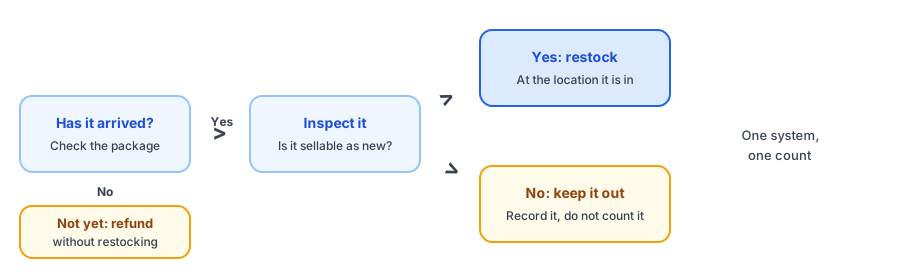
Where Phantom Stock Comes From
Three habits cause most of it. The first is refunding before the item arrives with restock switched on, so the count rises on the day of the refund and not the day of the box. The second is restocking without looking, which puts used or damaged items into sellable stock. The third is handling the same return in two places, such as your warehouse software and your store, so one unit is counted twice. Shopify's developer documentation describes each refunded line as carrying an instruction to restock to a chosen location or not to restock, and sources suggest the admin flow offers the same choice; confirm the current wording and steps in your own admin before you rely on them.
The Returns Checklist
Write Down Your Standard
The hardest category is opened or tried-on items. Write a short standard for what counts as sellable as new: sealed, tags attached, all parts present, no marks. Share it with whoever processes returns, so two people make the same decision about the same item. Without a written standard, your count slowly fills with items that nobody would sell as new, and the gap between the admin and the shelf grows.
Why It Matters for Restock Alerts
A returned unit that lifts a sold-out variant above zero can look like a restock. Apps that react to inventory changes reported by Shopify cannot tell a return from a delivery, which is the cause behind most false back in stock alerts. Griffin, a Shopify back-in-stock app, queues emails when a variant's stock rises above its notification threshold, so one returned unit on a popular sold-out item can reach every shopper waiting for it. If you have one unit and many people waiting, read our fair waitlist guide first. Griffin does not process returns or decide what to restock. Signups are stored in Griffin's own records, and the free plan includes 100 notifications a month.
Honest counts make restock emails trustworthy. Griffin emails shoppers who signed up for a sold-out variant when it is back.
Install Griffin on ShopifyTell Customers What Is Happening
If a returned item will not be restocked, or a sold-out product is not coming back, say so. The out-of-stock customer email templates cover that wording, and the guide to inventory counts and alerts that disagree explains what to check if counts and shelves drift apart. Add a returns spot check to your cycle count, so any phantom units are found before a customer orders them.
FAQ
Should I restock every returned item?
No. Restock only items you would sell as new and only once they are physically back and inspected. Damaged, used or incomplete items should be kept out of sellable stock and recorded separately.
What is phantom stock from returns?
It is inventory your admin counts but you do not physically have. It often happens when a refund adds a unit back to stock before the item arrives, or when a damaged item is restocked by mistake.
Can a return trigger a back-in-stock email?
It can, because a returned unit can lift a sold-out variant above zero, and apps that react to inventory changes reported by Shopify cannot tell a return from a delivery. Decide before you restock whether waiting shoppers should be told, especially for a single unit.
Does Griffin handle returns or restocking?
No. Griffin captures restock signups on sold-out products and variants and emails those shoppers when the item is back. It does not process returns or decide what to restock.
The Bottom Line
Restock only what is back, inspected and sellable as new, and record the rest. Process each return in one place, and think about waiting shoppers before a single unit goes live. Griffin is a Shopify back-in-stock app you can install from the Shopify App Store, free to start.