Selling in a physical shop and online from the same Shopify account is convenient because there is one catalog and one set of stock counts. It is also where restock alerts get confusing. The register sells a unit while a customer is reading the alert email. A return lands on the shelf and nobody tells the website. A product shows as sold out online while the shop has three on display. A shopify pos back in stock inventory mismatch is rarely a bug. It is two sales channels working from numbers that move at different speeds and mean slightly different things.
The Register Changes the Same Number Your Alerts Watch
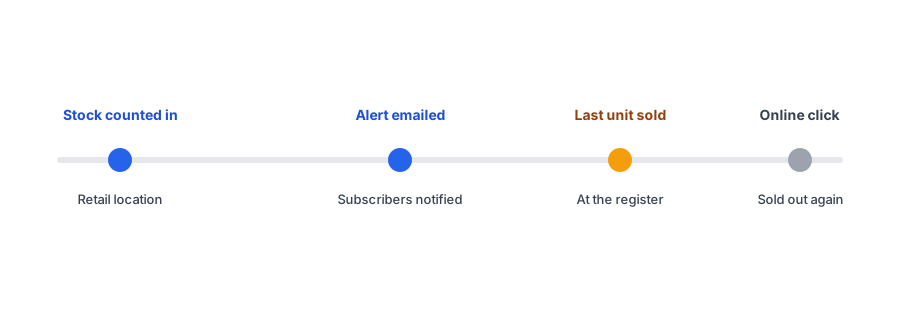
Every sale at the point of sale reduces the stock at that retail location, and a restock alert is triggered by stock going up. The two interact in ways that are easy to overlook. When a shipment is received into the shop and counted, the number rises and subscribers can be notified, but the first buyers may be walking in the door, not clicking the email. The last unit can vanish in store minutes after the alert goes out, leaving an online subscriber with a sold-out page and a reason to doubt the next alert.
This is a timing problem, not a counting problem, and it gets worse the smaller the restock is. If you receive five units and have forty subscribers, the shop floor competes with the email list for them.
Why the Website Can Disagree With the Shop
Shopify tracks inventory per location, and merchant forum threads describe real mismatches between in-store POS inventory and what the storefront shows. Three settings usually explain them:
- Whether a location is set up to fulfill online orders. Stock at a location that does not fulfill online orders will not make the product available online, even though it is physically in the shop.
- Fulfillment routing priority. When several locations can ship an order, the order in which they are used affects which stock is drawn down first.
- Whether the product page shows the total across locations or a single location. A theme or app that shows one can look wrong next to the other.
We cover the broader version of this problem, where alerts fire based on a total that includes locations that never ship online orders, in our post on restock alerts across multiple locations. This post is about the day-to-day mismatches that come specifically from selling at a register.
Receiving, Returns and Transfers in Store
Staff actions in store are a common source of surprise. Receiving a delivery at the shop and counting it raises the count at that location. A return or exchange processed at the register can put an item back into stock there. Moving stock between the shop and a warehouse changes both counts. Each of these is a legitimate inventory change that an app watching quantities may treat as a restock, which is part of why our post on false back-in-stock alerts is worth reading alongside this one. A returned item that is damaged or sitting in a back room should not raise the count that triggers alerts.
Selling in store and online? Test your restock alerts against your real inventory setup. Griffin adds Notify Me to sold-out products.
Install Griffin on ShopifyHow to Check Your Own Setup
- List your locations and note which ones fulfill online orders. Be sure the store you expect to power the website actually does.
- Decide whether the product page should show total stock or the stock at one location, and make sure your theme and apps agree.
- Run a test: with a test subscriber on a sold-out product, adjust stock at the retail location only, then at the online location only. Note which one triggers the alert and whether the storefront shows it as available.
- Agree a staff routine for receiving and returns so damaged or unsellable items are not counted into sellable stock.
- For small restocks, hold a few units back from the shop floor, or accept that the register and the email list are in competition.
We have not verified how every app handles location-level quantity changes, including ours on every store configuration, so the test above is the reliable answer for your setup.
FAQ
Can an in-store sale cause a back-in-stock alert mismatch?
Yes. A sale at the register lowers the same location inventory your online store draws from, so an alert can go out and the last unit can be sold in store before an online shopper reaches checkout.
Why does my website show a product as sold out when the shop has it?
Usually because the location holding the stock is not set to fulfill online orders, or the product page shows availability for a single location instead of the total. Check your location and availability settings.
Do POS returns and exchanges affect restock alerts?
They can. A return processed at the register may put an item back into stock at that location. Whether that counts as a restock for your alerts depends on the quantity change and your app, so test it.
How do I test whether my alerts match my POS inventory?
Pick a sold-out product with a test subscriber, then adjust stock at your retail location and at your online-fulfilling location separately. Note which adjustment triggers the alert and whether the storefront agrees.
The Bottom Line
A store that sells at a register and online gets simplicity from one inventory, and some friction from it too. Know which locations feed the website, decide how stock is shown, train staff on receiving and returns, and test your alerts with a real adjustment. Griffin is a Shopify back-in-stock app you can install from the Shopify App Store, free to start.