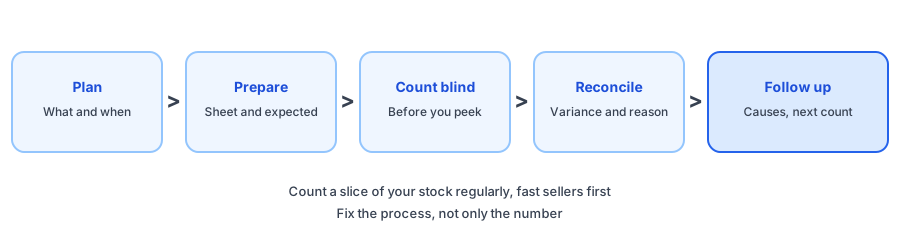
Stock numbers drift. A return is restocked that never came back, a delivery is put away twice, a unit is damaged and never written off. Each small error adds up, until your admin says in stock and the shelf says otherwise. A cycle count fixes that a little at a time. This inventory audit checklist for Shopify stores walks through plan, prepare, count, reconcile and follow-up, and the count sheet generator below turns a pasted list into a CSV file with expected, counted, variance and notes columns. Everything runs in your browser. The products and numbers shown are examples.
The Cycle Count Checklist
The Count Sheet Generator
What to Count First
Counting everything is slow, so rank by risk. Start with products that sell fastest, because errors there cost the most, and with products that have mismatched before. The ABC analysis tool gives you the ranking: count class A more often, B on a slower rotation and C rarely. Shopify's cycle count guide describes this kind of prioritization too. Sources suggest closing out transactions before you start and recording the reason for each adjustment; confirm the steps and where adjustments live in your own admin.
Count Blind, Then Compare
If counters see the expected number first, they tend to agree with it. Count what is on the shelf, write it down, then compare. Keep returns, damaged goods and display units in separate groups so they do not blur into sellable stock. Recount any line that is off by more than you can explain, and note the likely cause in the Notes column while it is fresh.
Fixing Counts Can Trigger Alerts
Corrections matter beyond accuracy. A back-in-stock app reacts to inventory changes reported by Shopify, and it cannot tell a real delivery from a correction. Griffin, a Shopify back-in-stock app, queues emails when a variant's stock rises above its notification threshold, so lifting a count from zero can look like a restock. Our guides on false back in stock alerts and on inventory counts and alerts that disagree explain how to avoid sending one by mistake. Griffin does not count stock or reconcile inventory; it emails shoppers who signed up on a sold-out variant when stock returns. Signups are stored in Griffin's own records, and the free plan includes 100 notifications a month.
Accurate counts make restock alerts trustworthy. Griffin emails shoppers who signed up for a sold-out variant when it is back.
Install Griffin on ShopifyMake It a Routine
One afternoon fixes this year's numbers, and a routine keeps them right. Add a short phantom stock check to your weekly inventory check, use the days of inventory left calculator to spot products whose numbers look odd, and write up any large surprise with the stockout postmortem template.
FAQ
What is a cycle count?
A cycle count is a partial physical count of your stock, done regularly on a rotating set of products instead of counting everything at once. It lets you keep counts accurate without closing down for a full stocktake.
How often should I count inventory?
It depends on your catalogue and how fast it moves. Shopify's guidance suggests many small retailers do a full count once or twice a year and use cycle counts in between, counting fast sellers and high-value items more often.
What should I do if the count does not match my admin?
Investigate the largest differences first, looking for late sales, returns, receiving errors and mis-picks. Then adjust the count in your admin and record why, so you can see patterns over time.
Can wrong counts cause false restock alerts?
Yes. A correction that lifts a variant from zero to a positive number can look like a restock to any app that reacts to inventory changes reported by Shopify, Griffin included. Count first, and think about timing when you correct upward.
The Bottom Line
A cycle count is small, regular and boring, which is why it works. Pick the products that matter, count blind, reconcile with reasons and follow up on causes. Griffin is a Shopify back-in-stock app you can install from the Shopify App Store, free to start.