Every sold-out page loses some shoppers for good. They came looking for a product, found a dead end and went to buy it somewhere else. That is expected. What is not inevitable is how many you lose. A little structure turns many of those dead ends into signups, alerts and sales. This guide gives you a five-step plan to win back customers that out-of-stock pages would otherwise lose, four email scripts for the awkward moments, and an honest map of which step needs which tool, because Griffin covers part of this plan, not all of it.
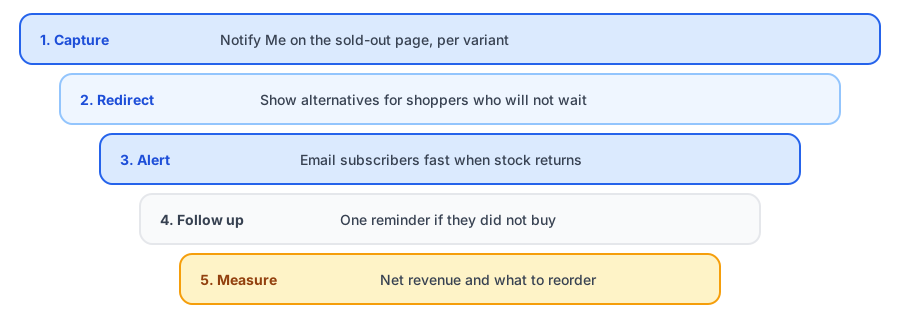
Step 1: Catch Them on the Sold-Out Page
The cheapest win-back is the one that happens before the shopper leaves. Make sure the page says it is sold out clearly and offers a way to be told when it returns. Griffin adds that Notify Me option, tied to the variant the shopper picked. Our sold-out page checklist shows what else the page needs.
Step 2: Give Them Somewhere Else to Go
Some visitors will not wait. Show similar in-stock products on the page so they have an alternative, and keep the Notify Me option beside it. Shopify's recommendations, your theme or an app can do this; Griffin does not provide product recommendations. For the full set of options, see nine things to do when a product is out of stock.
Step 3: Send the Restock Alert Fast
This is the highest-value step and it is the one Griffin handles: when stock returns, subscribers get an email linking to the exact variant. Speed matters because interest fades; see our restock email templates and subject line ideas.
Steps one and three are the foundation. Griffin captures the signup and sends the alert.
Install Griffin on ShopifyStep 4: Follow Up Once
Some people open the alert and still do not buy. A single, friendly follow-up a few days later can catch those who got distracted. Check whether your tools can send it automatically; if not, you can send it manually for your most important products. Do not turn it into a drip of pressure. For shoppers who viewed a sold-out product but never signed up, an email platform that can trigger on product views can send a gentle nudge, but only to people who have already agreed to hear from you. Our post on collecting emails from sold-out pages explains why a restock request is not marketing consent.
Step 5: Measure What Came Back
Track how many signups became orders and how much revenue they brought, net of refunds, as described in measuring restock revenue. Compare it with what the stockout cost using the lost-sales calculator. Use the result to decide what to reorder, with help from the reorder point calculator.
Four Email Scripts
These are original starting points. Replace the placeholders and adjust the voice. Use scripts A and B only with people who have agreed to receive them.
Script A: The sold-out follow-up
Use when: a known subscriber viewed a sold-out product and did not sign up.
Subject: Still thinking about [Product]?
Hi [Name],
We noticed you were looking at [Product], which is sold out right now. If you would like to know when it returns, you can ask us to tell you with one click.
In the meantime, these are close and in stock: [Alternative 1], [Alternative 2].
Script B: The restock reminder
Use when: someone was notified about a restock and has not bought.
Subject: [Product] is still available, for now
Hi [Name],
A few days ago we told you [Product] was back. It is still available, but we expect it to sell through soon.
If something put you off, reply and tell us. We would genuinely like to know.
Script C: The close alternative
Use when: the product will be out for a long time.
Subject: A good alternative to [Product]
Hi [Name],
[Product] will be out of stock for a while. If you cannot wait, [Alternative] is the closest thing we have and customers who wanted the original often choose it.
Of course, you can stay on the list for the original too.
Script D: The honest goodbye
Use when: the product is gone for good.
Subject: Update on [Product]
Hi [Name],
You asked us to tell you when [Product] was back, and we owe you a straight answer: it is not returning.
We would not want to leave you waiting. [Alternative] is the nearest match, and we have put a short guide on the page to help you compare.
Which Step Needs Which Tool
- Steps one, three and the signup data for five: a back-in-stock app such as Griffin.
- Step two: your theme, Shopify recommendations or a recommendations app.
- Step four and scripts A and B: an email platform with the right triggers, or a manual send.
If you are still deciding how to cover the email side, our post on Klaviyo versus a dedicated app compares the options. If the product is not coming back, read what to do with subscribers when it is discontinued.
FAQ
What share of sold-out shoppers can I win back?
There is no reliable benchmark. It depends on the product, how long the wait is and how many shoppers you can identify. Treat any promised percentage with caution and measure your own results over several restocks.
Do I need an email platform to run this plan?
Steps one and two need only a restock-alert app. Steps for visitors who did not sign up, such as browse follow-ups, usually need an email platform that can trigger on viewing a product. Check which triggers yours supports.
Should I email people who viewed a sold-out product but did not sign up?
Only if you already have their consent to email them, for example as existing subscribers or customers. Do not collect addresses from a restock form and use them for promotions.
What if the product is never coming back?
Say so. Tell the people waiting, offer something close, and stop the cycle of hope. Our guide to discontinued products covers what to send.
The Bottom Line
You will not win back everyone, but you can win back far more than a blank sold-out page does. Capture the request, offer an alternative, alert fast, follow up once, and measure. Griffin is a Shopify back-in-stock app you can install from the Shopify App Store, free to start.