A shopper opens your email, taps the hero product and lands on a page that says sold out. It is a small thing, but it happens constantly: abandoned cart emails remind people about items that are gone, recommendation blocks show bestsellers that sold out yesterday, and a campaign scheduled last week features a product that sold out this morning. This guide explains how to keep out-of-stock products out of your email campaigns, using Klaviyo as the main example because it is the most common email platform on Shopify, and how a restock alert catches the clicks that still land on sold-out pages.
Where Sold-Out Products Sneak Into Email
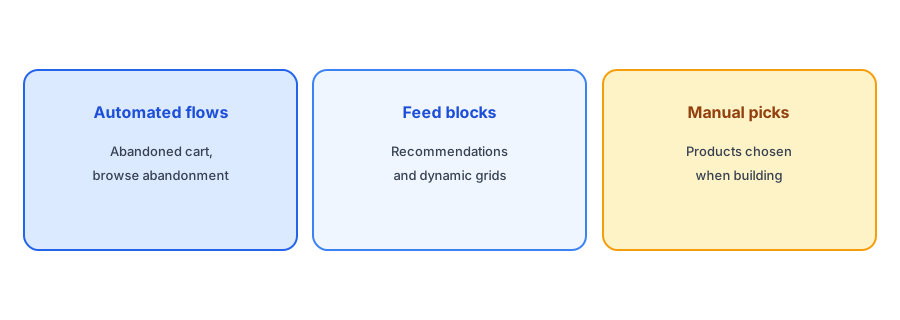
There are three different mechanisms, and each needs its own fix:
- Automated flows such as abandoned cart and browse abandonment, which include the products a shopper looked at.
- Feed-driven blocks, such as recommendations or "new arrivals" grids, which pull products from a catalog feed when the email is sent.
- Manually picked products in campaigns, which are fixed when you build the email.
Abandoned Cart and Browse Flows
An abandoned cart email sold out item problem is the most common one. Klaviyo's help center describes a way to handle it for Shopify: wrap the product in the email template with a catalog lookup that cancels the email if the item is unpublished in Klaviyo's catalog. For Shopify, Klaviyo marks a product as unpublished for low inventory only when customers cannot buy it while it is out of stock, and only when all of its variants are unavailable. Klaviyo also notes that this cancels the whole email rather than removing one item from it, and skipped sends appear in recipient activity with a reason you can check.
Two consequences are worth knowing. First, if you allow overselling on a product, Klaviyo will not treat it as unavailable, because shoppers can still buy it. Our post on continue selling when out of stock explains that setting. Second, if only the size the shopper wanted is gone but other sizes remain, the product still counts as available, so the email still sends. That is a good reason to include a link to the product page, where a variant-level Notify Me button can catch the shopper who wanted the missing size.
Settings and template tags change over time, so check Klaviyo's current documentation before you edit a live flow. If your flows stop sending after a change, our guide to Klaviyo flows that are not sending covers the usual causes.
Feed-Driven Product Blocks
Recommendation and dynamic product blocks are filled from a feed when the email sends, so this is where an email flow inventory filter helps most. Klaviyo's product feeds can include or exclude products by criteria including stock level, which means a "bestsellers" block can leave out items with no inventory. If you build custom catalog feeds, check whether they are set to allow out-of-stock items. A dynamic product block out of stock problem is usually a feed that was never told to exclude them.
When a promoted product sells out, Griffin turns the dead end into a Notify Me signup, so the click is not wasted. Free to start.
Install Griffin on ShopifyManually Picked Products in Campaigns
When you choose specific products for a campaign, nothing checks their stock later. The fix is a process, not a setting:
- Check stock on send day, not build day, for every featured product, and for each variant if the email shows a specific color or size.
- Avoid scheduling far ahead for products with thin stock.
- Have a fallback, such as a similar product or a "notify me" angle, ready to swap in.
- Pause, do not delete, a campaign whose hero product sold out, so you can reuse it after the restock.
The same discipline applies to paid ads. Our guide to stop advertising sold-out products covers ad platforms.
Other Platforms
Most email platforms that sync a Shopify catalog offer something similar: a product availability field, a way to filter feeds by inventory, or a conditional block. The names differ, so look for "inventory", "availability" or "in stock" in your platform's feed and block settings. Shopify Email builds emails from your Shopify products directly, but a product added to a scheduled email can still sell out before it sends, so the send-day check applies there too. Our overview of essential Shopify email flows lists where each one can be affected.
Catch the Clicks You Cannot Prevent
No setup is perfect. Emails get forwarded, opened days later or clicked after the last unit sells. That is why the product page itself should handle a sold-out state well: a clear message and a Notify Me form for the exact variant, so the shopper who arrived from an email can ask to be told when it returns. Our sold-out product page checklist covers the rest of that page.
FAQ
Can Klaviyo skip abandoned cart emails for sold-out products?
Yes, for Shopify it can cancel the email when the product is unpublished in its catalog, which happens only when every variant is unavailable for purchase. It cancels the whole email, not one item.
How do I hide out-of-stock items in recommendation blocks?
Use a product feed that excludes items by stock level, and check that custom feeds are not set to allow out-of-stock products.
Do manually chosen products update automatically?
No. Check stock for featured products on the day the campaign sends.
What about clicks that still reach sold-out pages?
Put a variant-level Notify Me form on the product page so those shoppers can sign up for a restock alert.
The Bottom Line
Keeping sold-out products out of email takes a separate check for flows, feeds and manual picks, plus a good sold-out page for the clicks that get through. Griffin handles that last part, and you can install it free from the Shopify App Store.