Email automations are the quiet employees of an online store. Set up well, they send the right message at the right moment without anyone remembering to. Set up badly, or never, they leave money on the table. Most advice lists far more flows than a small team can maintain. The seven below are the ones that come up again and again in guides for Shopify stores, in a sensible build order. Use the checklist to see where you stand, and note where the back-in-stock flow fits, because it is the one many stores are missing. We cite no performance figures here, since the ones published are vendor estimates.
Your Flow Checklist
Tick the flows you already have running and working. A flow that exists but is broken does not count.
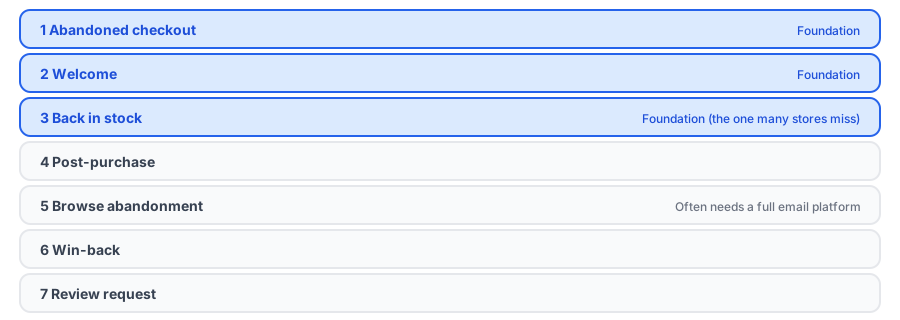
The Seven Flows, in Order
1. Abandoned checkout
Someone entered their details and left. A short sequence reminding them what they left can recover some of those orders. Because it targets people closest to buying, it is the usual first build. Our post on how restock alerts reduce cart abandonment explains how a sold-out product turns into an abandoned intention.
2. Welcome
A new subscriber is as warm as they will ever be. A short welcome introduces your brand and sets expectations. Collect addresses carefully; see our consent-safe approach.
3. Back in stock
This one is easy to overlook because the store does not look broken without it. The shopper who found a sold-out product and asked to be told is among the warmest leads you will meet, and without this flow that request goes nowhere. A dedicated app builds the flow for you: Griffin collects the signup on the sold-out page and emails subscribers when stock returns. Our complete guide covers it, and our comparison with building it in an email platform helps you choose.
4. Post-purchase
Confirm the order, set delivery expectations and offer a useful next step. Good post-purchase emails prevent support tickets and invite a second order.
5. Browse abandonment
This follows up with visitors who looked at products without adding to cart. Sources suggest it needs a full email platform, since Shopify's own email tool does not offer that trigger, so confirm what yours supports. Use it only with people who have already agreed to hear from you.
6. Win-back
Re-engage customers who have not bought in a while. For shoppers lost to a stockout, see our win-back plan and scripts.
7. Review request
Ask for a review after the product has arrived and had time to be used. Timing matters more than wording.
Flow three, ready to go. Griffin collects restock signups and sends the alert, with a free plan.
Install Griffin on ShopifyWhat Each Flow Needs From You
A flow is only as good as what feeds it. Before you build, make sure you have three things for each one: a trigger your tool can actually detect, consent to email the people it will reach, and a clear goal you can check. Abandoned checkout needs a checkout event and the customer's address. Welcome needs a signup form. Back in stock needs a signup on the sold-out page and an inventory signal. Browse abandonment needs identified visitors, which is why it depends on existing subscribers and a platform that tracks views. Write the goal down in one line, such as "recover orders from people who left checkout," so that when you review the flow later you know what it is supposed to do and can tell whether it is working.
Keep Flows Healthy
The risk with automation is that it fails silently. Once a month, send yourself a test through each flow, check that links and images work, and glance at the numbers. If a flow stops sending, you want to find out from your own test and not from a customer. Our guide to measuring revenue from restock alerts shows how to check one of them, and the troubleshooting posts on Klaviyo flows that do not send and emails that land in spam cover common failure points.
FAQ
Which email flows should a new Shopify store set up first?
Start with abandoned checkout and a welcome flow, then add back-in-stock and post-purchase. Browse abandonment, win-back and review requests come after the basics work.
Can I run these flows with Shopify's own email tool?
Some of them, but available triggers differ between tools and change over time. Sources suggest Shopify Email lacks a browse-abandonment trigger, so check what yours supports before you plan around it.
Is the back-in-stock flow really a flow I need to build?
If you use a dedicated back-in-stock app, the flow is built in: the app collects signups and sends the alert. If you build it yourself in an email platform, you are responsible for the trigger, signup form and testing.
How many flows are too many?
More flows than you can maintain. A small set that you check regularly outperforms a large set that quietly breaks.
The Bottom Line
Seven flows, built in order and checked regularly, will do more than twenty that nobody maintains. Start with abandoned checkout and welcome, add back in stock, and grow from there. Griffin is a Shopify back-in-stock app you can install from the Shopify App Store, free to start.