A merchant opens the Customers list in the Shopify admin and sees names and email addresses they do not recognize. Nobody has bought anything. The common thread is that each one signed up for a back-in-stock alert. At least one recent app review complains about exactly this, and the vendor's reply explained it as a subscription record the app needs to track notification requests. Whether a back-in-stock app creates customer accounts in Shopify is not universal. It is a design choice, and it has consequences for consent, list quality and reporting that are worth understanding before you install anything.
Two Different Kinds of Record
It helps to separate two things that both get called a customer.
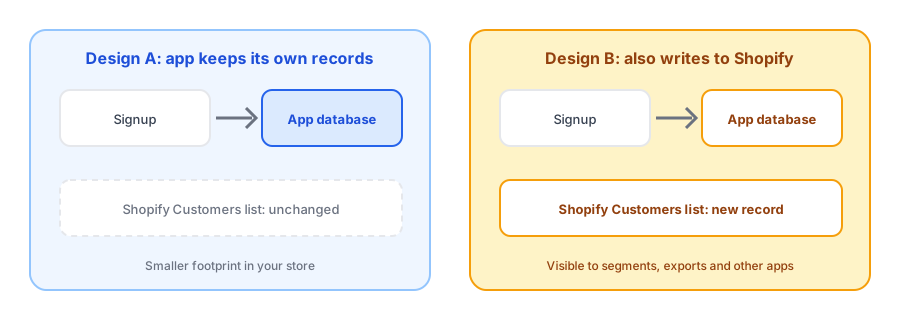
- The app's own subscriber record. This lives in the app's database and holds the email address, the product and variant the shopper wants, when they signed up, and whether they confirmed.
- A customer record in Shopify. This appears in your admin's Customers list, can carry a marketing status, shows up in segments and exports, and is visible to every other app and email tool connected to your store.
An app can do the first without the second. If it only keeps its own records, nothing appears in your Customers list. If it also writes to Shopify, those signups become part of your store's wider customer data.
Why It Matters
Consent
A shopper who asks to hear about one product has asked for exactly that. They have not opted into your newsletter or promotions. If their signup lands in your customer list with a marketing status that implies otherwise, you could end up mailing people who never agreed. Check how any app labels the people it adds. Our post on double opt-in and GDPR basics covers the consent side in more depth, and none of this is legal advice.
List quality and reporting
Customer totals, segments and campaign audiences all draw on the same list. Hundreds of signups from people who never bought can distort counts, skew conversion figures and clutter segments you built for real customers.
Data requests and deletion
When someone asks you to delete their data, you need to know every place it lives. Records in both the app and Shopify mean more places to clean. If you uninstall or switch apps, records written into Shopify stay behind unless you remove them, which is part of what we cover in our post on switching back-in-stock apps.
Choose a restock app with a clear data footprint. Griffin keeps signups in its own records.
Install Griffin on ShopifyHow to Check Your Own App
- Sign up for an alert on a sold-out product using a spare email address.
- Look in Customers in your Shopify admin for that address. If it appears, note its marketing status.
- Open your installed apps and review the permissions the app requested. Permission to read or write customers is a sign it may touch your customer list.
- Read the app's privacy and data pages, and ask the vendor what it stores, where, and how deletion works.
- Decide whether any segments or campaigns could accidentally include these people, and exclude them if so.
How Griffin Handles It
Griffin stores each signup in its own database: the email address, name, the product and variant, when they signed up and confirmed, and their status. It requests access to read your inventory, products, orders and theme, and it does not ask for permission to write to your customer list, so signups do not appear as customers in your Shopify admin. We recommend running the test above on any app you evaluate, ours included.
Questions to Ask Any Vendor
- Where is each signup stored: only in your database, or also in my Shopify customer list?
- If a customer record is created, what marketing status does it get, and can I change that?
- Which permissions does the app request, and why does it need each one?
- What happens to subscriber data if I uninstall, and how long do you keep it?
- How do you handle a deletion request from a shopper who signed up?
Clear, specific answers are a good sign. Vague ones are worth treating as a warning, because you are the one answerable to your customers for how their addresses are used.
Cleaning Up If It Has Already Happened
If an app has already added signups to your customer list, start by identifying them. Look for a tag the app applied, a shared creation date range, or customers with no orders. Check their marketing status before you email anyone. Then decide whether to keep, tag or remove them, and make sure no active campaign or segment is pulling them in by accident. If you are leaving the app, export what you need first so you are not forced to choose between losing the data and keeping records you never meant to hold.
FAQ
Why did my back-in-stock app add people to my Shopify customer list?
Some apps create a customer record for each signup in order to track the request. A vendor reply to one review described it as a subscription record needed to track notification requests. Whether yours does depends on its permissions and design.
Is a back-in-stock signup the same as marketing consent?
No. A shopper asking to be told when one product returns has asked for that message, not for your newsletter. Treating them as marketing subscribers by default can create consent problems. Check how your tools label them.
How can I tell whether my app writes to my customer list?
Do a test signup with a spare email address and look in Customers in your Shopify admin. Also check the permissions the app requested when you installed it, in your app settings.
What happens to these records if I uninstall or switch apps?
It depends on where they live. Records stored only in the app's own database are the app's responsibility to delete. Records written into Shopify's customer list stay there unless you remove them.
The Bottom Line
Whether a restock app adds signups to your Shopify customer list is a design decision with real consequences for consent and data hygiene. Test it, read the permissions, and ask the vendor plainly where the data lives. Griffin is a Shopify back-in-stock app you can install from the Shopify App Store, free to start.