Merchants are right to be cautious about installing apps. Every app adds code, requests or markup to your storefront, and a slow page costs sales. Back in stock app page speed is a reasonable question to ask before you install one, and it is one you can answer with evidence rather than trust. We have not published speed measurements for Griffin in this post and will not claim any, because a number from our test store would not describe your theme, your products or your other apps. What we can give you is a method that works for any notify-me app, and an idea of what to look for.
What an App Can Actually Add to a Page
A back-in-stock app typically adds a button or form to sold-out product pages and some script to make it work. The cost depends on how that is built: how much code loads, whether it loads on every page or only where needed, whether it blocks the page from rendering, and how many extra requests it makes. Apps built as theme app extensions can be added without editing theme code, and many load only where the block appears. Apps that inject scripts on every page can cost more. You cannot tell which you have from a marketing page, so test.
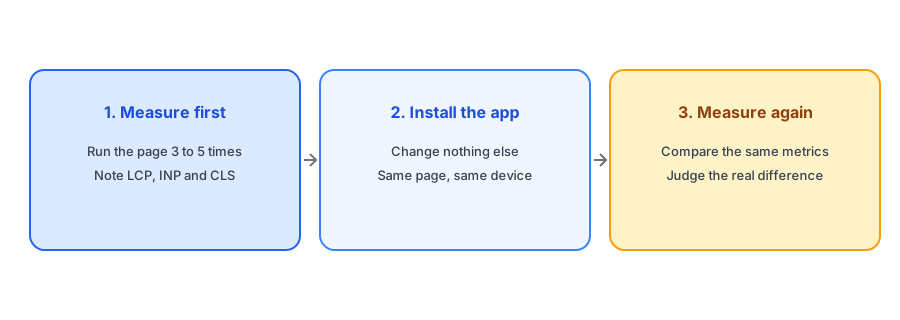
A Fair Before-and-After Test
Pick the page that matters most. For a notify-me app that is a sold-out product page, plus one in-stock product page and the homepage, since an app might load on all three. Run each through a tool such as PageSpeed Insights, using the mobile result, and run it several times, because single runs vary. Record the three Core Web Vitals: Largest Contentful Paint (good is under 2.5 seconds), Interaction to Next Paint (good is under 200 milliseconds) and Cumulative Layout Shift (good is under 0.1). Then install the app, change nothing else, and repeat. If you can, test on a duplicate theme so live visitors are not affected.
Compare averages, not best runs, and treat small differences with caution: if the numbers move by less than the run-to-run noise, you have not found a real effect. A bigger, consistent change in one metric is worth investigating.
Read the Waterfall, Not Just the Score
The overall score is a blunt tool. The more useful view is the list of requests and scripts the page loads. Look for the app's domain in the network waterfall and ask three questions: does it load on pages where it does nothing, does it block rendering, and does it cause the layout to jump when the button appears? A button that pushes content down after load can raise Cumulative Layout Shift even if the script itself is small. Reserving space for the button avoids that.
Test it yourself in fifteen minutes. Griffin is free to start, so you can run the before-and-after check on your own theme.
Install Griffin on ShopifyWeigh Speed Against What the App Earns
Speed is a cost, and the alert is a benefit. An app that recovers sales from sold-out products can justify a small cost, while an app that adds a visible delay and little revenue cannot. The question is whether the cost is large enough to matter on the pages that carry it. For a sold-out page that already converts poorly, a small addition may be acceptable. For a best-selling page, any delay deserves scrutiny. Our guide to measuring revenue from back-in-stock alerts helps you put a number on the other side of the scale.
Questions to Ask Before You Install
You can narrow down the field before testing. Ask whether the app uses a theme app extension, whether it loads only on pages that need it, and whether it is loaded asynchronously. Read recent reviews for mentions of speed or theme conflicts, and check how it behaves on your theme; our guide to evaluating a back-in-stock app before you install it covers the wider checklist, and the scorecard for choosing the right app turns it into a comparison.
A Practical Checklist
- Record Core Web Vitals on mobile for a sold-out page, an in-stock page and the homepage.
- Install the app, change nothing else, and repeat the test several times.
- Compare averages and ignore differences smaller than the run-to-run noise.
- Check the waterfall for scripts that load on pages where the app does nothing.
- Look for layout shift when the Notify Me button appears.
- Weigh any cost against the sales the alert recovers.
FAQ
Does a back-in-stock app slow down a Shopify store?
It can add some load, and the amount depends on how the app is built. The only reliable answer for your store is a before-and-after test on your own theme.
Which speed metrics should I check?
Largest Contentful Paint, Interaction to Next Paint and Cumulative Layout Shift, measured on mobile, plus a look at which requests the app adds.
How many times should I run the test?
Several times for each state, then compare averages. A single run varies too much to trust.
Can a Notify Me button cause layout shift?
Yes, if it appears after the page has rendered and pushes content down. Reserving space for it prevents that.
The Bottom Line
Do not accept or dismiss speed claims about any app, ours included. Run a fair test, read the waterfall and weigh the result against the sales recovered. Griffin is a Shopify back-in-stock app you can install from the Shopify App Store, free to start, which makes it easy to test on your own store.