A shopper writes to your store and asks you to delete everything you hold about them. If you run a Notify Me app, part of that data sits there: at minimum an email address and the product the shopper wanted. Knowing what the app stores and how a deletion request reaches it is part of running a store responsibly. This post explains the general picture and what to ask a vendor. It is practical background, not legal advice. Privacy law varies by place and changes over time, so speak to a qualified adviser about your own obligations. Where we describe Griffin, we draw only on what its published privacy policy says.
What a Restock Alert App Typically Holds
The core data is small: the email address a shopper gave and the product or variant they asked about. Beyond that, apps differ. Some record when the request was made, which alerts were sent and whether the person later bought, so that revenue can be attributed. Griffin's privacy policy states that it collects the shopper's email address and the product or variant subscribed to, that it does not collect payment information or passwords, and that it does not sell personal data. For orders linked to a notification it accesses order details to calculate revenue. Always read an app's own policy rather than relying on a summary, including ours.
What CCPA-Style Rights Look Like in Practice
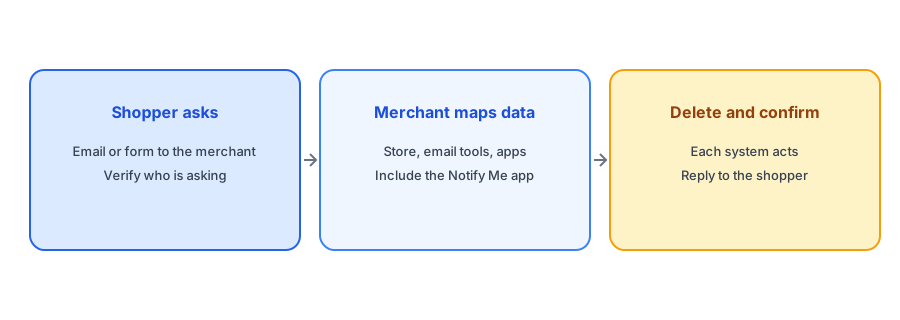
The California Consumer Privacy Act and similar laws give residents rights such as knowing what data a business holds, asking for deletion and opting out of the sale or sharing of their data. Whether the law applies to your store depends on factors like size and where your customers live. Even if it does not, shoppers elsewhere may ask for the same things, and European rules give similar rights. The practical task is the same in each case: receive a request, verify the person, find their data, act and reply. Our post on double opt-in and GDPR basics covers the European side.
How Apps Receive Deletion Requests
Shopify provides a way for the platform to pass customer data requests to apps. Apps in the Shopify App Store are expected to respond to Shopify's mandatory privacy notifications, which include requests to view and to erase customer data. That means a request you handle through Shopify may reach installed apps automatically. Do not assume this covers every case, since requests may also arrive directly by email. Ask each vendor how they handle both routes. Griffin's policy tells people to email hello@griffincodes.com to exercise rights such as access, correction and deletion.
Keep restock data minimal: an email and the product wanted. Griffin is free to start.
Install Griffin on ShopifyWhere Else the Data Goes
Deleting from the app is not always the whole job. If the app uses an email delivery provider, that provider processes addresses to send messages. Griffin's policy names Resend and SendGrid for this purpose and says they process recipient addresses solely to deliver messages. If you also exported subscribers into a marketing platform, or copied them into a spreadsheet, those copies need handling too. Our post on why a back-in-stock app may create customer accounts explains another place a shopper's data can end up, in your Shopify customer list.
Questions to Ask Any Vendor
Before installing, or when reviewing an app you already use, ask a few direct questions. What data do you store, and for how long? How do you handle a deletion request, whether it arrives through Shopify or by email? Which providers process the data? Do you sell or share it? Can I export or delete a single subscriber? A clear answer is a good sign, and vagueness is a signal to look elsewhere. Our guide to evaluating a back-in-stock app before you install it includes data handling in its checklist, and if you decide to leave an app, our post on switching back-in-stock apps explains what transfers.
Handling a Request Step by Step
When a request arrives, confirm who is asking, so you do not delete or disclose data for the wrong person. List the systems that may hold their data: your store, your email tools, your Notify Me app and any exports. Act on each, record what you did and when, and reply to the shopper within the time the relevant law allows. Keep the record short and factual. A simple log is enough for a small store.
A Practical Checklist
- Read your Notify Me app's privacy policy and note what it stores.
- Ask the vendor how deletion requests arrive and how they are handled.
- Know every place subscriber data can live, including email providers and exports.
- Verify the identity of anyone requesting access or deletion.
- Keep a simple log of requests and actions.
- Take advice on your own legal obligations.
FAQ
What data does a back-in-stock app store?
At minimum an email address and the product or variant requested. Some apps also record alerts sent and attributed orders, so read the app's policy.
How does a deletion request reach the app?
Shopify can pass customer data requests to installed apps, and requests may also arrive by email. Ask the vendor how they handle both.
Does CCPA apply to my store?
It depends on your size and where your customers live. Take advice, and remember shoppers elsewhere may ask for similar rights.
Is deleting from the app enough?
Not always. Check email providers, marketing platforms and any exports or spreadsheets that hold the same data.
The Bottom Line
Know what your Notify Me app stores, ask the vendor how deletion works and track every copy of the data. Griffin is a Shopify back-in-stock app you can install from the Shopify App Store, free to start. Read its privacy policy first, as you should with any app.