It is one of the most common questions new Shopify merchants ask: is there a setting somewhere that emails customers when a sold-out product comes back? The short answer is no. Shopify records your stock accurately, and it can trigger automations when stock changes, but it does not collect shoppers' email addresses for sold-out items or tell them when those items return. If you are searching for back in stock notification shopify options, this guide covers what you do get, what you have to build yourself, and where an app starts to make sense.
What Shopify Does Not Include
Shopify has no native feature that sends a back-in-stock message to a shopper. Community moderators answering this question on Shopify's own forum say Shopify does not support notifying customers when items return and does not email them automatically. Some themes and tutorials add a notify me form to sold-out products, but those are typically ordinary contact forms. They send the shopper's request to you, not a restock email to them. Someone on your team then has to find the requests, work out which product each one was for, and email people by hand when stock arrives.
What Shopify Does Give You
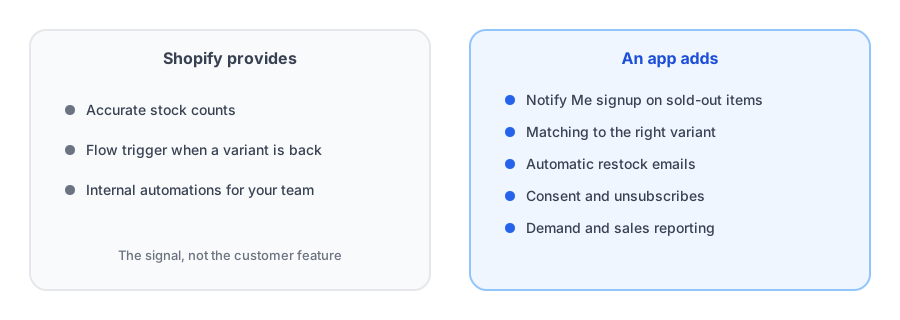
Shopify Flow, the free automation tool, has a trigger for exactly this moment. According to Shopify's documentation and changelog, the product variant back in stock trigger fires when a variant's inventory moves from zero or less to one or more, and the change can come from an order, a manual adjustment or an app. A separate inventory quantity changed trigger exists for cases that need location detail or low-stock tracking. That is useful, but it is a signal, not a customer feature. Flow does not collect signups from shoppers or keep track of who wanted which variant. We use it for a different purpose in our post on alerting your own team when a product restocks.
The Manual and DIY Options
A contact form and an inbox
This works for a handful of sold-out products. The limits show up quickly: requests arrive as free-text messages, a shopper who wanted a specific size may not say so, and you have to remember to follow up at the right time. It also leaves you holding email addresses with no clear record of consent or a way to unsubscribe.
Custom code
Developers can build a signup form that stores addresses and sends mail. A community thread describes this route as advanced and not supported by Shopify's own developers. You become responsible for variant matching, sending, deliverability and privacy, which is a lot to own for a feature that is not your core business.
Your email platform
Some email platforms offer back-in-stock flows built on their Shopify integration. They can work well, with trade-offs in setup and upkeep that we compare in Klaviyo back-in-stock alerts versus a dedicated Shopify app.
Skip the manual process. Griffin collects signups on sold-out products and emails subscribers when stock returns.
Install Griffin on ShopifyWhat an App Adds
- A Notify Me button or form on sold-out products, so shoppers can sign up in a few seconds.
- Signups tied to the specific variant, so someone waiting for a medium is not told about a large.
- An automatic email when stock returns, with the product and a link back.
- Consent handling and unsubscribe links. For the legal side, see our post on double opt-in and GDPR basics.
- Reporting on demand and recovered sales, which also helps you decide what to reorder.
Many apps have a free tier, so you can try one before committing; what is reasonable to pay is covered in our pricing guide. If you are ready to add one, our step-by-step guide to adding a Notify Me button without code walks through it.
Which Route Fits You
- One or two sold-out products, a few requests a month: a contact form and a careful spreadsheet can do.
- You already run flows in an email platform and have someone to maintain them: a platform flow may suit you.
- Regular stockouts, multiple variants, or any real volume: an app is usually the better use of your time.
- You want internal alerts as well: add a Flow for your team alongside whichever route you choose.
FAQ
Does Shopify automatically email customers when a product is back in stock?
No. Shopify's core platform has no feature that emails shoppers when a sold-out product returns. Community moderators say the same, and merchants either handle it manually or use an app.
What is Shopify Flow's back-in-stock trigger?
Shopify Flow has a trigger that runs a workflow when a product variant's inventory goes from zero or less to one or more. It gives you the restock signal for automations, but it does not collect shopper signups or notify shoppers by itself.
Can I use a contact form as a Notify Me form?
Some themes and guides add a form to sold-out products, but it is a contact form that sends the shopper's message to you. It does not email the shopper when stock returns, so you would have to do that manually.
When is a manual process enough?
Only when you have very few sold-out products and very few requests. Once you need to match people to specific variants, avoid mistakes and handle unsubscribes, an app saves more time than it costs.
The Bottom Line
Shopify gives you stock counts and a restock trigger for automations, but it does not email shoppers when a product returns. A manual process works at very small scale, and an app takes over as soon as you have real volume. Griffin is a Shopify back-in-stock app you can install from the Shopify App Store, free to start.