Search for the best back-in-stock app for Shopify and you will find a dozen roundups. Read a few and a pattern appears: nearly all of them are written by app vendors, and each ranks its own product first. That is not dishonest, exactly, but it means the rankings tell you more about who wrote them than about which app fits your store. A better approach is to build your own ranking from what matters to you. The scorecard below lets you compare any three apps on eight criteria, weighted by importance, and further down is an honest list of what Griffin does and does not do, so you can score it fairly too.
The Scorecard
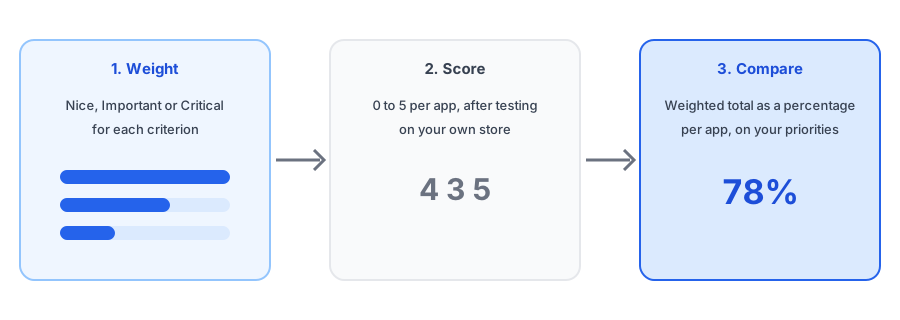
Name up to three apps. Set how much each criterion matters to you, then score each app from 0 to 5 after you have tested it. Use our evaluation checklist for the hands-on test, so your scores come from evidence and not from the listing page.
| Criterion | Importance | |||
|---|---|---|---|---|
| Detects restocks reliablyNo missed restocks, no duplicate or false sends | ||||
| Matches the exact variantThe shopper hears about their size or color only | ||||
| Email quality and deliverabilityLooks right, lands in the inbox, sender is clear | ||||
| Consent and data handlingClear opt-in, deletion, no surprise customer records | ||||
| Price at my volumeCost for the notifications I will really send | ||||
| Fits my theme and layoutButton, popup or inline form works on my store | ||||
| Shows what it earnsReporting on signups, orders and revenue | ||||
| Support when something breaksReplies, understands the problem, fixes it | ||||
| Weighted score | 0% | 0% | 0% | |
Scores are yours, not ours. Rate each app 0 (poor) to 5 (excellent) after testing it on your own store.
Why Rankings From Vendors Disagree
When we looked at published roundups, each publisher placed its own app first, and the lists disagreed with one another about who came next. Pricing and ratings also change often, so any list ages quickly. That is why we do not rank other apps here. If you want facts about a specific app, use its Shopify App Store listing, read recent reviews for patterns, and test it yourself. Our posts on pricing and what a free plan limits explain what to compare on cost.
What Griffin Does and Does Not Do
So you can score it fairly, here is an honest summary, checked against how Griffin works today.
| Does | Does not (today) |
|---|---|
| Adds Notify Me to sold-out products, as a popup or an inline form | Send SMS, push or WhatsApp alerts; email only |
| Ties each signup to the exact variant and links the email to it | Offer preorders or pre-launch waitlists |
| Offers double opt-in as a setting, off by default | Attach discount codes to restock emails |
| Keeps signups in its own records, not your Shopify customer list | Recommend alternative products or forecast your stock |
| Reports recovered revenue, net of refunds and discounts | Support headless storefronts or B2B catalogs |
| Has a free plan of 100 notifications a month | Send low-stock alerts to merchants |
Score Griffin against any other app. It has a free plan, so the test costs nothing.
Install Griffin on ShopifyHow to Use Your Result
A score is a conversation starter, not a verdict. If two apps finish within a few points of each other, the difference is smaller than the uncertainty in your ratings, so decide with a real test: install both on a development store or free plan, run a restock through each, and see which one behaves better. If an app wins overall but scores zero on a criterion you marked critical, treat that as a dealbreaker and not a rounding error. And revisit the scores after a few months. Apps change, your catalog changes, and the app that fit a ten-product store may strain at five hundred.
Questions to Settle Before You Score
- Which channels do you need? Email is the usual start; compare email and SMS and web push before adding more.
- How many notifications will you send in a busy month? Estimate with the lost-sales calculator and your waitlist sizes.
- Do you already use an email platform for restock flows? See Klaviyo versus a dedicated app.
- Do you sell across locations, markets or in store? Check multiple locations and Shopify Markets.
- Moving from another tool? Read what transfers when you switch.
FAQ
What is the best back-in-stock app for Shopify?
There is no single best. Most published rankings are written by app vendors and each ranks its own product first. The right app depends on your volume, your theme, the channels you need and how much you value support, so score candidates against your own priorities.
How should I compare back-in-stock apps?
Weight what matters most to you, then score each app on the same criteria after testing it. Reliability, variant matching, deliverability, consent handling, price at your volume, theme fit, reporting and support cover most of it.
Do I need SMS or push notifications?
Only if your customers want them. Email is the simplest starting point, and extra channels bring extra consent rules. Decide what you need before comparing, because it narrows the field quickly.
Can I trust ratings and review counts?
They are a useful signal, but read what the complaints are about and check recent reviews. A high average can hide a recurring problem that matters to your store.
The Bottom Line
The best back-in-stock app is the one that scores highest on your priorities after you have tested it, not the one at the top of a list written by a vendor. Build the scorecard, test the finalists, and weigh what each one does not do as carefully as what it does. Griffin is a Shopify back-in-stock app you can install from the Shopify App Store, free to start.