Every restock app promises recovered sales. Few merchants can say with confidence what theirs actually recovered. The reason is not carelessness: restock alerts are one of the harder things to measure, because the buyer is already motivated, may return through several routes, and often buys on a different device from the one that received the email. To measure back-in-stock alert revenue in a way you can trust, it helps to separate three questions: what happened, what the tools say happened, and what would have happened anyway.
The Metrics Worth Tracking
Start with a short list and track it per product, not just store-wide, since one hot item can dominate the totals.
- Signups: how many shoppers asked to be notified, and for which variants.
- Alerts delivered and clicked: whether the message arrived and was acted on.
- Orders from alerts: purchases that can be tied back to a specific alert.
- Recovered revenue, net of refunds, not the gross figure at the moment of purchase.
- Waitlist depth versus units restocked: a list of 300 against 20 units explains a low conversion rate on its own.
- Time to purchase: how quickly buyers move after the alert, which shows how long the window really needs to be.
Why Tools Disagree
If you compare an app's number with GA4 and Shopify, expect three different answers. This is normal, and the reasons are mostly mundane.
- Net versus gross. GA4 generally records revenue from its purchase event, while Shopify can report gross sales including taxes and shipping by default. Treat Shopify net revenue after discounts and refunds as the financial source of truth.
- Last click. Standard link tagging credits the final click only. Restock shoppers often arrive through more than one touch, so tagged links undercount their influence.
- Matching rules. Each app decides what counts: how long after an alert an order is still credited, whether the order has to follow a click on the alert's link, and what happens with refunds.
- Tagging that gets lost. Links can be stripped, rewritten or opened in a different browser, which breaks any method that relies on a parameter surviving the journey.
How Griffin Attributes Orders
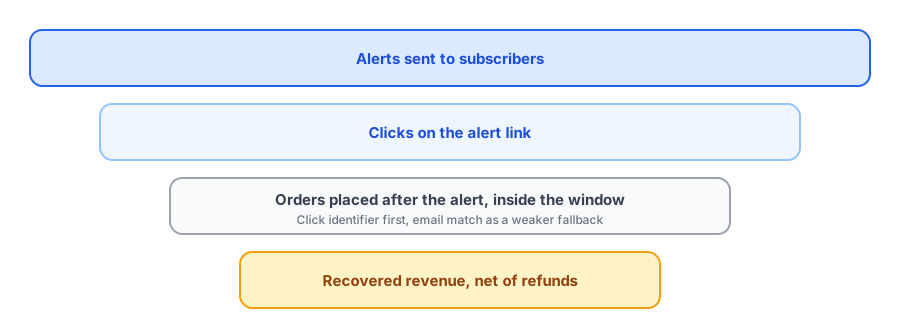
Griffin does not rely on UTM tags for its revenue figure. Each restock email link carries an identifier for that specific alert, which Griffin's storefront extension saves on the cart when the shopper follows the link. When an order is placed and paid, Griffin matches it to the alert that way, which is the more reliable route. If there is no usable identifier, it falls back to matching the order's email to a subscriber who was notified about that same variant, and records that this match is the weaker kind. An order only counts if it was placed after the alert went out and within an attribution window, which is 14 days by default. Refunds are netted off, and only paid orders count toward recovered revenue. If you also want to see restock traffic in GA4, make sure the links in your alerts are identifiable there; Griffin's own figure comes from its order matching, not from GA4.
See what your restock alerts actually recover. Griffin shows recovered revenue net of refunds.
Install Griffin on ShopifyAttribution Is Not the Same as Lift
Whatever tool you use, recovered revenue is attributed revenue. It tells you an order followed an alert, not that the alert was the only reason. Some of those shoppers would have come back to the page on their own. To estimate true lift you need a comparison. The simplest honest ones are:
- Compare how quickly similar products sell through after a restock with and without alerts.
- Where it makes sense, notify a portion of a long waitlist first and compare it with the rest of the list that has not yet been told.
- Look at your own history before and after installing an app, keeping seasonality and promotions in mind.
None of these is perfect, and a store with few restocks will have noisy results. The goal is a sensible range, not a single precise figure.
A Simple Monthly Routine
- Pull signups, alerts sent and orders from alerts for each restocked product.
- Check recovered revenue net of refunds against Shopify's own sales for those products.
- Note the waitlist depth against units restocked so low conversion is not misread.
- Use the demand data to plan reorders, as we describe in tracking customer demand on out-of-stock products.
- Compare the result with the app's cost; our pricing guide covers what is reasonable to pay.
To improve the numbers rather than just measure them, see back-in-stock email copy and design that converts and our overview of how restock alerts reduce cart abandonment.
FAQ
What is a good conversion rate for back-in-stock alerts?
There is no universal benchmark you can trust. Rates depend on how long the wait was, how many people were notified compared with units available, and how much the shopper wanted the item. Track your own baseline per product and compare restocks over time.
Why does GA4 show different revenue than my back-in-stock app?
They count differently. GA4 usually records net revenue from the purchase event, Shopify's own reports can include taxes and shipping, and apps apply their own matching rules and time windows. Treat Shopify net revenue as the financial source of truth and use the rest for direction.
Does attributed revenue mean the alert caused the sale?
Not necessarily. Attribution shows an order followed an alert. Some of those shoppers might have come back anyway. A holdout or a comparison against similar restocks without alerts is the way to estimate true lift.
Should refunds be subtracted from recovered revenue?
Yes. Revenue that is later refunded was not recovered. Check that whatever report you rely on nets refunds off.
The Bottom Line
Measure per product, expect different tools to disagree, net off refunds, and remember that attribution is not lift. A clear matching method and a monthly routine beat chasing one perfect number. Griffin is a Shopify back-in-stock app you can install from the Shopify App Store, free to start.