Black Friday rewards stores that run deals and punishes stores that run out in the middle of them. A deal item that sells out on day one leaves you with disappointed shoppers, ads pointing at a sold-out page and no stock for the full-price customers who would have bought next week. The fix is a number you work out before the sale: how many units to promote, how many to protect. If you are doing your Black Friday inventory planning this month, use the calculator below. In 2026, Black Friday falls on November 27 and Cyber Monday on November 30. Every value shown is an example to replace with your own.
The Calculator
How the Numbers Work
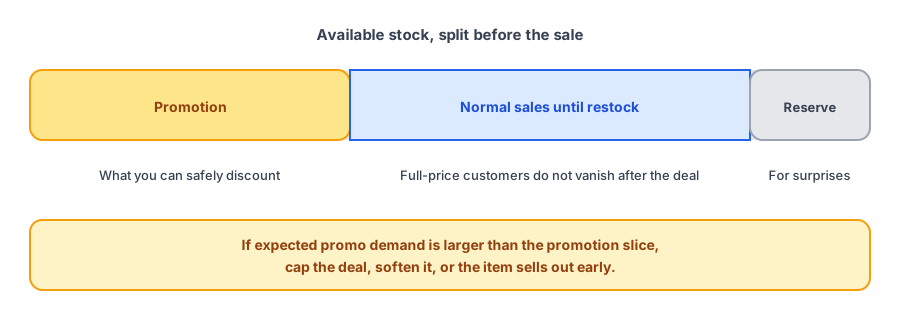
The calculator adds up three things you need to cover. Promo demand is your normal daily sales times your expected lift times the days the deal runs. Post-promo demand is normal sales until your next delivery, because the full-price customers do not disappear when the deal ends. The reserve is a cushion on top, since forecasts are wrong more often than they are right. What is left after the post-promo demand and the reserve is what you can safely allocate to the promotion. If that is less than expected promo demand, you will sell out early unless you cap the deal.
Choosing Your Lift Assumption
The lift is the weakest input, and the one you control most. Use your own history: compare daily sales during a past promotion with a normal stretch for the same product. If you have no history, choose a cautious range and run the calculator at two or three values to see how sensitive the answer is. Published spike figures are mostly vendor estimates, so we do not quote them here. Whatever you choose, update it after the first day of sales and recalculate.
If a deal item does sell out, capture the demand. Griffin adds Notify Me to sold-out products and emails subscribers when stock returns.
Install Griffin on ShopifyRules for Protecting Your Best Sellers
- Do not discount your most important product deeply if you cannot cover the demand. A smaller deal that lasts beats a large one that ends on day one.
- Use per-customer limits for scarce items, and state them clearly on the product page and at checkout.
- Put slower products in the deal and keep your best sellers at full price or in a tighter offer.
- Hold a safety reserve and do not let promotions draw it down. It is what keeps the weeks after the sale running.
- Check counts at least daily during the sale, and again after returns start coming in.
If the Deal Item Sells Out Anyway
Have the plan ready before it happens. Keep the page live and make sure it says sold out and offers Notify Me; our sold-out page checklist covers the details. Pause or redirect ads for it, as we explain in stopping ads for sold-out products. Tell shoppers when you expect more stock if you know, and offer a close alternative; see the alternatives match test. And remember that a surge of sold-out signups brings its own load, which our Black Friday and Cyber Monday volume guide and free plan limits post help you plan for.
Before and After the Sale
Work out your reorder dates now with the reorder point calculator, and plan the gifting season that follows with our guide to holiday stockouts and shipping cutoffs. To size what a stockout could cost you, use the lost-sales calculator. Griffin handles restock alerts for shoppers; it does not manage promotions or allocate your stock.
FAQ
How much stock should I put on a Black Friday promotion?
Enough to meet the expected promo demand while still covering normal sales until your next restock, with a reserve for surprises. The calculator above works that out from your own numbers.
How do I estimate the promo lift?
Use your own history: compare sales on a past promotion with a normal period for the same product. If you have no history, choose a cautious range and update it as soon as the first day of sales comes in. Published spike figures are mostly vendor estimates.
What if the deal item sells out on the first day?
Tell shoppers plainly, keep the page live with a way to be notified, pause or redirect ads, and say when you expect more stock. A clear sold-out state is better than a deal that quietly stops working.
Should I limit quantity per customer?
It can stretch limited stock across more shoppers, and it discourages resellers. Say the limit clearly on the product page and at checkout so it does not surprise anyone.
The Bottom Line
Decide how many units go on promotion before the sale starts, protect the stock your full-price customers need, and have a plan for the item that sells out anyway. Griffin is a Shopify back-in-stock app you can install from the Shopify App Store, free to start.