The best email subscribers are the ones who raise their hand for something specific. A shopper who lands on a sold-out product and asks to be told when it returns has done exactly that. It is a stronger signal than a popup offering 10 percent off, and your sold-out pages produce them every day. Out-of-stock pages are a natural chance to collect emails, and the main thing to get right is not the form. It is the promise you make with it. This guide gives you six copy sets to paste into your signup, a consent-safe checklist, and a plan for what to send next.
One Rule Before Anything Else
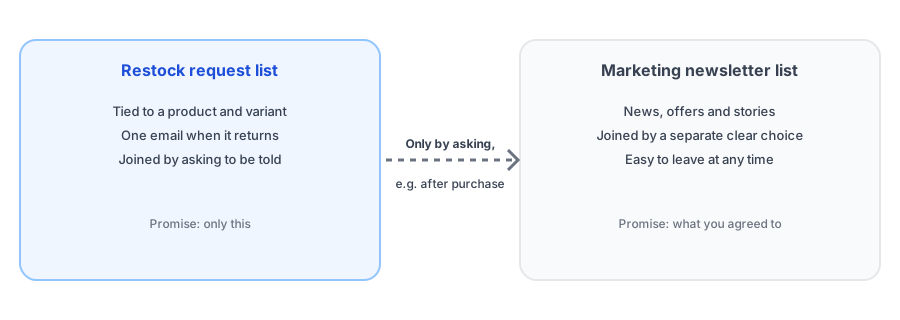
A restock request is not newsletter consent. The shopper asked for one email about one product. If you quietly add them to a marketing list, you break that promise, risk complaints and possibly rules in places that require clear consent. Keep the restock list and your marketing list separate, and grow the second one by asking, not by assuming. Our posts on apps that create customer accounts and double opt-in and GDPR basics explain the details. None of this is legal advice.
Six Signup Copy Sets
Each set fills the main text fields of a restock signup. In Griffin you can edit the button label, the popup title and description, the submit text and the field labels, so the headline, description and button in each set can be pasted in. The after-signup line is a suggestion for wherever your setup lets you edit the confirmation message. Change the words to fit your brand, but keep the promise honest.
1. Plain and clear
Use when: you want a default that works anywhere.
- Headline: Get notified when it is back
- Description: Enter your email and we will send you one message when this product is available again.
- Button: Notify me
- After signup: Thanks. We will email you when it returns.
2. With a consent line built in
Use when: you want to be explicit about what they are agreeing to.
- Headline: Tell me when it returns
- Description: We will use your email only to tell you when this product is back in stock. Nothing else, unless you ask.
- Button: Notify me
- After signup: Done. You will hear from us once, when it is back.
3. Limited stock
Use when: the product sells out fast and you want honest urgency.
- Headline: Join the list, it sells quickly
- Description: Stock is limited, and we email people in the order they signed up. Add your email to be one of the first to know.
- Button: Add me to the list
- After signup: You are on the list. We will email you the moment it is back.
4. For a specific size or color
Use when: your catalog is variant-heavy.
- Headline: Notify me about this option
- Description: We will email you when this exact size and color is back, not other options.
- Button: Notify me
- After signup: Saved. We will let you know when this option returns.
5. Warm and casual
Use when: your brand voice is friendly.
- Headline: Missing this one? Same.
- Description: Leave your email and we will tap you on the shoulder when it is back.
- Button: Tap me when it is back
- After signup: Got it. Talk soon, and only about this.
6. Premium and quiet
Use when: your brand is understated.
- Headline: Be the first to know
- Description: Leave your email address and we will write to you when this piece is available again.
- Button: Notify me
- After signup: Thank you. We will be in touch when it returns.
Edit your signup wording in minutes. Griffin lets you change the button, title, description and submit text.
Install Griffin on ShopifyA Consent-Safe Checklist
- The form says what the email is for, and that it will arrive when the product is back.
- Only restock emails go to restock signups. Promotions are a separate, opt-in choice.
- Every email has a working unsubscribe link.
- You can delete a person's data on request, in every place it lives.
- You consider double opt-in, which confirms the address and the intent. Griffin offers it as a setting, and notifies only confirmed subscribers when it is on.
- You ask only for what you need. Griffin's form needs an email and an optional name, nothing more.
What to Send After the Restock
The restock email is the one they asked for, so send it promptly and keep it focused; see our restock email templates. After they buy, you have a natural moment to invite them to your newsletter, because they are now a customer who knows you. Keep that invitation clearly separate and optional. If someone does not buy, do not chase them with promotions you were never asked to send.
Use the List as Data Too
Even before you email anyone, the list tells you which products people want most. Our guide to tracking customer demand on out-of-stock products shows how to read it, and measuring restock revenue shows how to see what it brings back. Choose a layout that fits your store with popup versus inline, and check your page overall with the sold-out page checklist.
FAQ
Can I add restock signups to my newsletter?
Not automatically. A shopper who asked to be told about one product has not agreed to marketing emails. Ask for newsletter consent separately, with its own clear choice, or invite them after they buy.
Is double opt-in required for restock alerts?
Not everywhere, but it is a good practice that improves list quality and helps with consent in regions with stricter rules. Griffin offers double opt-in as a setting, which is off by default. This is not legal advice.
What should the signup form say?
Say exactly what will happen: you will get one email when this product is back. Short, specific copy converts and keeps expectations honest.
Where do restock signups live?
It depends on your app. Some write them into your Shopify customer list; others keep them separate. Griffin keeps them in its own records and does not add them to your Shopify customer list.
The Bottom Line
Sold-out pages are one of the best places to meet people who want something from you. Make a clear promise, keep restock requests separate from marketing, and invite people to more only after they have a reason to say yes. Griffin is a Shopify back-in-stock app you can install from the Shopify App Store, free to start.