A waitlist is the simplest conversion tool a sold-out product can have. The shopper leaves an email address, you remember what they wanted, and when it returns they hear about it first. If you are looking for how to add a waitlist to sold-out products, the setup is quick. The part worth planning is what happens when it works too well, and the list is longer than the stock. This guide gives you five steps and a small calculator for exactly that case.
Waitlist or Back-in-Stock Alert?
For a product that has sold out, the two are the same thing from the shopper's side: join a list, get an email when it returns. Some tools use "waitlist" for another purpose as well, a pre-launch list for products that have never been in stock. Griffin focuses on sold-out products. If you want the comparison in depth, read back-in-stock notifications versus waitlists.
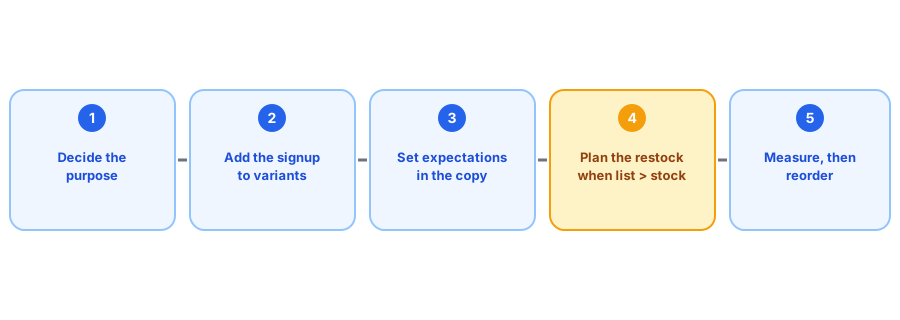
Five Steps to Add a Waitlist
1. Decide what the list is for
A waitlist for sold-out products is about capturing existing demand. A pre-launch list is about building anticipation. They need different copy and different promises, so decide which you are building before you start.
2. Add the signup to sold-out variants
Shopify does not include this natively, so you need an app. Our guide to adding a Notify Me button without code walks through it, and Griffin ties each signup to the variant the shopper picked.
3. Set expectations in the copy
Say what will happen: one email when the product is back, and if stock will be limited, say that too. Our post on consent-safe signup copy has six ready-made sets.
4. Plan what happens at restock
This is where the calculator below helps. Decide in advance how you will handle a list bigger than your stock.
5. Measure, then reorder
The list is demand data. See tracking customer demand on out-of-stock products and the reorder point calculator for how to use it.
Start your waitlist now. Griffin adds Notify Me to sold-out products and emails subscribers when stock returns.
Install Griffin on ShopifyWill Your Restock Cover the List?
Not everyone on a waitlist buys when told, but a long list can still outrun a small batch. Enter your own numbers below; the values are examples, and the buy rate is your assumption to refine over time.
What to Do When the List Is Bigger Than the Stock
- Tell people before the send that stock is limited, so nobody is surprised.
- If your tool lets you stage sends, consider who should hear first; otherwise accept that the email goes to everyone and the units go fast.
- Tell the people who miss out when the next batch is due, or whether there is one.
- Use the shortfall as a reorder signal for next time.
Our detailed guide to limited restocks and waitlists covers the options, and our restock email templates include a limited-units version. For the full picture of restock alerts, see the complete guide.
Common Waitlist Mistakes
- One list for the whole product. If the product has sizes or colors, tie each signup to the option the shopper chose, so a restock of one does not notify everyone. See apparel size runs for why this matters.
- Promising a date you cannot keep. If you do not know when it returns, say so; a missed date costs more trust than an honest "not sure yet."
- Forgetting the list exists. A waitlist is only useful if someone checks it, so look at the largest ones every month when you plan orders.
- Treating the list as a newsletter. A waitlist signup is a request for one email about one product, not marketing consent; see what apps do with customer records.
- Leaving people waiting for a product that is gone. Close the loop with a message and an alternative, as described in handling subscribers when a product is discontinued.
None of these takes long to fix, and each one makes the list more valuable. A small, well-run waitlist on your five most-requested products does more than a large, neglected one on everything.
FAQ
What is a waitlist on Shopify?
It is a way for shoppers to leave their email on a sold-out product so they can be told when it is available again. Shopify does not include this natively, so stores add it with an app.
Is a waitlist the same as a back-in-stock notification?
For sold-out products, effectively yes: the shopper joins a list and is notified on restock. Some tools also offer pre-launch waitlists for products that have never been in stock, which is a different use. Griffin covers the sold-out case.
What if my waitlist is longer than my stock?
Expect the units to go quickly and decide in advance how to handle it: say stock is limited, send in a sensible order if your tool allows it, and tell the people who miss out when the next batch is due.
How long should a shopper stay on a waitlist?
As long as the product might return. If it will never return, tell them and offer an alternative rather than leaving them waiting.
The Bottom Line
A waitlist is quick to add and valuable to have. Set it up on sold-out variants, tell people what to expect, and use the calculator to plan for the day the list outruns the stock. Griffin is a Shopify back-in-stock app you can install from the Shopify App Store, free to start.