Subscriptions turn a stockout into a quieter, slower problem. A one-time shopper meets a sold-out page and either leaves or asks to be notified. A subscriber meets nothing: their renewal simply runs, and the product they expected is not there. Whether that renewal ships, fails, skips or oversells depends on how your inventory and subscription tools are set up, and most merchants discover their settings only when it happens. This post covers how shopify subscription product out of stock handling usually works and how it relates to a back-in-stock alert.
Two Different Waiting Rooms
A restock alert serves a shopper who wanted to buy and could not. A subscriber has already bought, in the sense that they agreed to a recurring order. When stock runs out, the first group needs a way to be told when to come back. The second group needs the order to be handled gracefully without them having to do anything. The tools overlap only at the moment stock returns, and that is where problems can start.
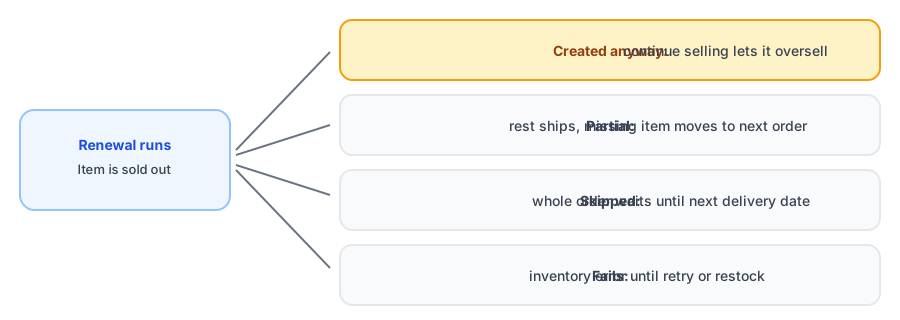
What Can Happen to the Renewal
Different setups lead to different outcomes. The ones merchants run into most often:
- The order is created anyway. If continue selling when out of stock is on for the product, one major subscription app documents that it creates the order even without stock. You oversell and have to ship late.
- Partial fulfillment. The available items ship, and the missing one is moved onto the customer's next scheduled order.
- The whole order is skipped. Some apps skip an entire order if any item is unavailable, and the customer waits until the next delivery date.
- The order fails. With no stock and no continue-selling, an order can fail with an inventory error, and retries may be scheduled or manual.
- Swaps or pauses. You can temporarily swap the product for a substitute, and some apps can pause a subscription and resume it when stock returns.
This summary comes from public help pages of subscription apps, and the details vary by app and change over time, so confirm them against your own tool's documentation. The inventory setting underneath all of it is the one we explain in our post on continue selling and Notify Me buttons.
Cover the shoppers who are not subscribers. Griffin adds Notify Me to sold-out products and emails when stock returns.
Install Griffin on ShopifyWhere a Restock Alert Fits
A subscribed product usually also has one-time buyers and people who are considering subscribing. Those shoppers hit the sold-out page, and a Notify Me option keeps them in reach. Griffin works for that audience: it sends the alert when your inventory returns. It does not connect to subscription apps or manage renewals, so treat the two systems as separate and make sure they do not contradict each other.
The Collision When Stock Returns
The tricky moment is the restock itself. Suppose a hundred units arrive. Renewals that were skipped or failed may be retried and claim some of them, while the waitlist is being notified and shoppers rush in for the rest. If subscriptions retry automatically, they can take stock before waitlist members have even opened their email, and the people you just told can arrive to a sold-out page. This is the same shape of problem as in our guide to limited restocks and waitlists, with one more group competing for the same units.
Decide in advance who comes first. Many merchants prioritize existing subscribers, because they have an ongoing commitment. Others split the stock. Either is reasonable if it is deliberate and communicated.
What to Decide Before It Happens
- Which products can be subscribed to, and what happens to their renewals when stock is short.
- Whether partial shipments, skips or substitutions are acceptable for each product.
- How subscribers are told when their order is affected, in your own words, before they notice.
- Who gets restocked units first: subscribers, waitlist or both in some ratio.
- How inventory settings, including continue selling, are configured for subscribable products.
Replenishment categories such as supplements are where this matters most, since customers rely on regular delivery; see our post on supplement and wellness brands.
FAQ
What happens to a subscription order if an item is out of stock?
It depends on your inventory settings and your subscription app. Depending on configuration, the order may still be created and oversold, the available items may ship with the missing one moved to the next order, the whole order may be skipped, or the order may fail until stock returns.
Do back-in-stock alerts apply to existing subscribers?
Not automatically. Alerts are for shoppers who signed up to be notified. A subscriber whose renewal was affected is a different case and usually needs a message from your subscription tooling or from you directly.
Should subscribers get priority when stock returns?
Often yes, because they are existing customers with a commitment, but it is a business decision. Decide in advance whether renewals draw from restocked inventory before the waitlist is notified, and tell people either way.
Can a subscription pause itself and resume when stock is back?
Some subscription apps offer that, and others rely on retries, partial fulfillment or manual swaps. Check what your own app documents rather than assuming.
The Bottom Line
A subscriber and a waitlist member are waiting for the same units for different reasons. Decide what happens to renewals when stock is short, check your inventory settings, and plan who gets restocked units first. Griffin is a Shopify back-in-stock app you can install from the Shopify App Store, free to start.