Overselling means taking orders for more units than you have. It is one of the most damaging inventory problems because it happens after the customer has paid, which turns an inventory error into a service failure. Merchants often assume Shopify should simply prevent it, and in many cases it does, but several common setups allow it. Shopify oversell prevention begins with understanding which of those setups you have. This post covers the causes, a set of practical fixes and what to do when an oversell happens anyway. We do not quote how often overselling occurs, because it varies widely, and where we describe Shopify behavior we rely on its documentation, so check current help pages.
Cause One: Selling at Zero on Purpose or by Accident
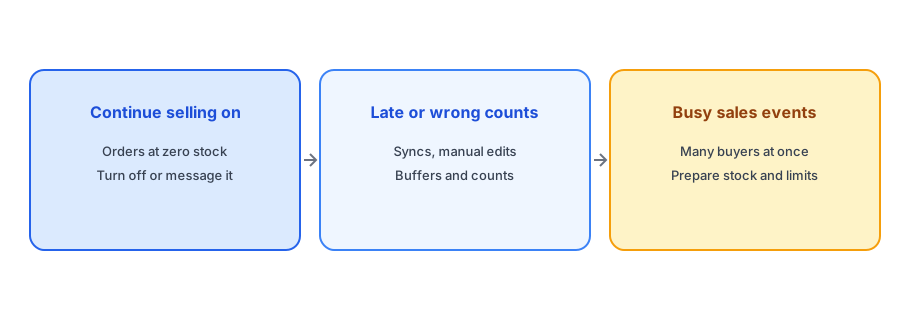
The most direct cause is the continue-selling setting. When it is on for a variant, customers can order at zero stock, so overselling is built in. Sometimes that is intentional, for backorders, and sometimes it was switched on once and forgotten. Audit your products for this setting. Where backorders are intended, say so clearly to customers; our guide to backorder messaging gives wording. Where they are not, switch the setting off and offer a restock alert instead.
Cause Two: Counts That Are Late or Wrong
Shopify checks stock when customers check out, but it can only check the number it holds. If that number is wrong, orders can exceed real stock even though Shopify allowed them. Wrong numbers come from delayed syncs with a warehouse or marketplace, from manual edits, from returns not restocked and from miscounts. Our posts on 3PL and ERP inventory sync and POS inventory mismatches explain how timing gaps arise, and the cycle count checklist helps you catch drift before it costs you an order.
Cause Three: Busy Sales and Simultaneous Buyers
Carts do not reserve stock. According to Shopify's help documentation, stock is held once payment details are submitted, so several shoppers can have the last unit in their carts at once, and only one can complete the purchase. Shopify revalidates stock during checkout, which prevents most conflicts, but fast-moving events add pressure on slow syncs and external systems. Our post on cart inventory reservation explains what is held and when. Before a launch or sale, review stock on your hot items and consider limits per customer.
When stock is gone, keep the shopper. Griffin adds Notify Me to each sold-out variant and is free to start.
Install Griffin on ShopifyPractical Prevention
Prevention comes down to a few habits. Keep continue selling off unless you are deliberately taking backorders. Keep a buffer on fast sellers by setting the available number slightly below physical stock, so small errors do not turn into oversells. If you sell through several channels, allocate stock to each channel or keep a shared pool with a safety margin, and make sure updates flow promptly. Count your fastest sellers regularly. Process returns and cancellations promptly so stock does not sit in limbo. And before a big event, check your numbers, because a wrong count matters most when traffic is highest. Our guide to Black Friday stock allocation shows how to hold stock back for planned sales.
What to Do When It Happens
If an oversell happens, speed and honesty matter most. Contact the affected customers quickly, before they find out by waiting. Explain what happened, offer clear options such as waiting for new stock, switching to an alternative or a full refund, and apologize plainly. Do not leave customers guessing about delivery. Our out-of-stock email templates give wording you can adapt. Afterwards, find the cause and fix it, so you do not repeat the message.
Use Notify Me as the Safety Valve
When a product genuinely runs out, a restock alert is the clean alternative to overselling. The shopper gives an email, no one pays for something you cannot ship and you tell them when it returns. Griffin notifies the subscribers of the variant that returned to stock. For products where you cannot promise a ship date, this is usually safer than backorders. Our post on back-in-stock alerts versus preorders helps you decide between them.
A Practical Checklist
- Audit which variants have continue selling on, and decide each deliberately.
- Keep a small buffer on fast sellers.
- Check how fast external systems and channels update Shopify.
- Count fast sellers regularly and process returns promptly.
- Review stock before launches and sales, and consider per-customer limits.
- Have a prepared message and refund option for any oversold order.
FAQ
Why did Shopify let me sell more than I have?
Common reasons are continue selling being on, a wrong or delayed stock count, or stock held in systems that update Shopify late.
Does adding to cart reserve stock?
According to Shopify's documentation, no. Stock is held once payment details are submitted.
What should I do when an order is oversold?
Contact the customer promptly, explain, and offer waiting, an alternative or a refund.
How do I avoid overselling a popular product?
Keep continue selling off, hold a buffer, keep counts accurate and review stock before busy events.
The Bottom Line
Most overselling traces back to a setting, a stale number or a busy moment, and all three can be managed. Griffin is a Shopify back-in-stock app you can install from the Shopify App Store, free to start.