A stockout feels like bad luck, but most of them trace back to a short list of causes: a reorder point that was too low, a late order, a supplier delay, a sales spike nobody planned for or a stock count that was wrong. Without a record, the same cause comes back. A stockout postmortem is a one-page write-up you can finish in 15 minutes: what ran out, for how long, why, what it cost and what changes. The stockout analysis template below turns a short form into a summary you can copy into a doc or a message. Dates, numbers and names shown are examples.
The Postmortem Form
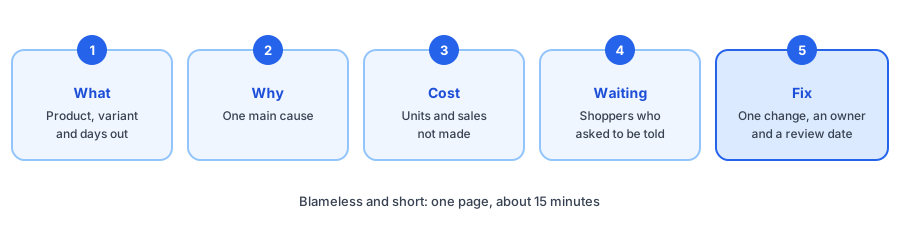
The Five Questions
- What ran out, and for how long? Name the product and variant, and count from the first day it could not be bought.
- Why? Pick one main cause. If several contributed, choose the one that, fixed, would have prevented it.
- What did it cost? Estimate the units and the sales you did not make, and be clear it is an estimate.
- Who was waiting? Count the shoppers who asked to be told, and any sales you turned away.
- What changes, and who owns it? One fix, one owner and a date to check that it worked.
Common Causes and a First Fix
- Reorder point too low: recalculate it from recent sales and lead time with the reorder point and safety stock calculator.
- Ordered too late: work out how many days of stock you have left with the days of inventory left calculator, and set a warning with the low-stock alert planner.
- Sales spike: before a promotion, decide how many units to hold back using the stock allocation calculator.
- Supplier or shipping delay: add buffer days to your lead time, and warn shoppers early.
- Count error or phantom stock: if the page said in stock when the shelf was empty, see why inventory counts and alerts can disagree and what to do when a back-in-stock alert goes out by mistake.
Estimating the Cost Honestly
The form multiplies days out of stock by your normal daily units and your price, then reduces the result by the share of demand you expect to return later. That is an upper-bound style estimate. It cannot see shoppers who bought an alternative, and it can count the same demand twice if a product was also hidden from search. Do not borrow a recovery rate from someone else: use 0 if you are unsure, or measure your own after a restock. Our lost-sales calculator goes deeper on the maths.
Use Your Waitlist as Evidence
A waiting list is a record of demand you could not serve, which makes it useful in a postmortem. Griffin, a Shopify back-in-stock app, adds a Notify Me popup or inline form to sold-out products. Shoppers sign up for the variant they want, and Griffin emails them when it is back. Signups are recorded per product and variant, so you can see how many people were waiting; our guide to tracking demand on out-of-stock products explains how to read it. Griffin's revenue report shows recovered revenue net of refunds, and our guide to measuring restock alert revenue shows how to use it. The free plan includes 100 notifications a month. Griffin does not diagnose why you ran out, so the form above is for that.
Next time a product sells out, make the gap count. Griffin captures restock signups on sold-out variants and emails them when the item returns.
Install Griffin on ShopifyMake It a Habit
Keep every postmortem in one place and read the pile each quarter. If the same cause keeps appearing, the fix is a process change, not a better apology. Start with the products that carry the most revenue, which you can find with the ABC analysis tool, and keep the tone blameless so people report problems early.
FAQ
What is a stockout postmortem?
It is a short, blameless write-up of one stockout: what ran out, for how long, why, what it cost and what will change. The goal is to find the cause and fix it, not to assign fault.
How do I estimate the cost of a stockout?
Multiply the days the product was out by the units you normally sell per day and by the price, then reduce it by the share of demand you expect to return later. Treat the result as an estimate, since it cannot see shoppers who bought an alternative.
How often should I write a postmortem?
Write one for any stockout of a product that matters, such as a best seller or a product you advertised. Review the pile each quarter to see which causes repeat.
Does Griffin write stockout postmortems?
No. Griffin captures restock signups on sold-out products and variants and emails those shoppers when the item is back. The signup count is useful evidence for a postmortem, but Griffin does not diagnose causes.
The Bottom Line
A stockout you can explain is one you can prevent. Write the postmortem while the details are fresh, pick one fix with an owner and check it on a date. Griffin is a Shopify back-in-stock app you can install from the Shopify App Store, free to start.