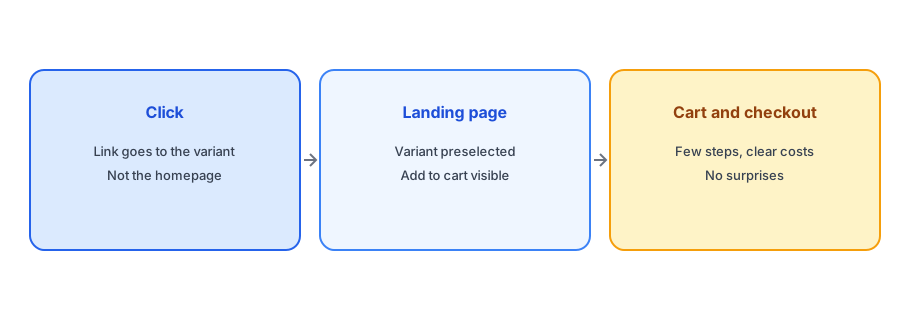
Merchants tend to judge a restock alert by whether it was sent. The real question is whether it produced orders. Between the email and the order sits a short path: the click, the landing page, the cart and the checkout, and each step can lose a shopper who arrived with high intent. Improving how many back-in-stock subscribers convert is mostly about removing friction on that path. Vendor blogs recommend variant-level links and shorter paths, and the reasoning holds. We do not quote conversion figures, because published numbers are vendor claims and vary widely, so this post focuses on what to check.
The Link: Go Straight to the Variant
A shopper who asked for the medium in navy should land on a page with the medium in navy already selected, not on a product page defaulting to the first size or on your homepage. A link to the specific variant removes a decision and prevents the shopper from picking the wrong one. Griffin ties each signup to the chosen variant and notifies only that variant's subscribers, so the email can point to it. Check what your app does: click the link in a test email and see whether the right variant is selected. Our ten-minute test plan includes this check.
The Landing Page: Make Buying Obvious
On arrival, the shopper should see the product, the selected variant, the price and a working Add to Cart button without scrolling, on a phone as well as a desktop. Remove anything that gets in the way: an unrelated popup, a large banner pushing the button down or a cookie notice covering it. Make sure the page loads quickly, since a slow page loses people who are ready to buy; our post on how apps affect page speed explains how to check. If the stock is limited, say so plainly, which helps the shopper decide to act.
Avoid Reasons to Hesitate
People who waited for a product are not browsing, but they can still be put off. Show shipping costs and delivery times early so there is no surprise at checkout. Repeat your return terms near the button. If the price changed since the shopper signed up, say so openly; our guide to price changes in restock emails covers the wording. Keep the discount question simple too: our post on discount codes in restock emails explains when a code helps and when it just gives away margin.
Send the right shopper to the right variant. Griffin notifies subscribers of the variant that returned and is free to start.
Install Griffin on ShopifyThe Cart and Checkout: Fewer Steps
Once the shopper adds the item, the shorter the route to payment the better. Check that the cart is reachable in one tap, that guest checkout is available and that accelerated payment options are enabled if you use them. A required account creation step is a common loss point. Our post on why a back-in-stock app may create customer accounts explains how accounts can enter the picture. Test the whole path on a phone with a real card or a test order.
When the Stock Is Gone Again
If the shopper clicks and the product has sold out again, the experience can sour quickly. Make the sold-out state clear, offer to notify them again and, if you can, show a close alternative; see our guide to matching alternatives on a sold-out page. Plan ahead for small restocks with big waitlists, as covered in our posts on limited restocks and alert timing.
Measure Each Step
To improve the path, measure it. Tag the links in your restock email so that analytics can separate those visits, then compare clicks, add-to-carts and orders. Where the drop is steepest is where to work. Our guide to measuring revenue from back-in-stock alerts shows how, and why opens are unreliable explains why to look at clicks and orders instead.
Do Not Over-Engineer the Email
Once the path after the click is sound, resist the urge to add more to the email itself. A restock email works best when it is short, names the exact item and puts one clear button at the top. Extra product recommendations, banners and offers pull attention away from the one thing the shopper asked for. If you want to cross-sell, do it on the confirmation page after purchase, where it cannot compete with the order. Keep the sender name and subject plain and familiar so the email is recognized and opened.
A Practical Checklist
- Check that the email link opens the exact variant with it selected.
- Keep the product, price and Add to Cart visible on a phone without scrolling.
- Clear popups and banners that cover the buy area.
- Show shipping costs, delivery time and return terms early.
- Allow guest checkout and keep the cart one tap away.
- Tag the links and measure clicks, carts and orders.
FAQ
How can I convert more back-in-stock subscribers into orders?
Link the email to the exact variant, make the landing page clear and fast, avoid surprises at checkout and keep the path short.
Should the restock email link to the product page or the homepage?
To the specific variant, with it selected. A homepage link adds steps and loses shoppers.
What if the product sells out again before the shopper clicks?
Show a clear sold-out message, offer to notify them again and suggest an alternative if you have one.
How do I find where shoppers drop off?
Tag the email links and compare clicks, add-to-carts and orders to see the steepest drop.
The Bottom Line
The alert earns the click, and the path afterwards earns the order. Link to the variant, keep the page clear and remove friction. Griffin is a Shopify back-in-stock app you can install from the Shopify App Store, free to start.